Using WUnderground.com to integrate Personal Weather Stations - Settings / Weather - Rachio Community
Home | Support | Status Page
Using WUnderground.com to integrate Personal Weather Stations
You have selected 0 posts.
2 / 294
Oct 2014
post by aaronrryan on Oct 6, 2014
1
I currently have a PWS (Personal Weather Station) running on my house (AcuRite 5in1 with internet bridge: http://bit.ly/1l2o813 ), which transmits data to the weather underground.
My Station is at: http://www.wunderground.com/personal-weather-station/dashboard?ID=KCABREA6
My PWS tracks rain fall which would be awesome to be able to delay my sprinklers based on the rainfall collected by my PWS.
This would be useful for people that doent have a PWS too, since they might find a nearby neighbor that has one, and they
can use that data for Weather Intelligence as well.
So if we can pick the source of where the “Weather Intelligence” gets it’s rain data, that would basically be the solution.
wunderground.com has an API, which can be found at:
http://www.wunderground.com/weather/api/
I was able to integrate my wunderground data with my VeraLite by getting a free API key,
and using a URL like this:
http://api.wunderground.com/api/Your_Key/conditions/q/CA/Brea.json
You could require the users get their own API Key from wunderground, so Rachio does not have to pay for access
to wunderground’s API.
- What Determines Which Weather Stations Are Selectable?
- How does this PWS look to folks?
- Flex, Soil Sensor, Rain Sensor and Moisture Levels
- PWS Not Appearing
- 4 Innovative Ways to Decrease Your Painful Water Costs
- 4 more
79.1k views 262 likes 50+ links 90 users
57](https://community.rachio.com/u/Gene "Gene")
26](https://community.rachio.com/u/franz "franz")
13](https://community.rachio.com/u/emil "emil")
10](https://community.rachio.com/u/WokingWounded "WokingWounded")
9](https://community.rachio.com/u/knwpsk "knwpsk")
read 43 min
Top replies
post by coslor on Oct 6, 2014
@aaronrryan Personal weather stations are awesome, and we definitely support them. And while we appreciate the suggestion of using personal API keys, I’d guess that if we started using WU’s API thousands of times per day without paying for our own license, we would be shut off pretty quickly, key or no
The good news is that we do support weather stations that report through the MADIS, HamWeather, and PWSWeather networks. PWSWeather is probably your best bet, so I have an email in to the folks over there to see if there’s an easy way to connect your system to their network as well as WU’s. I’ll let you know what we hear back.
post by donandersonjr on Oct 11, 2014
@aaronrryan I too have the acurite 5 in 1 and publish to weather underground as well. I am using WeatherSnoop ( http://www.weathersnoop.com/home/) to publish to PWS. So my AcuRite published to Weather Underground, and then WeatherSnoop, which had to be installed on a computer downloads from weather underground and then publishes back to PWS. It was very easy to set up, and ensures that rachio is using my weather data.
post by franz on Oct 12, 2014
franz Co-Founder/CTO @ Rachio
@donandersonjr Sweet! @coslor Can we get an FAQ on this?
post by coslor on Oct 12, 2014
@donandersonjr you’re more on the ball than the PWSWeather folks, who finally responded to my email and said that AcuRite can’t post to PWSWeather. Guess they were wrong
Are there more instructions that we can put up to help @aaronrryan and others set up their systems? Send me a message if you’re interested in helping us put together a step-by-step guide. We’re not weather station experts here, but we’re always willing to learn.
post by dbmet on Oct 12, 2014
My acurite also post to several sites via metrobridge router which is connected to my acurite bridge. It also post to Wunderground, Weatherbug Backyard, Weatherforyou, CWOP. Works very good.
post by aaronrryan on Oct 15, 2014
I bought Meteobridge and am running it on a DLINK DIR-505L, and have my Acurite 5in1 uploading to PWSWeather now. I tried enabling the “Use weather data from nearby personal weather stations” but it doesnt pick my station “KCABREA6”.
http://www.pwsweather.com/obs/KCABREA6.html
Does it take a while for the Iro to update it’s list of PWS stations?
post by coslor on Oct 15, 2014
@aaronrryan we’re working with the Aeris folks to figure out why you’re not seeing your station. I’ll give you an update when we get their results back.
post by dbmet on Oct 15, 2014
Mine Says its using MID_E4745 Not sure which station that is… One of the Weather Station sites my station is EW4745 (E4745) Not sure if its using mine or not… Lol…
post by aaronrryan on Oct 16, 2014
Mine says MID_D6637 which is the same as DW6637 and is a nearby city.
http://140.177.205.131/site/D6637
I’m curious if the WeatherForYou “manual updates” on Tues and Fri Morning is the reason it hasnt appeared yet. See FAQ below:
http://www.pwsweather.com/faqs.php#Im-sending-data-but-its-not-appearing-on-WeatherForYoucom-Why
I’ll update this thread if my station shows up tomorrow (Friday)
If not, I’ll try joining CWOP too and see if it shows up then.
post by aaronrryan on Oct 20, 2014
Nope, it’s still not picking my station. Today, it’s choosing MID_UP361.
Is Aeris API part of HAMWeather.net?
I can see my station at http://www.hamweather.net/weather/current/KCABREA6.html
post by franz on Oct 21, 2014
franz Co-Founder/CTO @ Rachio
@aaronrryan We are following up with Aeris, will let you know as soon as our questions are answered. Thanks!
post by aaronrryan on Oct 24, 2014
I am now part of the CWOP network as KU6Z (my HAM radio callsign)
http://www.findu.com/cgi-bin/wxpage.cgi?call=KU6Z
CWOP data is sent to NOAA (via MADIS), and my station KU6Z maps to AU958.
Enabling “Use weather data from nearby PWS” on the Rachio App now maps to MID_AU958.
So in a somewhat round about way, my Iro is now seeing my weather station.
It took about 5 days of uploading to CWOP before it showed up within the Rachio App.
post by franz on Oct 24, 2014
franz Co-Founder/CTO @ Rachio
@aaronrryan That’s fantastic and thanks for sharing! This is really useful information for the community. We wrote an article on PWS that essentially validates what you did. Aeris backed off on the PWSWeather network http://pwsweather.com/ until they can consume that much data. Hopefully they will have the integration before the end of the year. If this does not happen we will look to switching to WU if there is enough demand. I’m glad to see there are definite work-arounds. Please let us know if you have any further feedback or questions!
http://www.support.rach.io/article/309-personal-weather-stations-aeris-and-you
post by franz on Oct 24, 2014
franz Co-Founder/CTO @ Rachio
@aaronrryan We’ve had quite a bit of interest in this, any chance you could put together a quick walk-through of how you did this? I’ll publish the article for you If not no worries. Have a great weekend.
post by aaronrryan on Oct 25, 2014
The core component of this solution is the meteobridge, which cost $20 for the hardware (DLINK DIR-505L from amazon) and the software from meteobridge.com for 59 Euros. You can check that the meteobridge will work with your weather station at:
http://www.meteobridge.com/wiki/index.php/Stations
Here is a summary of what I did (which only applies when using the AcuRite Internet-Bridge).
I bought the Acurite 5in1 with Internet Bridge from acurite.com, got that installed and updating to the internet.
Next, I bought the DLINK DIR-505L and flashed it with new firmware from meteobridge, Instructions and firmware can be found here: http://www.meteobridge.com/wiki/index.php/Getting_Started
Now the DIR-505L is a meteobridge. The firmware will work for 14 days without needing to buy a software license.
Next I needed to setup the the wifi on the Meteobridge so that it is a client “WLAN mode” on my homes Wifi network. I checked the box for “LAN Bridge”" http://www.meteobridge.com/wiki/index.php/Setup_Network
Once I got this working, I plugged in the Acurite internet-bridge into the ethernet port on the meteobridge. The meteobridge acts as a transparent bridge, and the acurite bridge thinks it is just on the local lan. The meteobridge “sniffs” the traffic from the acurite bridge and this is how it is able to collect the weather information and send it to a weather network of my choice. I needed to select “Acurite Internet-bridge” from the “Select Station” menu: http://www.meteobridge.com/wiki/index.php/Select_Station
Next, I choose the weather station I wanted to upload too. In this case, CWOP is the network will get the data to the Rachio App. http://www.meteobridge.com/wiki/index.php/Weather_Networks
I signed up for a CWOP account at:
http://www.findu.com/citizenweather/cw_form.html
I am a HAM radio operator, so I’m a unique case where I can use my callsign.
I had to email: CWOP-support@noaa.gov and request my account be activated.
Before you start uploading data you should update the “System” menu and put in your Latitude and Longitude and the “Select Station” menu to add your Altitude, because this data is sent to CWOP along with your weather data.
Once your data is uploading you will immediately see the updates at findu.com at: http://www.wxqa.com/search.htm
The next step is getting the CWOP data sent to NOAA. When I contacted CWOP-support@noaa.gov, they replied that my station ID has been added to the “Active Member” list and would show up at NOAA in a few days. You can always check the list to see if your station is on there at: http://www.wxqa.com/members.txt
Once you’re on the “Active Member” list you are now a part of NOAA. It took me 5 days of being on the list before Rachio app could see my station. The Active member list will also show the mapping between your “Call/CW” and “NWSID”. The NWSID is the ID you will see in the Rachio App.
I hope this helps.
-Aaron
post by franz on Oct 25, 2014
franz Co-Founder/CTO @ Rachio
@aaronrryan Wow this is great, thank you so much. I’m sure this will help anyone looking to make this integration. Hopefully Aeris does not take too long to incorporate the PWSWeather network. If by the end of 2014 (8 weeks) they haven’t figured it out, we will more than likely move to a different weather service. Once again thanks for this and have a great weekend! Let us know if there are other features you would like or have any feedback.
Take care.
Franz
post by aaronrryan on Oct 25, 2014
I think setting up CWOP is a bit complex for the average user. Especially since it requires special software and hardware to get it there. WUnderground on the other hand, was very straightforward and simple. I think most PWS that are internet connected are able to send data to WUnderground. It’s unfortunate Aeris doesn’t include data from wunderground, it would make it alot easier for users that already upload to wunderground and dont want to do the extra steps and costs of installing a meteobridge or other custom solutions.
I dont mind so much since I like playing around with the technology and in the process I’ve learned a bunch about the many weather networks available on the internet.
post by franz on Oct 26, 2014
franz Co-Founder/CTO @ Rachio
@aaronrryan Agreed on the complexity of CWOP, you’d think there was a simpler way…?
Aeris is moving to PWSWeather, if it isn’t finished by end of year will take a hard look at other options. Unfortunately WUndergroud current API pricing is about 6x times more expensive than what we have today, for which it’s hard to justify that gap.
Lucky you on building that stuff out, jealous for sure
post by rgarza28 on Oct 27, 2014
I plan on doing the same process as described above but for those that are not DYI types, you can purchase the Meteobridge as a consumer product such as the WeatherBridge from Ambient Weather. It’s just more expensive going that route.
post by coslor on Oct 27, 2014
@rgarza28 , thanks for the tip! We’ll update our docs.
9 days later
post by franz on Nov 5, 2014
franz Co-Founder/CTO @ Rachio
@rgarza28 @aaronrryan @dbmet @donandersonjr
Good news, Aeris is delivering PWSWeather integration fully next week!
“We are starting the roll out this evening actually.
Starting overnight/tomorrow morning the observations endpoint will utilize PWSweather stations when using filter=allstations and / or passing the PWSweather stations ID (preceeded with PWS_”)
Over the next week, observations/summary support will be added as well."
I will post when this is live and used in our system!
post by aaronrryan on Nov 5, 2014
cool, thanks for update!
post by rgarza28 on Nov 11, 2014
I got my PWS up and running on weather underground, PWSWeather and CWOP. I should be covered.
post by franz on Nov 11, 2014
franz Co-Founder/CTO @ Rachio
@rgarza28 When you select PWS on the Iro settings screen it should find yours, if not let us know!
post by rgarza28 on Nov 11, 2014
is that on the phone app or the webpage?
post by franz on Nov 11, 2014
franz Co-Founder/CTO @ Rachio
@rgarza28 It’s a setting on the mobile app, I know it takes a few days for CWOP to show up…
post by rgarza28 on Nov 11, 2014
@franz I see the setting on the webpage but not the iphone app (v1.7.0). On the webpage it finds one that is 6.5 miles away (MID_C3617). I/ve been broadcasting for the last 4-5 days now. PWSweather station ID KTXMISSI
post by franz on Nov 11, 2014
franz Co-Founder/CTO @ Rachio
@rgarza28 I will follow up with Aeris, they told me they were turning on PWSWeather this week, will let you know where they are at. Attached is a screenshot showing PWS feature on mobile. Thanks, and I’ll be following up!
post by rgarza28 on Nov 11, 2014
@franz Oh that screen. Yes I have it enabled and it reports station: MID_C3617 6.5 miles away. It fluctuates with another station that is closer MID_C3172 at 4.5 miles.
8 days later
post by franz on Nov 20, 2014
franz Co-Founder/CTO @ Rachio
@rgarza28 I finally got the latest update from Aeris. It looks like their official support for pwsweather stations is going live tomorrow. I’m curious to see if the pwsweather stations start showing up, they should!
This is directly from Aeris:
"I can confirm this is finally going live tomorrow (Thursday Nov 19) with our general API Update. The new features will included per your general usage.
ADD - observations - support for pwsweather stations. either by using “filter=allstations” or “filter=pws”.
ADD - observations - query latest ob for pwsweather station by preceeding the PWSweather ID with "PWS_"
ADD - observations/summary - support for pwsweather stations. either by using “filter=allstations” or “filter=pws”.
ADD - observations/summary - query latest ob for pwsweather station by preceeding the PWSweather ID with “PWS_”
MOD - observations - If station has ever reported precip, then precip1hr will default to 0 instead of null, if not provided (due to no precip)
MOD - observations/summary - If station has ever reported precip, then precip.totalMM / IN will default to 0 instead of null, if not provided (due to no precip)
ADD - observations - new “hasprecip” filter. If you want to only search stations that provide precip
ADD - observations/summary - new “hasprecip” filter. If you want to only search stations that provide precip
There are several other additions and improvements to other API endpoints as well."
post by rgarza28 on Nov 20, 2014
@franz does this mean that I need to rename my station to include the “PWS_” prefix? Mine is listed as KTXMISSI7. Currently, my units are reporting MID_E6141 @ 3.5 miles
post by franz on Nov 20, 2014
franz Co-Founder/CTO @ Rachio
@rgarza28 No, that is only for the API call. As far as I can tell it should show up after they release their software today. Hopefully in the next day or so it will appear. If not I will follow up with Aeris. I am also going to purchase a PWS and get it setup.
post by rgarza28 on Nov 20, 2014
@franz Ah ok. I’ll keep an eye out for it and post anything that I find.
Thanks for the great support!
post by franz on Nov 21, 2014
franz Co-Founder/CTO @ Rachio
@rgarza28 A note from Aeris:
Franz,
We have pushed Aeris API V1.3.5 to production. Change log:
http://www.hamweather.com/support/documentation/aeris/history/
A couple notes:
- Due to an issue the PWSweather data is only available for today & going further. Next week the team will start re-importing the previous archive. Specifically, we found an issue with the previous import and decided we would make support available now & import the previous archives (going back to 2001) starting next week
Due to the wide variety of stations supported, there may be a few bugs / QC issues. If you notice any oddities please let us know so the team can review.
post by franz on Nov 21, 2014
franz Co-Founder/CTO @ Rachio
@rgarza28 I am starting to see PWS stations come through like this PWS_KPROCOLO
post by rgarza28 on Nov 24, 2014
@franz Yes I see what could be mine called PWS_KTXMISSI. Not sure if that is mine or not since there are several of that name but with a number affixed to the end. Mine is KTXMISSI7. PWS_KTXMISSI is also listed at Distance of 3.5 miles.
Checking the Settings in the Web Version of the application physically shows the correct location but with a distance of 3.45 miles.
post by franz on Nov 24, 2014
franz Co-Founder/CTO @ Rachio
@rgarza28 That’s strange, I’m pretty sure that has to be yours. Can you check the coordinates here with the coordinates that the Iro is at? (device settings --> tap on the Iro name/zipcode). Curious to see how close they are, my geodistance calculation could be off
post by dbmet on Nov 24, 2014
Mine is working… Very nice…
post by franz on Nov 24, 2014
franz Co-Founder/CTO @ Rachio
@dbmet Awesome!
28 days later
post by ptr727 on Dec 23, 2014
There are several wunderground stations near my house, would be great to be able to use them as a weather source.
post by franz on Dec 23, 2014
franz Co-Founder/CTO @ Rachio
@ptr727 If you enable using personal weather stations in the app we support most through http://pwsweather.com/ and http://wxqa.com/.
I would be wary of any station that is not yours, we have had a lot of data quality issues
post by ptr727 on Dec 23, 2014
Problem with your current stations are that they are too far away, specifically too far inland, making them less applicable vs. the LAX station.
As for being weary of a station that is not mine, surely that reasoning would apply to any station, even the ones you support?
As there is no option (I could find) to select my station of preference, I do not know if there are any better stations, maybe even the ones I know from wunderground, than the one auto selected by the app?
post by franz on Dec 23, 2014
franz Co-Founder/CTO @ Rachio
@ptr727 We allow you to choose to enable PWS or not. As far as data quality for the PWS, we don’t have control of that. We currently will pick the station closest to your house (PWS or non-PWS). In our next version of mobile we will allow you to select from a list of stations.
I only provide the warning around PWS since these are sometimes in people’s backyards and can be affected by a whole host of things.
Thanks and let us know if you have any other feedback!
4 months later
post by leeowen on Apr 27, 2015
So,
I just got my Meteobridge up and running EW7209 is my CWOP call sign. Before I pay the license to MB I would like to know that I will be able to reference my PWS for my IRO. Lots of info to digest but it appears if I am on CWOP that should be all that is needed… however, when I reference my IRO I don’t get any PWS’s that are close by… only ones miles way and I have several that are close and reporting. Any ideas?
post by emil on Apr 27, 2015
Hi @leeowen, good afternoon. Thanks for reaching out regarding your PWS.
We do support CWOP – for details on setup, please see this support article.
I’ve heard it can take a few days after the Meteobridge is setup before it will register with our weather services.
Let me know if you have any further questions after reviewing the support article.
Best, Emil
post by leeowen on Apr 28, 2015
Thanks Emil! I ave followed those instructions. My station ID is EW7209. Can you check to see if I am in your system? Thanks in advance!
post by emil on Apr 28, 2015
Hi @leeowen, looks like you’re currently pulling weather from MID_E5921. I don’t think EW7209 has populated in to our weather API yet.
Can we recheck tomorrow and see? I’m sure it just needs to sleep in a bit more and have some time to wake up
Thanks, Emil
post by leeowen on Apr 29, 2015
Thanks Emil! Will do!
post by emil on May 5, 2015
Hi @leeowen, just wanted to check in. Is EW7209 showing up for you yet?
post by leeowen on May 12, 2015
It sure is! Thanks for checking in
post by Tomzo on May 17, 2015
I was thinking of buying a PWS so I could get better local weather data but was not thrilled about spending the money. I looked on Weatherunderground and found several PWSs near me. I evaluated the data quality on them and found one that has a great record of reliable data.
I downloaded a WeatherSnoop 3 trial and chose the WU PWS as my data source as opposed to using a PWS that I would own. I then shared this data to PWSweather.com to a station that I created for this purpose. The data is syncing along nicely now although I don’t see it when I enable PWS in the mobile app. My guess is that it will take a while to get the data through to the system Rachio is using.
This seems to be a fairly low cost way to go as Weathersnoop Lite will transmit the data for $20 license fee.
post by emil on May 17, 2015
@Tomzo, good afternoon!
Very interesting! Please keep us posted on this integration. This sounds like a great workaround to pulling weather data from wunderground.
Are you allowed to change stations should the PWS go offline or data integrity suffer?
Thanks for sharing, great find!
Best, Emil
post by Tomzo on May 17, 2015
Weaathersnoop allows you to select a wide variety of sources of weather data, so if the PWS on WU that I chose starts to have data quality issues I will simply select another nearby that is working well.
There is a PWS that the Rachio software “sees” nearby but it’s rain sensor is out of service because it shows no rain for May but we have had nearly 2 inches.
I will update as I finalize the installation of the Weathersnoop software. I was testing it on my laptop but since that shuts down from time to time I will reinstall it on an iMac I keep running in my house so there won’t be interruptions in the data stream.
post by Tomzo on May 18, 2015
Update - I installed Weathersnoop Lite ($20) on my iMac yesterday and it is dutifully transferring the data from the WU station that my neighbor has set up to a PWSweather station that I set up (LEHNER). The one thing that is odd is that even through both the agent on Weathersnoop that monitors WU and the sharing system that uploads to PWS are set to act every minute, the data on PWS only changes every 15 minutes. There are a whole series of identical sets of data stacked up that change slowly over time. I don’t think that this will be an issue as this is plenty of data to run the IRO, but I thought it was an interesting data transfer anomoly.
I have yet to see this station pop up as the closest station to me in the Rachio software, but I figured that might take a couple of days. It is my understanding that v2.0 will allow me to select it directly and that is coming soon!
post by Tomzo on May 18, 2015
Update II - After looking at the data a bit more closely, it seems that the WU PWS that I am scalping data from only uploads data every 15 minutes, so that is why my data is changing so slowly. I suppose I can drop my refresh rate down to match.
post by emil on May 18, 2015
@Tomzo, good morning! Thanks for the updates. A few questions to help other users:
Has moving Weathersnoop to your iMac/desktop fixed the data reporting issue?
Usually it takes 24-48 hours for the weather feed from PWS to become visible to the Iro. Please let us know once the Iro is able to see the Wunderground station.
And yes, v2.0 will allow you to select a preferred weather station
Any tips you could share on setting up Weathersnoop would be greatly appreciated. With your permission, I’d like to create a support article with this information.
Thanks again all your help with this Very exciting news to be able to bridge Wunderground stations to the Iro!
Best, Emil
12 days later
post by dengland on May 30, 2015
Looking forward to that. My Iro has been installed about 1 week. My weather station has been publishing to WU for years. I connected to PWS and started to publish there this afternoon. Hope my Iro will be able to see it soon.
post by Norida on May 30, 2015
My Iro took 48 hours before it started “seeing” my Netatmo on PWS and WU. It’s been working great ever since.
post by emil on May 31, 2015
@Norida, awesome, great news!! Just curious, did you have your Netatmo setup on WU before PWS?
Did you use Weathersnoop?
Best, Emil
post by Norida on May 31, 2015
Hi Emil,
I did not use Weathersnoop (not even sure what that is). I used your step by step guide that delineates how to set up my pws on PWSweather ( Can the Iro be connected to a Netatmo weather station?). A day later I also linked my Netatmo to WUnderground using MeteoWare Plus.
post by pixelknave on Jun 1, 2015
That said, I believe that Netatmos that are allowed on the Netatmo Weather Map (mine included) are automatically added to WUnderground. There’s a somewhat awkward process to “claim” your auto-published station in WU, but I haven’t done that yet.
post by emil on Jun 4, 2015
Ah, thanks @pixelknave, I wasn’t aware of this. Learn something new everyday
Once you do this, please let us know if you have any advice on how to do this for other users.
Best, Emil
4 months later
post by Ashishnarang on Sep 23, 2015
Is thete a weathersnoop for windows?
post by rmylek on Sep 24, 2015
This is what i used to publish my pws
post by Ashishnarang on Oct 2, 2015
thank you!
post by Ashishnarang on Oct 2, 2015
rmylek](https://community.rachio.com/t/using-wunderground-com-to-integrate-personal-weather-stations/217 "Load parent post")
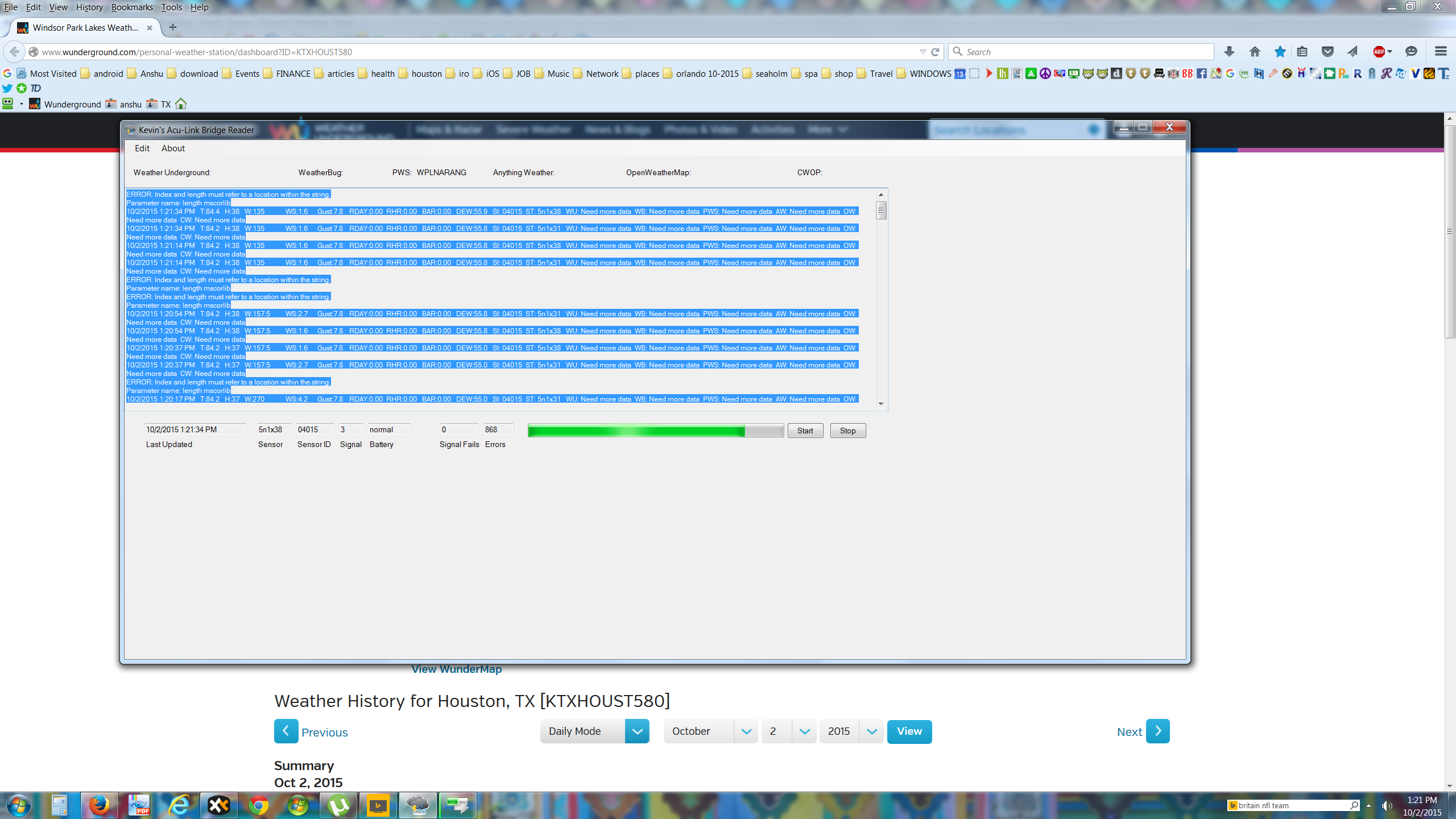
\ Screenshot 2015-10-02 13.21.42.png2560×1440 448 KB](https://community.rachio.com/uploads/db1097/original/1X/8207ac8d06f5f916686db0ee24162b8676a118a5.png "Screenshot 2015-10-02 13.21.42.png")
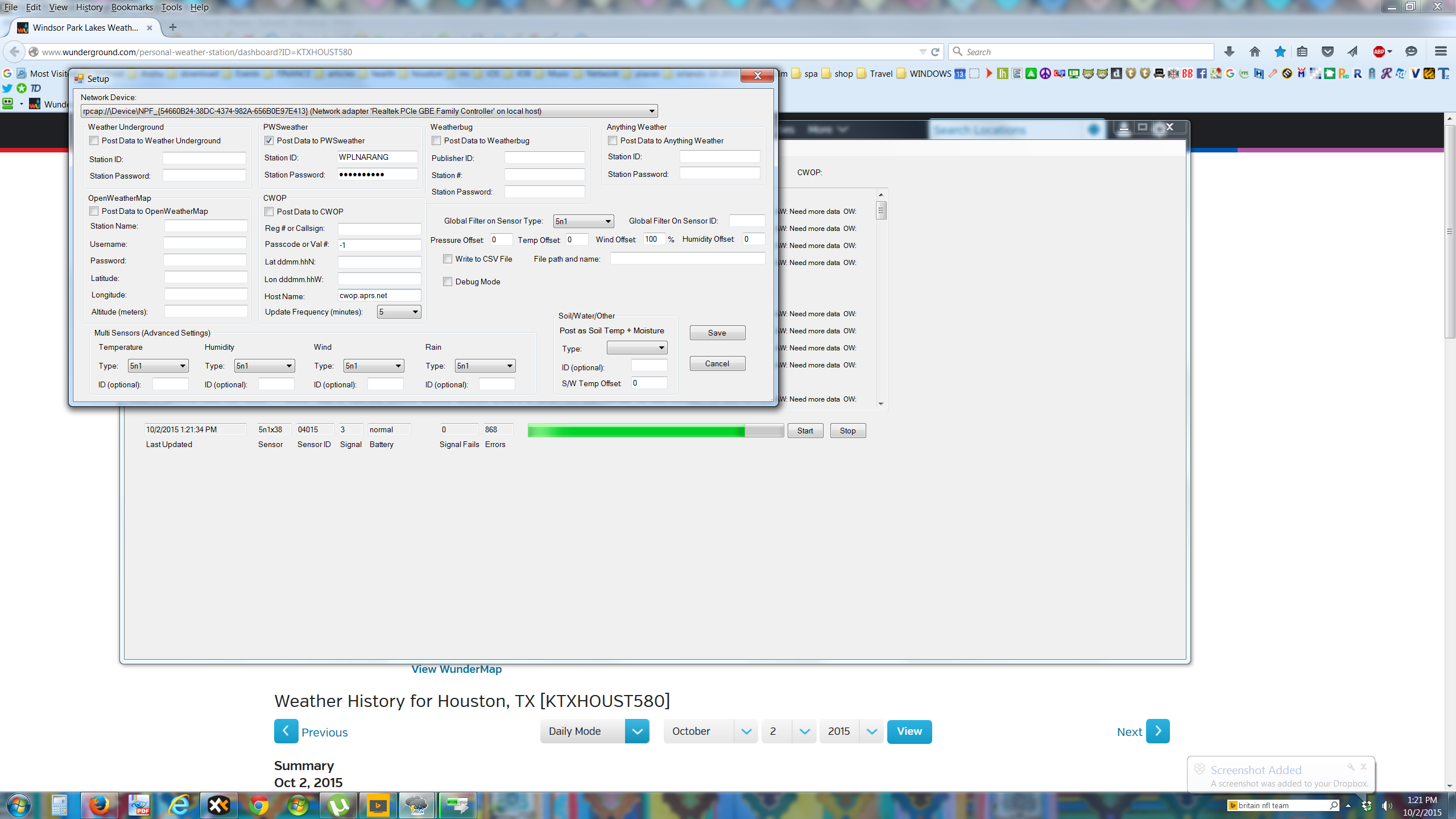
\ Screenshot 2015-10-02 13.21.50.png2560×1440 463 KB](https://community.rachio.com/uploads/db1097/original/1X/b7f0c0cc256289348fee995ee6278c9c33220a5b.png "Screenshot 2015-10-02 13.21.50.png")
\ Screenshot 2015-10-02 13.22.04.png2560×1440 548 KB](https://community.rachio.com/uploads/db1097/original/1X/a848b22b1a7aa519147878bf67870ec2ed1f5ead.png "Screenshot 2015-10-02 13.22.04.png")
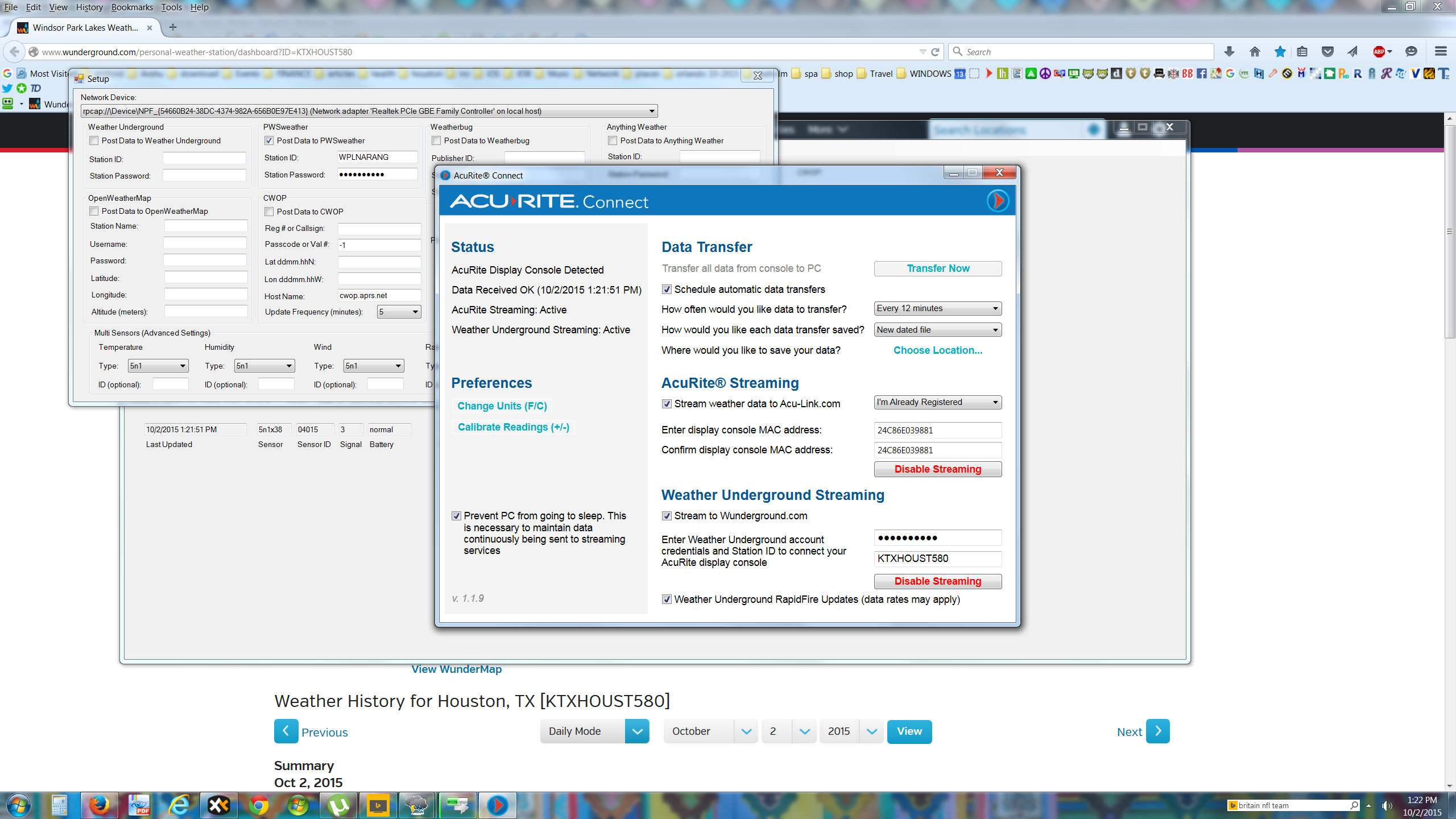
hi, i am running the windows app: “kevin’s acu-link bridge reader”
and get strange errors. see attached. please help!
2 months later
post by emil on Dec 5, 2015
@Ashishnarang, are you still experiencing issues with this?
16 days later
post by kman on Dec 22, 2015
1
So in spite of having a lovely Ambient Weather weather station (~$300) on my roof that reports perfectly to Weather Underground, and having spent $200+ on an internet-connected Rachio Iro, currently the only way to automatically link my Iro to my PWS is to spend ANOTHER $100 on hardware and software (per the support article linked above)?!?
“The core component of this solution is the meteobridge, which cost $20 for the hardware (DLINK DIR-505L from amazon) and the software from meteobridge.com for 74.42 dollars.”
Or I guess there are a couple of software-only options that work (really a pain to set up, but might work) if I want to leave a computer up and running 24/7 just to re-report my weather feed to a different service?
PLEASE, Rachio, add support for Weather Underground!!!
post by emil on Dec 22, 2015
@kman, are you referring to WeatherSnoop? We’ve had a few users connect their wunderground stations to the Rachio cloud using WeatherSnoop, but you have to have a Mac in order to do so.
Out of curiosity, what Ambient Weather weather station do you have? I’ll keep searching for PC solutions similar to WeatherSnoop.
Best, Emil
post by kman on Dec 22, 2015
1
Yes, the software-only solutions I referred to are the WeatherSnoop, for Macs, or the software linked above for PCs: http://kevin-key.blogspot.ca/ I have both Macs and PCs, including some that are on 24/7, but those systems all have other functions and I don’t want to tie them up running weather software, or be dependent on them to stay on. (I can restart anytime I want when home for movie streaming purposes, for instance, but if it was to crash while I was on vacation, I’d lose all weather connectivity until I got back home, which defeats the purpose!)
I have an Ambient Weather WS-1200-IP Observer. It includes the Observer-IP module automatically collects the station’s data to upload, but which, unfortunately, will only report that data to Weather Underground (which all works brilliantly, except the Iro can’t see that data). I could buy the $209 WeatherBridge from Ambient, or essentially building my own, per the instructions on the Meteobridge website (and buying the software license), for around $100, and that would allow uploading the data to any number of weather reporting/recording services, including the ones that are directly supported by Rachio (like CWOP and PWSW). But I’m not eager to spend yet another $100-209 just so I can use the actual weather data that’s already being recorded above my roof.
3 months later
post by johnny2678 on Mar 23, 2016
gotta agree with kman… isn’t there a way to get the IRO to use weather data from weather underground? Or at the very least, a PC program that can sync weather underground to pwsweather.com?
If no to both, then this should be a priority. The closest weather station is 7 miles away and in FL that might as well be on a different planet. Esp when there are two weather underground stations <1 mile away.
post by emil on Mar 23, 2016
@johnny2678, not at this time.
There are some work arounds, but they take some work to setup. In short, you’d need to direct your wunderground PWS to CWOP, then CWOP to PWSweather.com.
Here’s some resources to explore:
- http://kevin-key.blogspot.ca/
- http://support.rachio.com/article/310-setting-up-pws-using-cwop
- http://www.wxqa.com/
Will do some digging again to see if there’s any new workarounds to scrape wunderground data via a PC.
post by johnny2678 on Mar 23, 2016
Thanks for the response emil. I found this on github but it’s 6 years old so little chance of it working for our needs. The other links you posted are either for a) yet another appliance or b) for those that have a personal weather station set up on their property. I don’t desire either… just the ability to pull conditions from a weather station reporting close by.
The Wunderground API allows for 500 free calls / day so there is the potential to write something that will scrape conditions every 5 minutes and post to pwsweather. Need to find what format PWS weather needs for submissions… and this seems a little hacky just to get accurate local conditions.
post by emil on Mar 23, 2016
@johnny2678, I’m gonna see if we can hack something together for you. No promises, but I’ll get another set of eyes on it.
post by johnny2678 on Mar 30, 2016
I’m impatient so I had to give this a shot myself.
I’ve been shipping Weather Underground data to pwsweather for 18 hours now using this script. Check the README for info. I’m no coder and have limited time to support so feel free to branch and improve.
Oh, and yes, it shows up in Rachio after about 10-15 minutes.
- How does this PWS look to folks?
- Gen3: Why did all CWOP stations disappear from the PWS selection page?
post by franz on Mar 30, 2016
franz Co-Founder/CTO @ Rachio
Sorry for the workaround but seems like it is magical
We are evaluating all of our weather data for next year, and will have more options along with higher quality and granularity.
post by emil on Mar 30, 2016
@johnny2678, thanks for sharing! Glad to hear it’s working for you. We’ll recommend this to future wunderground users
post by virus86 on Apr 4, 2016
I just got an Iro 1st gen and a Ambient Weather WS-1400-IP. Has there been any update on using WU data with the Iro? I have an old Windows laptop to turn into a “hub”, but most programs only work for acurite weather stations, Linux, or Mac. I might do the DLink mod if there is no other way.
post by franz on Apr 4, 2016
franz Co-Founder/CTO @ Rachio
Not the best solution, but for now this is what some of our users have been doing for an integration.
We will be largely expanding our weather service footprint as well as accuracy, so stay tuned. Big plans in this arena Timeframe is unclear, but something we want to focus a good amount of time on.
post by Lfarm on Apr 8, 2016
Thanks Franz. One more vote here for improved WU integration. I am using an Accurite weather station as well and publishing to WU. I am a new user of the Rachio 2nd generation and overall very impressed. Looking forward to sending it my own weather data.
post by franz on Apr 8, 2016
franz Co-Founder/CTO @ Rachio
Ya, I want a much bigger weather footprint.
The development and product team is aware of this and will be incorporating in the future. We definitely understand the upside of having more/closer weather data for our customers
post by nygroove on Apr 9, 2016
Yes please integrate WU PWS My nearest weatherstation is 4 miles away I live on the coast so 4 miles inland do sent reflect the same Temps or humidity.
post by sbdobrescu on Apr 14, 2016
…No solution if you don’t have an iOS device, unfortunately Looks like it requires WeatherSnoop (step 4)
post by sparky79 on Apr 19, 2016
johnny2678](https://community.rachio.com/t/using-wunderground-com-to-integrate-personal-weather-stations/217 "Load parent post")
Thanks Johnny2678. I started using this today and is working great to copy my WU PWS data to PWSWeather! Definitely like to see Rachio make Weather Underground PWS available so I do not have to do this workaround.
post by plainsane on Apr 19, 2016
Wu is the bom isn’t it?
post by TastyWombat on Apr 20, 2016
johnny2678](https://community.rachio.com/t/using-wunderground-com-to-integrate-personal-weather-stations/217 "Load parent post")
Your script is working well for me also.
For others who would like to use this solution, but don’t have or want a linux box lying around running all the time, I have a suggestion.
Go to lowendbox.com or wherever you like, find the cheapest, lowest spec’d Virtual Private Server you can, and run the script there.
I rented a linux virtual machine for $12 for the year, selected a Ubuntu image (because I’m familiar with Ubuntu), copied over the script and set it up, installed crontab and configured that, and now I’m done.
Could be a very simple solution for people who just don’t want to mess with another box in their home. Given the overkill that even the lowest power VPS is, I could add dozens of people to my machine without breaking a sweat.
Hope this idea helps.
12 days later
post by sparky79 on May 3, 2016
johnny2678](https://community.rachio.com/t/using-wunderground-com-to-integrate-personal-weather-stations/217 "Load parent post")
Hey Johnny2678. I am sure you are not offering support… But thought I would ask as you may be having the same issue. I have been using this script for a couple weeks now (thank you again), but the past two days (5/1 and 5/2) the precip data from WU did not transfer over to PWSWeather. Any ideas? Possibly WU or PWS changed their format for May? Here are my stations:
https://www.wunderground.com/personal-weather-station/dashboard?ID=KOHMEDIN16
http://www.pwsweather.com/obs/KOHMEDIN16.html
The ‘daily precip total’ is what has been getting populated on PWSWeather. All other data points look to be there.
I do not see any apparent error when it is executed. Copy paste from terminal:
Grabbing JSON using the following URL: http://api.wunderground.com/api/[...]/conditions/q/pws:KOHMEDIN16.json
–2016-05-03 09:13:36-- http://api.wunderground.com/api/[...]/conditions/q/pws:KOHMEDIN16.json
Resolving api.wunderground.com ( api.wunderground.com)… 23.10.184.120
Connecting to api.wunderground.com ( api.wunderground.com)|23.10.184.120|:80… connected.
HTTP request sent, awaiting response… 200 OK
Length: 2595 (2.5K) [application/json]
Saving to: ‘/home/[…]/wu-pws/wu.json’
100%[======================================>] 2,595 --.-K/s in 0s
2016-05-03 09:13:37 (282 MB/s) - ‘/home/[…]/wu-pws/wu.json’ saved [2595/2595]
PWSDATEUTC=2016-05-03+12%3A58%3A33
PWSWINDDIR=247
PWSWINDSPEEDMPH=4.7
PWSWINDGUSTMPH=0
PWSTEMPF=46.9
PWSRAININ=-999.00
PWSDAILYRAININ=
PWSBAROMIN=29.91
PWSDEWPTF=46
PWSHUMIDITY=96
PWSSOLARRADIATION=
PWSUV=1
–2016-05-03 09:13:37-- http://www.pwsweather.com/pwsupdate/pwsupdate.php
Resolving www.pwsweather.com ( www.pwsweather.com)… 54.243.240.101
Connecting to www.pwsweather.com ( www.pwsweather.com)|54.243.240.101|:80… connected.
HTTP request sent, awaiting response… 200 OK
Length: 131 [text/html]
Saving to: ‘/dev/null’
100%[======================================>] 131 --.-K/s in 0s
2016-05-03 09:13:37 (26.4 MB/s) - ‘/dev/null’ saved [131/131]
wget -O /dev/null --post-data=ID=KOHMEDIN16&PASSWORD=[…]&dateutc=2016-05-03+12%3A58%3A33&winddir=247&windspeedmph=4.7&windgustmph=0&tempf=46.9&rainin=-999.00&dailyrainin=&baromin=29.91&dewptf=46&humidity=96&solarradiation=&UV=1&softwaretype=wu_pws_ver1.0&action=updateraw http://www.pwsweather.com/pwsupdate/pwsupdate.php
‘Dailyrainin’ is blank (though we have not had any rain today). I am not sure if that is normal, or if it should be 0.00 (possible indicator that it is not getting the data correctly from WU).
Thanks in advance.
post by johnny2678 on May 3, 2016
Have you had rain the last two days? I didn’t see any on the WU station you linked too but I’m on a phone and might have missed it. The -999 number is out of bounds so guessing pwsweather strips it out.
Sorry, travelling now with no access to the scripts (in the air as i write this), but I can check tomorrow when I get back.
Right now we’re forecasted for .41 inches tmr so that should definitely register.
post by sparky79 on May 3, 2016
Yes. 0.07" on 5/1 and 0.43" on 5/2. The 0.32" on Saturday (4/30) was the last day the precip appeared to work and transferred over to PWSWeather - Sun (5/1) and Mon (5/2) is when it did not carry over. All stated precip does show on WU. Thank you.
post by johnny2678 on May 4, 2016
could be multiple issues with both the WU API and the PWS API. Or I could just be misunderstanding the whole thing…
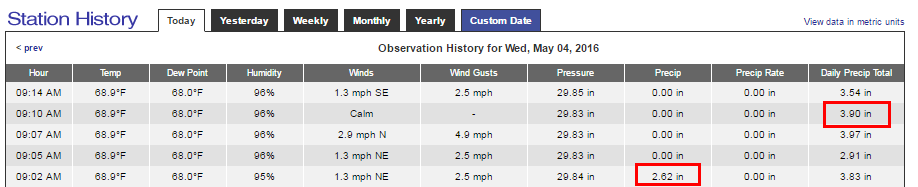
Using this mornings data from my weather station as an example (hard rain):
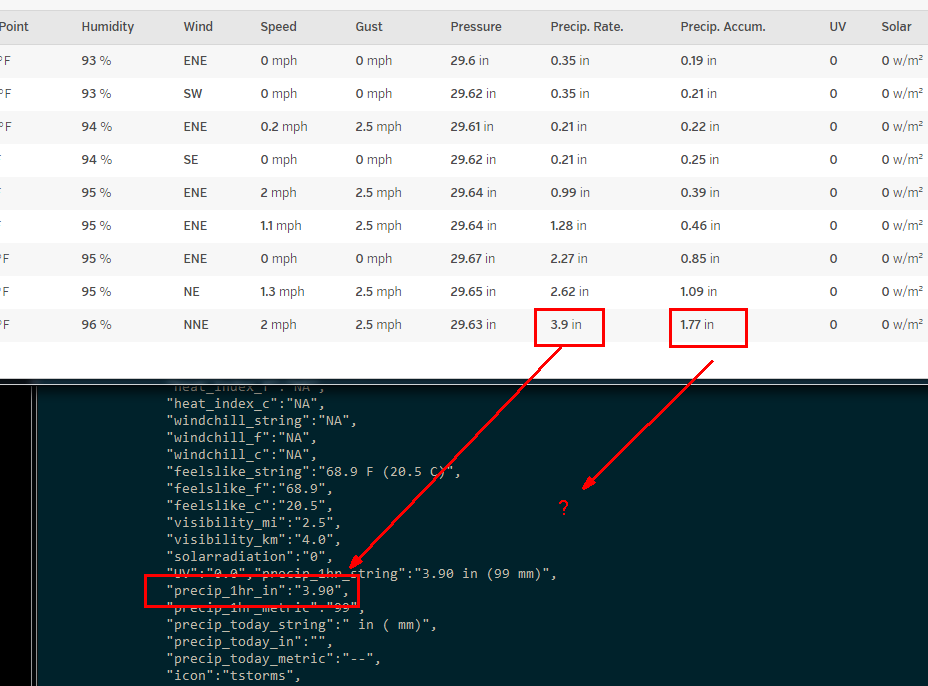
- Weather Underground Web UI reports precip rate as 3.9 inches / hr. That value is reported in the WU JSON in the precip_1hr_in key. Total rainfaill is reported as 1.77 inches, but that value never makes it into the JSON - ??
\ Pasted image928×686 36 KB](https://community.rachio.com/uploads/db1097/original/2X/f/f9ff3a3db0c1a34928346bd4138e7da626713942.png "Pasted image")
- On the pwsweather.com Web UI side… the 3.9 is reported as the daily total if you push the value using the RAININ key, or as the precip (see the 2.62 value) if you use the DAILYRAININ key. There doesn’t seem to be a variable to populate the precip rate. Might have to ask pwsweather about this…
\ Pasted image918×187 15.9 KB](https://community.rachio.com/uploads/db1097/original/2X/7/7d7dae2681e51ff74208a4d22ecdfddabf7f6579.png "Pasted image")
post by sparky79 on May 4, 2016
OK, well I guess it was good while lasted.
In my case, my AcuRite station does not forward the precip rate to WU, only the running precip accum/total. The WU ‘precip accum’ is what was populating to PWSWeather as the ‘daily precip total’ - until recently. Sounds like they may be making changes. FWIW here is my data from 4/28:
\ Pasted image1226×583 44.9 KB](https://community.rachio.com/uploads/db1097/original/2X/6/63be232fd926284f8ed84e9f5e7f7c6b28959f30.png "Pasted image")

\ Pasted image901×455 17.8 KB](https://community.rachio.com/uploads/db1097/original/2X/f/fc632de42a2d0274b7002b3bc6860a630d0114d0.png "Pasted image")
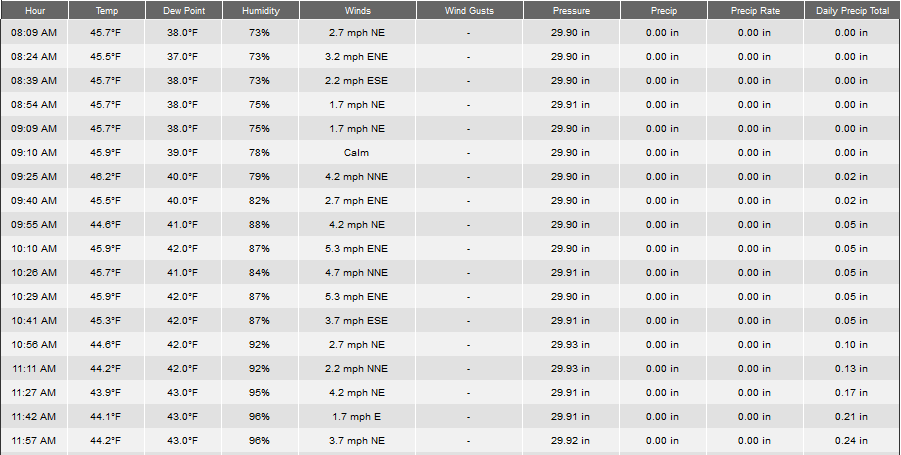
From your screenprint, it sounds like WU is no longer providing the ‘precip accum’ (which is why it is not forwarding to PWS), but in your case it looks like it is crossing your values. Weird.
post by johnny2678 on May 4, 2016
The crossing values in my screenshot is my attempt to see if switching the RAININ and DAILYRAININ values made a difference. It didn’t
For what it’s worth, here’s the response from the pwsweather guy when I wrote him this morning.
Hi John,
The hourly rain has always been a problem because different software and devices send it differently. Some calculate it since the last update, some since the top of the hour and some within the last 60 minutes. We have a number of routines in there to try and come up with a close figure but it’s not perfect. We try to do the best we can with the rainin parameter.
I’m going to ask the developers to take another look at rain. I just noticed an anomaly in my numbers for today. Didn’t throw the accuracy off, but it’s just different.
–
Joe Torsitano
And then…
Hi John,
There is a reconciliation program that runs in the morning which compiles all the numbers and comes up with a realistic precipitation number. I haven’t checked lately if it’s exactly the same as my stations. I actually had some rain today so will probably be looking at that while rain is on my brain.
–
Joe Torsitano
So maybe changes are coming.
I also posted a question to Weather Underground forums about why the Precip Accum. value isn’t in the JSON results. No responses yet, but you can follow here.
post by johnny2678 on May 4, 2016
Also, the Rachio team can clarify but Precip Accum will affect MAD values. I don’t think precip rate affects MAD.
So if we can get this value to show up in the JSON, and load it to PWSweather, I think that will suffice.
post by sparky79 on May 5, 2016
Yes/agreed on the precip accum. My flex schedule was adjusting the moisture levels based on my weather station’s precip accum/daily precip that was getting sent to PWS weather. It seems WU mysteriously took it out and if they put it back in we are back in business w/ the script. I really hope that next year the Rachio team will directly integrate with WU. Thank you.
post by sparky79 on May 5, 2016
johnny2678](https://community.rachio.com/t/using-wunderground-com-to-integrate-personal-weather-stations/217 "Load parent post")
Its a miracle! I just looked at my PWSweather station and daily precip totals are now getting populated again from WU! They started showing up as of 12:01AM today (nothing showed up at all yesterday - or since 5/1). Somebody must have made a change at WU per your post and got it back into the json. Lets hope this sticks.
\ Pasted image902×165 7.57 KB](https://community.rachio.com/uploads/db1097/original/2X/b/bf37c139da0ef195bbd2bc3b242f50e6434c9ebc.png "Pasted image")

post by johnny2678 on May 5, 2016
Well, guess someone was listening
I can confirm that the precip_today_in JSON value is now populating…
post by narancic on May 7, 2016
I think the power Rachio would have by creating a Vera plugin would make the opportunities limitless. All the sensors and external plugin/api information it has available today could create even more robust logic in when and how long to water lawns and plants. Please create a Rachio plugin for Vera.
post by benblackmer on May 9, 2016
Thanks for the suggestion! We’ll take a look.
13 days later
post by nygroove on May 22, 2016
Is there any chance of using WU PWS in the near future?
post by benblackmer on May 23, 2016
At the moment, we don’t have plans to directly integrate WU PWS into Rachio. However, you can use this workaround to get WU data: http://support.rachio.com/article/380-connecting-weatherunderground-to-your-iro
Have a great day!
1 month later
post by jstoeberl on Jun 27, 2016
1
+1 to add direct WUnderground support, honestly I can’t understand the problem to add this support…
For international users like me (I’m from Austria) it will open the door to use Rachio instead of other solutions!
17 days later
post by RayT on Jul 14, 2016
+1 for WUnderground support.
I have an Ambient Weather WS-1400-IP Weather Station but can’t currently use it with my Rachio. Instead it wants to use a weather station a couple miles away which receives sinificantly different rainfall, when it does rain here in Tucson. I see there are some workarounds available but I’m not interested in sinking more $'s into this system to make it work as advertised.
15 days later
post by 7ryder on Jul 29, 2016
benblackmer](https://community.rachio.com/t/using-wunderground-com-to-integrate-personal-weather-stations/217 "Load parent post")
Can you help us understand why?
post by Dkd114 on Jul 31, 2016
Does weather snoop and the machine it’s on need to be running 24/7 for this workaround to work?
post by benblackmer on Jul 31, 2016
@emil, do you know the answer to this? I believe yes, but I’d love a clarification.
post by benblackmer on Jul 31, 2016
7ryder](https://community.rachio.com/t/using-wunderground-com-to-integrate-personal-weather-stations/217 "Load parent post")
@7ryder, integration WU directly into Rachio comes with a subscription cost.
Question for you: is something you’d be willing to pay for?
post by 7ryder on Jul 31, 2016
@benblackmer thanks for the reply.
I’m not really familiar with the API pricing at WU, but I took a quick look and pricing doesn’t seem too unreasonable.
If rachio didn’t use a cloud service, and used direct access like RainMachine, it appears that it would cost rachio customer $0/month, right?
https://www.wunderground.com/weather/api/d/pricing.html?MR=1 it looks like I could get a developer API license for free. And according to this website, https://opensprinkler.freshdesk.com/support/solutions/articles/5000017485-getting-a-weather-api-key a free basic account is more than adequate.
But, because rachio uses the cloud, we can’t use this option, correct? So, would rachio’s installed base make more than 100,000 calls per day to WU? if not, it would cost no more than $200/month for every customer.
Am I correct about the pricing or am I missing something?
At any rate, what would the cost/month be to offer it? And if this is the only thing holding back rachio from offering this, why not make it optional and let the customer decide?
post by benblackmer on Aug 2, 2016
Thanks @7ryder. Appreciate all the comments.
We’re still evaluating different weather options for next year. Along those lines, what would you pay for a direct integration with WU?
post by outbreak on Aug 3, 2016
johnny2678](https://community.rachio.com/t/using-wunderground-com-to-integrate-personal-weather-stations/217 "Load parent post")
Hmmm… I have a raspberry pi laying around and am going to try this! Thanks!
post by outbreak on Aug 5, 2016
Working like a champ! Thanks for getting this together!
post by jmone on Aug 6, 2016
I’d be interested in a simple plug and play Weather Station that just worked with rachio…
post by CH-Johnson on Aug 6, 2016
Dkd114](https://community.rachio.com/t/using-wunderground-com-to-integrate-personal-weather-stations/217 "Load parent post")
I’ve been using this set up for a few months.
$20 for weathersnoop running 24-7. I have an extra Mac mini server so it is easy for me to pull it off.
1 month later
post by jrgass on Sep 12, 2016
benblackmer](https://community.rachio.com/t/using-wunderground-com-to-integrate-personal-weather-stations/217 "Load parent post")
$50 but it would have to be dead easy.
22 days later
post by funkadelic on Oct 4, 2016
johnny2678](https://community.rachio.com/t/using-wunderground-com-to-integrate-personal-weather-stations/217 "Load parent post")
thanks, Johnny! I have my Ambient Weather WS-1400-IP uploading to wunderground and this script works great getting the data over to pwsweather.
8 days later
post by rlivingood1 on Oct 13, 2016
benblackmer](https://community.rachio.com/t/using-wunderground-com-to-integrate-personal-weather-stations/217 "Load parent post")
mac only scraping solution is inadequate. If a 3rd party software can be written for $19 for lifetime ownership on Mac, Rachio should either write the pc software and sell it for $19 or create an integration to weatherunderground. Weatherunderground has much better resolution of weather stations
post by ptr727 on Oct 15, 2016
I just came back to Rachio after using Skydrop for a long time, and I’m disappointed to see the Wunderground is still not natively supported
I have an Ambient Weather that posts to wunderground: https://www.wunderground.com/personal-weather-station/dashboard?ID=KCAMANHA8
post by Raptor2213 on Oct 15, 2016
Well, I didn’t have a MAC when I followed the KB to set up Weathersnoop, but took my file server and installed a MAC OS on VMWare, and I think I’ve got it working. The hardest part was getting VMWare to work with a MAC OS again, but thanks to some help from the internet, I think I’ve got it running.
Helpful links:
post by anderep on Oct 19, 2016
Add another Wunderground station owner to the list. Would really like the benefit of what the OP is asking for.
https://www.wunderground.com/personal-weather-station/dashboard?ID=KTXFORTW25#history
2 months later
post by ScottHammet on Dec 29, 2016
Add another WU user to the list. Got a new PWS (Ambient Weather WS-1001-WiFi) for Christmas that’s working like a champ with WU. Disappointed that Rachio still doesn’t work with WU, though. Not a big deal until I open the system up in the Spring, so hoping Rachio support will materialize by then.
Load more posts below
Invalid date
Invalid date
Loading complete