It’s here! Rachio V3.0 App Update Released - Announcements - Rachio Community
Home | Support | Status Page
It’s here! Rachio V3.0 App Update Released
You have selected 0 posts.
13.8k views 109 likes 8 links 44 users
11](https://community.rachio.com/u/mckynzee "mckynzee")
8](https://community.rachio.com/u/Dukebox "Dukebox")
8](https://community.rachio.com/u/scorp508 "scorp508")
7](https://community.rachio.com/u/franz "franz")
6](https://community.rachio.com/u/davelr "davelr")
read 15 min
Top replies
2 / 111
Mar 2018
post by franz on Mar 1, 2018
franz Co-Founder/CTO @ Rachio
1
We are proud to announce our new major update of the Rachio app. I hope you enjoy the new design and features. Here are some highlights:
- The new Remote (pause, skip forward, skip backward are finally here!)
- Wind Skip!
- Up Next feed that allows manual schedule skipping
- End your schedules before sunrise, start after sunset, or end by a specific time.
- Create your own custom Cycle and Soak times
- 12 and 1 hour weather intelligence schedule verification
- Restricted days on flexible monthly schedules
Check out the full list for a more comprehensive rundown.
Our community feedback is what has gotten us where we are, and we are so grateful for how involved and helpful many of you have been throughout this process.
The last year has been challenging as a company growing our team and re-engineering our cloud platform. We have learned a lot and can not wait to apply this amazing group of people to the opportunities ahead of us. The new infrastructure we have created will allow us to deliver software more quickly.
We will be listening even more and hope to get many of the features and functionality that our users are asking for.
At Rachio we are calling this “the season of innovation.” The new app is just the beginning.
Hope you are ready for the ride!
PS- who won the contest?
13.8k views 109 likes 8 links 44 users
11](https://community.rachio.com/u/mckynzee "mckynzee")
8](https://community.rachio.com/u/Dukebox "Dukebox")
8](https://community.rachio.com/u/scorp508 "scorp508")
7](https://community.rachio.com/u/franz "franz")
6](https://community.rachio.com/u/davelr "davelr")
read 15 min
Top replies
Pinned globally on Mar 1, 2018
Pinned globally on Mar 1, 2018
post by mckynzee on Mar 1, 2018
post by robnielsen on Mar 1, 2018
Good news, I see the recommended time for Flex Daily is to end before sunrise, how does this work when full duration is greater than the time before sunrise? For example, a full duration for me is 7 hours 59 minutes. I also am on an odd/even water restriction.
post by mikecousins on Mar 1, 2018
Mine crashes every time I click on the email box on the login screen… Can you provide a link to the old APK so I can continue watering my lawn?
post by a0128958 on Mar 1, 2018
Congrats!
Make sure you tell this team nice job!
Best regards,
Bill
post by mikecousins on Mar 1, 2018
Wow, it’s even worse. If I try to use the web app as a workaround I get the following error:
Your account is outdated. Please log in to your account on a mobile device to automatically update your account. You will then be able to access your Rachio account normally on any platform.
I can’t login using my mobile device because the app is broken so now I’m completely screwed.
post by mikecousins on Mar 1, 2018
Seems like the app was crashing due to something my password manager was doing (Dashlane). How do we login now? It just refreshes the screen when I click Sign In. There are no error messages displayed.
post by mckynzee on Mar 1, 2018
mikecousins](https://community.rachio.com/t/it-s-here-rachio-v3-0-app-update-released/10766 "Load parent post")
Hey @mikecousins-
Sorry to hear you are running into issues with the new app. Have you tried deleting the app and reinstalling it? What kind of device are you using? We will get this resolved for you!
McKynzee
post by mckynzee on Mar 1, 2018
@mikecousins That third party password manager may be causing issues, are you able to disable it for the Rachio app and tell me if that resolves the issue?
post by mikecousins on Mar 1, 2018
Logging into my password manager actually solved the issue. Very strange that it caused a crash though.
post by mikecousins on Mar 1, 2018
And my account is now working, had to use my old username in the email field. If you use your email address you don’t get an error message strangely. Thanks.
post by mckynzee on Mar 1, 2018
Glad it’s resolved @mikecousins!
post by mikecousins on Mar 1, 2018
It looks very nice once you’re in. Good work.
post by Danny21 on Mar 1, 2018
Is there any new features that have been requested many times by users such as homekit, select what zones use the master valve and which ones don’t, a zone setting for a pool fill, being able to change a zone to a master valve control. For a year of waiting I don’t see anything new and useful.
post by aristobrat on Mar 1, 2018
1
Wind Skip and Remote (which lets you pause the sprinklers to let your dog go use the lawn) have been two requests I’ve seen asked for a gazillion times.
post by scorp508 on Mar 1, 2018
Glad it’s out, congrats.
I’ll use “finish before sunrise” for sure, however some more documentation on it would be nice. Does it use the lat/long of your weather station to determine the local sunrise? Does it then subtract the total time of the next planned watering cycle from sunrise to calculate start time? How long before sunrise does it try to finish?
That said, I’m sad a real well pump delay toggle was still not added. Pretty please add a simple on/off toggle and how many minutes to wait between zones in the same schedule. I don’t want to hack up water/soak in some weird way and put zones on multiple schedules. I also wouldn’t mind seeing a “max allowed watering time before delay” that would allow the system to run for a period of time before forcing a well pump delay. This would not be the same as the water/soak principal.
post by gadgetfan on Mar 1, 2018
Glad to see an update and that it’s a substantial one.
One question: My usage history seems to be gone. I show zero minutes for March, which is fair, since my system hasn’t run today. But no past usage in the app. On the website I can download a CSV of my past usage back to July, but it’s all zeros.
Anyone else seeing this? Is this just a byproduct of the upgrade?
post by mckynzee on Mar 1, 2018
Hey @gadgetfan-
This support article covers your questions on usage. Let me know if there is anything else i can help with!
McKynzee
post by dr_jared88 on Mar 1, 2018
So does the SmartThings integration need to be updated to take advantage of the pause feature through that? I really want to be able to pause and resume watering based on motion!
Thanks!
post by MidnightVoice on Mar 1, 2018
mckynzee](https://community.rachio.com/t/it-s-here-rachio-v3-0-app-update-released/10766 "Load parent post")
Won’t let me into my web account because I have not updated my phone version. Phone version seems to think I have latest version, but it has not been updated for ages. So I will wait and hope it is all sorted out by the time it gets hot
post by mckynzee on Mar 1, 2018
Hey @MidnightVoice-
Sounds like your app isn’t updated yet. Check out this article to get that updated!
McKynzee
post by mckynzee on Mar 1, 2018
dr_jared88](https://community.rachio.com/t/it-s-here-rachio-v3-0-app-update-released/10766 "Load parent post")
Hey @dr_jared88-
Great question! We have yet to enhance our integrations to catch up with our app update, but this would be a super cool add! I will make sure to log your feedback.
McKynzee
post by sbillard on Mar 1, 2018
I was a beta tester of the app. I could not update the original app until I uninstalled the beta. This was on Android. Kept getting “failed to install.” results.
BTW rally nice upgrade!
post by MidnightVoice on Mar 1, 2018
mckynzee](https://community.rachio.com/t/it-s-here-rachio-v3-0-app-update-released/10766 "Load parent post")
Done (three times)
“Your account is outdated. Please log in to your account on a mobile device to automatically update your account. You will then be able to access your Rachio account normally on any platform.”
post by davelr on Mar 1, 2018
Ok, could someone explain why under profile:
First name is "NV"
Last name is “.tv Mont nimble bloc David Ross”
???
thanks
post by mckynzee on Mar 1, 2018
Hey Dave-
Definitely sounds strange. Do you mind contacting Rachio support via your mobile app so we can troubleshoot?
McKynzee
post by Bizza on Mar 1, 2018
The Android app will not update. I’ve deleted the app, rebooted, reinstalled a few times and still get a install error. Any suggestions?
post by davelr on Mar 1, 2018
Hi @mckynzee,
I assume you meant open a ticket as that’s all I could find in the mobile app.
tnx
Dave
post by DalePorter on Mar 1, 2018
Thanks for breaking my setup!!! The new app was pushed to my iPhone via automatic updates andthe new version erased my account settings on my phone and is now trying to get me to add a new controller except the new app will not go through the controller setup. why in the world would you push an update that erases the currently installed controller? So far, this smart controller has been nothing but a time consuming project. I thought it was suppossed to help me save time and money? I don’t know how many hours I wasted getting the controller to work in the first place and now I have to go through the whole process again because you pushed an update… NOT COOL!!!
post by Bizza on Mar 1, 2018
Bizza](https://community.rachio.com/t/it-s-here-rachio-v3-0-app-update-released/10766 "Load parent post")
Wow, can’t even use the web interface now. It needs the mobile app to upgrade the device. I’m completely stuffed now…
Please help ASAP.
post by tmcgahey on Mar 1, 2018
DalePorter](https://community.rachio.com/t/it-s-here-rachio-v3-0-app-update-released/10766 "Load parent post")
Seems you might have a very isolated issue here. A number of us both Android and iOS have updated without incident. All of my previous information is intact down to the pictures of my zones.
When mine updated I had to log back into my account, you are sure you used the correct login credentials and didn’t just create another account?
post by SouthernRain on Mar 1, 2018
I can not seem to see any of my clients’ Controllers. I had over 80+ pre-Updated app. Now ONLY my home controller shows up. What am I doing wrong???
post by morrone on Mar 1, 2018
I just want to express my appreciation for this update. I really like the updates to the Android app. I think it is a nice improvement in layout and usability!
I absolutely love “end by sunrise”. I’ve converted all of mine over to that.
I am really happy that I can use Flex Daily now for my front yard, now that I can accomodate my city’s constraints on watering days.
The improvements to the remote look excellent too. I’ve really liked being able to remotely activate the sprinklers while testing and repairing broken components out in the yard. The old interface certainly worked for that, but was a little clunky. The new one looks very quick and easy to use.
I like the new easier way to get to the consolidated history through a tab.
Overall, I am quite pleased.
I know how much effort can go into overhauling backend infrastructure. I’m sure you folks put a huge amount of work into that, and that part isn’t nearly as visible to us end users. But congratulations anyway! I look forward to the new improvements that will enable in the future.
Thanks again, everyone at Rachio!
post by jonstrong on Mar 1, 2018
Just installed the new app and took a quick skim through it. Looks great - Looking forward to playing with the Weather Intelligence page and features - very helpful. It’s still quite cold and very wet in my part of New Jersey, so I’ve still got my Gen 2 / 16 Zone unit on standby until Spring finally gets here. The controller did really well for me last summer (first summer with it installed), and I’m looking forward to taking a deeper dive into the features this spring, as well as the new app.
Kudos to the software team. This appears to be a solid move up – looking forward to giving it a spin.
post by Bill.Maupin on Mar 2, 2018
1
I’m NOT complaining, but it just doesn’t seem like it should’ve taken a year for what seems to be a few minor improvements and a layout change. I can only assume the back end was a MUCH larger task. I’d love to see a “local” weather station option. Select your station type and Rachio listens to your local station directly. It seems like most stations report to WU, but Rachio can’t use WU due to API call restrictions. Props to Gene for all his efforts to alleviate this! But I hope Rachio steps up and fixes the issue in house. Maybe hire Gene
post by callmemaestro on Mar 2, 2018
1
The new app has completely broken my system. It erased my credentials and data for the Rachio. I have to go through and re-add the controller to the wifi network. When I try to add the controller, it fails repeatedly. Even after restarting the device. I tried to get into the iOS app, but now that just says “Bad Credentials”, even when using the same credentials that work on web and Android. And on the web, there is no longer an interface there - it just says “go use the iOS or Android App” and all it will let me do is change my password and set notification settings.
Now we’re getting flooded with rain, and I cannot turn off my irrigation. We are in a very dry climate in Los Angeles, so I’m stuck just unplugging the darn controller so I don’t drown my entire landscaping.
Terrible migration job, Rachio. Data should not disappear when there is a free automatic app update.
post by callmemaestro on Mar 2, 2018
tmcgahey](https://community.rachio.com/t/it-s-here-rachio-v3-0-app-update-released/10766 "Load parent post")
Not isolated. Happened to me as well. I used the correct login credentials. However, I would note that I had a username before for logging in (as opposed to an email address), and the new version forces users to use an email address to log in. So I suspect that is the source of the bug on Rachio’s part.
post by Dukebox on Mar 2, 2018
\ Screenshot_20180302-202243.jpg1536×2048 298 KB](https://community.rachio.com/uploads/db1097/original/2X/d/d995ad31ef28d18be465e82263d523b1aeb516ea.jpg "Screenshot_20180302-202243.jpg")
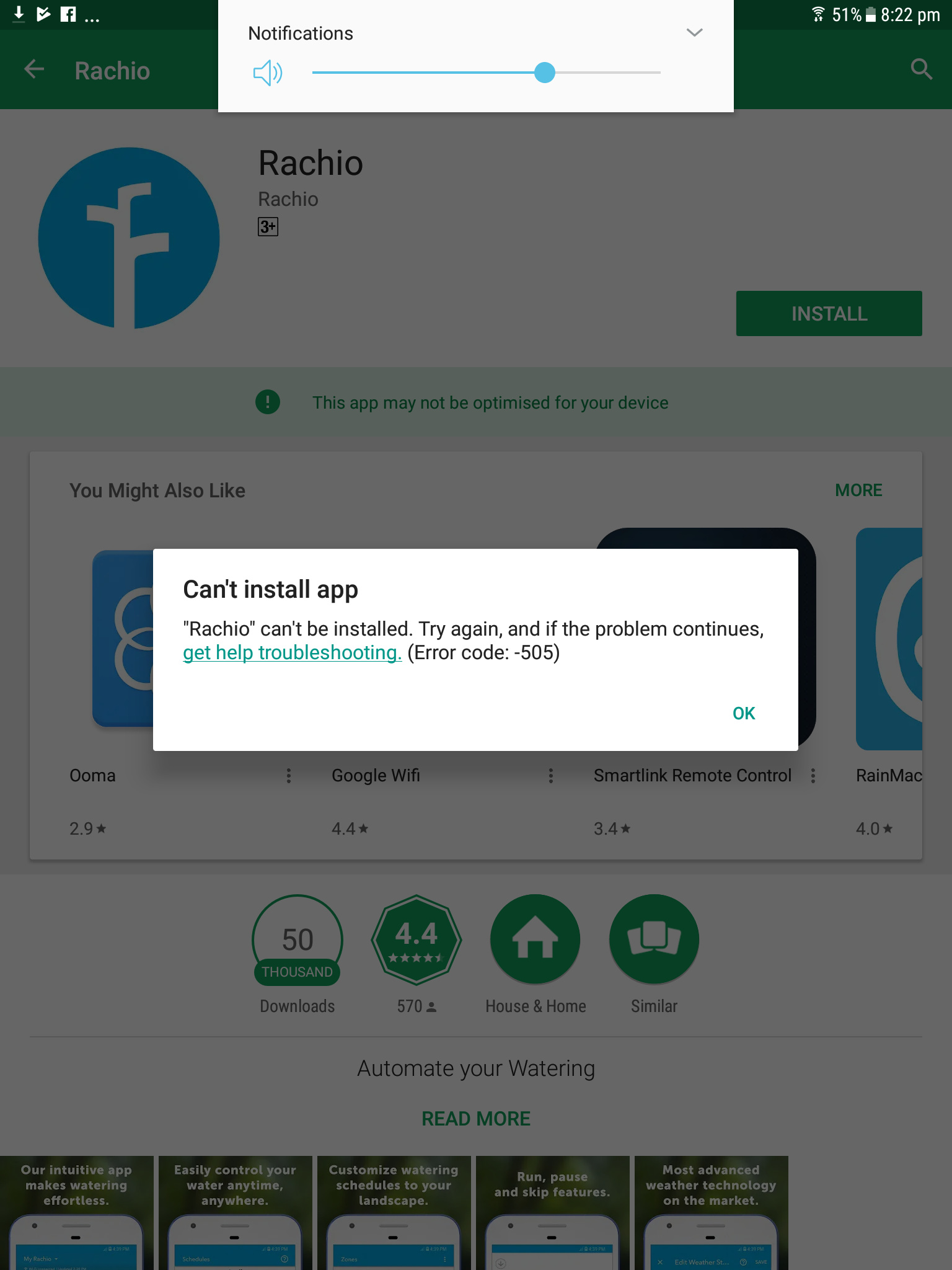
I keep gettingetting tne follow error tyring to update the app on android devices (samsung and a google pixel).
Have cleared the cache and also uninstalled the old app and still this message.
Im kind of screwed now.
First time i’ve been disappointed in this product.
post by Dukebox on Mar 2, 2018
Bizza](https://community.rachio.com/t/it-s-here-rachio-v3-0-app-update-released/10766 "Load parent post")
Hey are you getting this error as well
post by Bizza on Mar 2, 2018
Yep, that is the error I am getting.
My phone is encrypted which caused an issue on another app some time ago. That is the only thing I can think of that maybe causing the issue.
post by Dukebox on Mar 2, 2018
Not sure it’s that.
I’ve tried it on an unencrypted Google Pixel a Samsung galaxy tab and a nexus 5.
Same error on each device.
Have tried every option available online for dealing with 505 errors…
No luck
post by Brett on Mar 2, 2018
I’d still like to see the ability to be on flexible daily and have a zone that is able to state that it sees none of the rainfall that is forecasted. Really sad to not see that available as it was pretty much the only thing I felt I was really missing from the previous version. Guess I still have to use monthly flexible and skip rain pauses for that one zone still…
post by Dukebox on Mar 2, 2018
Dukebox](https://community.rachio.com/t/it-s-here-rachio-v3-0-app-update-released/10766 "Load parent post")
Managed to get an old nexus 4 to pick up the app… But pretty disappointed that my main devices are throwing out this error.
post by tmcgahey on Mar 2, 2018
For those getting the error, what version of Android are your phone running?
post by tmcgahey on Mar 2, 2018
Not sure I follow you on this one? The weather station you have Rachio pointed to would be what would populate actual vs forecasted rainfall. If you aren’t happy with the results of the selected weather station, try another, or you could hook up your own…
post by chris on Mar 2, 2018
chris Co-Founder/CEO @ Rachio
callmemaestro](https://community.rachio.com/t/it-s-here-rachio-v3-0-app-update-released/10766 "Load parent post")
Hi @callmemaestro - did you by any chance have your controller installed by someone else? It looks like another individual ‘owns’ your controller and shared it with you. That person needs to upgrade to version 3 for you to see it, which should happen in the next day or so - whenever that person logs in. If you want more info on who shared with you, please PM me.
post by chris on Mar 2, 2018
chris Co-Founder/CEO @ Rachio
DalePorter](https://community.rachio.com/t/it-s-here-rachio-v3-0-app-update-released/10766 "Load parent post")
Hi @DalePorter - we took a look and you have two accounts. Can you log in with your other account? That should take care of everything for you. If you need that username, just PM me. Happy to help.
post by chris on Mar 2, 2018
chris Co-Founder/CEO @ Rachio
SouthernRain](https://community.rachio.com/t/it-s-here-rachio-v3-0-app-update-released/10766 "Load parent post")
Hi @SouthernRain - we took a look at your account and you should see all of your shared accounts show up today. Apologies for the inconvenience!
post by chris on Mar 2, 2018
chris Co-Founder/CEO @ Rachio
Dukebox](https://community.rachio.com/t/it-s-here-rachio-v3-0-app-update-released/10766 "Load parent post")
Hey @Dukebox - were you by any chance a beta user with us?
post by lucasc on Mar 2, 2018
lucasc Operations Support Consultant @ Rachio
Dukebox](https://community.rachio.com/t/it-s-here-rachio-v3-0-app-update-released/10766 "Load parent post")
Hey @Dukebox and @Bizza. We have identified an issue that is preventing you from downloading. We have it fixed now and running though a couple of tests to make sure everything works well. We will have this out as soon as possible. I’ll ping this thread once we get it out.
-Lucas
post by tmcgahey on Mar 2, 2018
See, Rachio is on it! I knew people that “lost” their data had something amiss with their log-ins…
Overall, I thinking this was a pretty smooth rollout for such a major overhaul. Good job Rachio!
post by davelr on Mar 2, 2018
Just a couple of quick questions on V3.
Rain Skip-
IIRC, in V2, rain skip was determined at some time in the early morning based on experienced and forcast rainfall. Is this still the procedure in V3?
Wind Skip-
Can you explain how wind skip is determined? If it is based on the same type of analysis as rain skip in V2, it might be pretty useless. An explanation of how it works would be helpful in determining if it should be applied.
Start/Stop dates-
If I’m not mistaken, V2 did not set start/stop dates for a following year. At least what I remember was that the user had to manually select them at the beginning of the season. Is this still the process?
I also notice that you’ve dropped support for IE11.
Thanks
post by scorp508 on Mar 2, 2018
In the past people have called out they use a zone or two in order to water plants in a green house, or potted plants under the overhang of a porch. Those zones see zero rainfall even though their other traditional zones out in the yard do get rainfall. Those plants can end up being starved of water if there is a lot of rain activity as the controller then thinks every zone has plenty of moisture when in reality some saw none of the rain.
post by chris on Mar 2, 2018
chris Co-Founder/CEO @ Rachio
Hi @scorp508 - one thing to consider here is putting the zones under the porch in another schedule and just turning off rain skip (or any other skip) for that schedule. This will ensure those zones get watered regardless of weather.
post by scorp508 on Mar 2, 2018
I only see Freeze and Wind skip at the per-schedule level unless I’m overlooking it while Rain Skip is over in the global Weather Intelligence page. A rain sensor is also global and would override all schedules.
I’m not personally affected by the lack of this feature, but I can see the value in having rain skip (and Rain Sensor affected or not) per schedule and per zone.
post by davelr on Mar 2, 2018
I’m not personally affected by the lack of this feature, but I can see the value in having rain skip (and Rain Sensor affected or not) per schedule and per zone.
At least on the Android version you can set Rain Skip individually for each schedule.
post by scorp508 on Mar 2, 2018
What section is it under? On iOS 3.0.1 under the schedule’s individual Weather Intelligence area there’s only Freeze Skip & Wind Skip.
post by davelr on Mar 2, 2018
It’s under Schedules/select schedule/Weather Intelligence - you can set Rain, Freeze, Wind, Saturation, and (if a fixed schedule) Season Shift. If you’re on a flexible schedule the Season Shift choice is not present.
I checked the web site as well and the rain skip setting is presented there as well. That could be a fall back way to control it if/until the setting gets added into the IOS app.
BTW, I’ve only Fixed and Flex Monthly schedules, so don’t know if this is still accurate for a Flex Daily schedule.
post by mckynzee on Mar 2, 2018
scorp508](https://community.rachio.com/t/it-s-here-rachio-v3-0-app-update-released/10766 "Load parent post")
Hey @scorp508-
Are you creating/editing a flex schedule? These are the only two Weather Intelligence features available on Flex schedules, which may be causing the issue!
McKynzee
post by davelr on Mar 2, 2018
I guess that addresses my uncertainty about Flex Daily schedule settings. However Rain and Saturation settings are available on Flex Monthly schedules.
post by Brett on Mar 2, 2018
tmcgahey](https://community.rachio.com/t/it-s-here-rachio-v3-0-app-update-released/10766 "Load parent post")
On my WeatherTRAK I could only have what was effectively a flexible daily schedule… Then there was a setting for each zone that was the usable rain setting. This could be set between 0 and 100%. If I have a zone that is 100% under cover I’d set this setting to 0%. If I have a zone that is under heavy tree cover I may set it to around 40%. This way all the other zones can react as they should to forecasted rain but zones that don’t receive that rain have no way to use a flexible daily schedule and not account for the rainfall.
post by callmemaestro on Mar 2, 2018
chris](https://community.rachio.com/t/it-s-here-rachio-v3-0-app-update-released/10766 "Load parent post")
I’ll give that a try, thanks.
post by callmemaestro on Mar 2, 2018
chris](https://community.rachio.com/t/it-s-here-rachio-v3-0-app-update-released/10766 "Load parent post")
I’m trying to understand - why did you think it’s a good idea to delete access from shared controllers in a V3 update?
My installer certainly didn’t know this update was coming. Why on earth would you delete access from your customers this way?
All over a minor app update? It makes zero sense. Help me understand.
I’m in a torrential rainstorm and I’m up after midnight scrambling to figure out how to save my landscape from over-irrigation in the rain.
I can’t just contact my installer at 11:30pm at night. I have to wait until morning, but the schedule starts at 5am.
So the whole thing was a mess. Bottom line: Never, EVER yank access from your users.
This is exactly the reason why people don’t trust wifi-enabled products. You can’t trust the companies with the auto-updates.
post by callmemaestro on Mar 2, 2018
tmcgahey](https://community.rachio.com/t/it-s-here-rachio-v3-0-app-update-released/10766 "Load parent post")
No, Rachio was not on it. There was nothing amiss with my log-in. Rachio set a policy that was designed to remove access from ALL users with shared access. It’s senseless to have users open up an app and discover all their access has been taken away without notification or warning.
post by Dukebox on Mar 2, 2018
chris](https://community.rachio.com/t/it-s-here-rachio-v3-0-app-update-released/10766 "Load parent post")
Negative
post by Dukebox on Mar 2, 2018
tmcgahey](https://community.rachio.com/t/it-s-here-rachio-v3-0-app-update-released/10766 "Load parent post")
V.8.0.1.
I have managed to download it on a crusty of device running 6.0.1. But this then migrated the account rending the old rachio app useless on my day to day device
post by franz on Mar 2, 2018
franz Co-Founder/CTO @ Rachio
morrone](https://community.rachio.com/t/it-s-here-rachio-v3-0-app-update-released/10766 "Load parent post")
Thanks for the post, I’ve forwarded this to the team, they love this. Most people don’t realize the “heavy” lifting that we’ve done on the backend infrastructure, thanks for appreciating that! It’s a micro-service architecture that is going to allow us to build out new features at a much faster pace.
Have a great weekend!
post by chris on Mar 2, 2018
chris Co-Founder/CEO @ Rachio
callmemaestro](https://community.rachio.com/t/it-s-here-rachio-v3-0-app-update-released/10766 "Load parent post")
@callmemaestro we definitely apologize for the inconvenience. I just want to clear up that shared access wasn’t deleted. It just requires that both parties be on V3, and I understand this is frustrating.
Unfortunately (and fortunately for future innovation) for us to move onto our new platform, there wasn’t really anyway for shared access to live in both V3 and V2 at the same time. I understand that this is a Rachio problem and not customer problem, and your specific experience was pretty bad, so again, apologies.
I think if you plug your controller back in, you should be good to go now.
post by scorp508 on Mar 2, 2018
Hmm. Ok… interface design change request then to prevent continued confusion. Instead of hiding options certain schedule types don’t use, the UI could still show them in their normal position and pop a “Not available in this mode” or “This feature is only available in [MODE]” warning if the end user tries to enable it.
post by scorp508 on Mar 2, 2018
This is great to hear. I truly hope it allows a much more iterative process with shorter sprints between feature releases rather than slower big bang releases. A little more openness on this backend transition may have alleviated a little of the angst while waiting for V3.
post by franz on Mar 2, 2018
franz Co-Founder/CTO @ Rachio
I haven’t had time for that
post by scorp508 on Mar 2, 2018
Touché, sir! [hat tip]
post by Dukebox on Mar 3, 2018
lucasc](https://community.rachio.com/t/it-s-here-rachio-v3-0-app-update-released/10766 "Load parent post")
Hi Lucas. Do you have an ETA on the release of this fix?
post by brockeg on Mar 3, 2018
Having the same problem as other users. Have IoS iphone 6 with V2.9.2 Rachio app. Hasn’t updated. Web says can’t log in until I update phone to 3.0. App store says app only for IoS users (which I am). IoS is Latest; 11. something. Other apps updating okay, all setting okay. Restarted iphone. restarted controller. logged out on iphone, and back in.
Help please!
post by cp037 on Mar 3, 2018
Same exact issues here. Thanks for saving me the trouble of writing all that out
post by radiam on Mar 3, 2018
Hi all. Android 8.1 pixel xl. Couldn’t update app. Uninstalled now can’t install. Cleaned play store cache and data. Keep getting 505 error. Any suggestions? I note a couple of others having same issue but didn’t see any fixes.
Thanks
post by franz on Mar 3, 2018
franz Co-Founder/CTO @ Rachio
@radiam Our Android team is researching this and will let you know when identify a resolution. Thanks!
post by cp037 on Mar 3, 2018
I removed iOS app and reinstalled, the update then came in. I am now able to log in to both IOS and Web via Chrome. I did the iOS login first, then the web interface let me in. Nice redesign, I appreciate your hard work on an already outstanding product!!
post by jzdepab on Mar 3, 2018
Ok, so I ran into a new bug: I set things up for finish before sunrise. My sprinkler set off at 5:09 AM. At 5:10 AM it said that it would skip because of rain (it’s been raining all night). But the sprinklers kept running anyway.
Definitely something is running in the wrong order?
post by akashb on Mar 3, 2018
I upgraded to the new Android app and both my Rachio controllers are now showing as “Offline” in the mobile app. Also, when I try to go to the website and login from a computer, I get “Error loading data”. I can’t access my account or my controllers. Help?
post by garfather on Mar 3, 2018
Awesome new app!
post by Kubisuro on Mar 3, 2018
I’m so happy that Wind Skip is now a feature: summers here are famous for north winds which basically prevent any actual rotary spray irrigation from being effective. I’m brand new to Rachio so this is fortunate that I started at the 3.0 release!
post by franz on Mar 3, 2018
franz Co-Founder/CTO @ Rachio
jzdepab](https://community.rachio.com/t/it-s-here-rachio-v3-0-app-update-released/10766 "Load parent post")
Having the engineering team review. Will let you know what is found.
post by lucasc on Mar 3, 2018
lucasc Operations Support Consultant @ Rachio
Dukebox](https://community.rachio.com/t/it-s-here-rachio-v3-0-app-update-released/10766 "Load parent post")
@Dukebox, @Bizza, @radiam - Thank you so much for your patience. Can you check the google play store and let us know if you are able to download the app now?
post by Dukebox on Mar 3, 2018
1
Same error code at first attempt… BUT THEN
Deleted cache and data for:
Google Play Services
Google Play
Downloads (need to get it to show all system apps )
And boom… It installed the revised update.
Thanks guys. Now officially working on a google Pixel. Will try it on by Samsung galaxy tab 2 tonight.
post by radiam on Mar 3, 2018
Same as dukebox. Still wouldn’t install until clear cache, data and reboot but now installed and working. Showed controller offline for a while but started working. Well done.
Sad thing is I needed to get this setup so I can delete controller. I have sold the house and leaving the rachio here. Time to get a new one. Hopefully the team has a controller with an Australian plug now rather than me having to build one.
post by Bizza on Mar 3, 2018
lucasc](https://community.rachio.com/t/it-s-here-rachio-v3-0-app-update-released/10766 "Load parent post")
All works here. As above the cache has to be cleared.
Thanks for the quick turnaround.
post by mckynzee on Mar 5, 2018
akashb](https://community.rachio.com/t/it-s-here-rachio-v3-0-app-update-released/10766 "Load parent post")
Hey @akashb-
Are you still seeing controllers offline? Sounds like they may have failed in receiving the new firmware that accompanied the app. Can you try power cycling your controller? If that doesn’t work, can you reach out to support?
McKynzee
post by akashb on Mar 5, 2018
Thanks for the response! I talked to support and had my issue resolved.
post by Jimguzdziol56 on Mar 7, 2018
Congrats on the upgrade. Nice improvements. I have an Ambient IP weather station. When will I be able to use it’s rain data with Rachio? Right now I’d have to spend an additional $200 for WeatherBridge.
post by DLane on Mar 7, 2018
@Jimguzdziol56 - use @Gene 's wufyi.com service for free to migrate WeatherUnderground data to a place Aeris (which Rachio uses) can read the data. I’d recommend the beta version of wufyi.com as that is what Gene has been working on.
post by kcaron on Mar 9, 2018
Hi absolutely hate this update.
First it reset my whole system that was working perfectly. Shame on the developers for allowing this to happen. Need more beta testing before rollout or at least a notification to users about the impact of changes and deletion of features.
My rotaries are watering huge amounts of time compared to everything else now and I still have not figured out how to get them back in line.
Second I no longer can see a graph of the estimated gallons used. That was a key feature when I made my purchase decision. Minutes watered does nothing for me.
Finally the history needs a summary of all the details. Bring back the graphics as they were easy to read and understand.
At this point I can not recommend Rachio to anyone unless the SW update is fixed or at the very least someone can tell me if I can reinstall the previous release.
Very unhappy.
post by mckynzee on Mar 9, 2018
Hi @kcaron-
I am sorry to hear your system was reset, this is not typical. I would recommend reaching out to support, as this sounds like a more serious issue.
Rachio has changed estimated gallons to minutes in order to give users more accurate reading. For more information on this decision, check out this article!
Can you give me more context as to how the new history is more difficult to read now? We thought the one consolidated feed would be an improvement, as well as the new, more specific icons. Any feedback would be appreciated!
All that being said, it may be easier to chat about this over the phone. If you are interested, I would love to talk about how we can improve in the future. Click here to schedule a call with me!
McKynzee
post by vmetsis on Mar 10, 2018
Hi @mckynzee,
I just checked the updated rachio app, and after exhaustively searching the app to find my water consumption, I came to the forums panicking to see if I am missing something.
If I understand your post above correctly, you guys have removed the water consumption tracking from the new app??? Please tell me that I misunderstood, and this is just something temporary!
I see you have added a minute usage tracking, but what does the minute usage mean? In 60 minutes of usage, I could be consuming 6 gallons or 600 gallons of water. How does the minute usage help me?
The single most important reason I purchased the rachio controller is that I could pair it with a water flow sensor (which I purchased for over $300) to track my water consumption.
If that feature has been now removed, it’s a deal breaker. I’m not only going to have to stop using rachio, but I will have to return it and demand my money back as this change drastically alters the described functionality of the controller.
Looking forward to an explanation.
Thanks,
Van
post by scorp508 on Mar 11, 2018
More accurate of what exactly?
Gallons is an apples to apples (great card game BTW) measurement you can compare across zones if they’re setup well and a flow sensor is in place. I fully appreciate the fact that V2 had shortcomings on how to properly measure gallons which were not easy to overcome.
Minutes as a primary report axis don’t seem to provide the same insight as gallons. Happy to be wrong, but here’s what I see happening with this change. You may be able to compare a single zone to itself over time. It wouldn’t be useful to stitch all of the individual zone comparisons into one parent “minutes saved” report as each zone may have different head counts, flow rates, etc… which makes a minute of watering in each zone a completely different unit of measurement. Were the minutes saved on 6 head zones, 3 head zones, an emitter zone, etc.?
A single zone run twice for the same period of time may also be different units of measurement given water pressure is not always a perfect constant.
Example incoming…
March 15th two zones are watered starting at 5AM. Zone 5 and Zone 9 are watered for seven minutes each as the moisture levels were still adequate in all other zones. Let’s say the system was able to keep 40psi to the rotary heads during this time.
March 20th eight zones are watered starting at 5AM. Zones 1-8 are watered for seven minutes each. Sometime during Zone 4 you may deplete the home’s water pressure tank due to running the well too long without a delay to recharge the pressure tank. You’re still getting water, but not necessarily at the same pressure as you were for Zones 1-3. Maybe the last half of Zone 4 through 8 is only able to get 25psi. Your minute readings of Zones 4-8 are now entirely different animals from what they’d be if the pressure wasn’t impacted.
…example over.
Cookbooks do not read “Fill a measuring cup with water. Tip over for 3 seconds.” The result of those seconds may be wildly different depending on the angle the reader tipped the cup or the mouth on the cup.
Gas stations do not charge based on the number of seconds you had the pump trigger pulled. The flow rates vary if you have the trigger pulled in a little or a lot, or if one or twelve people are pumping from the same storage tank at the same time.
I’m totally happy to be told I’m a moron and <$REASON> is why minutes are accurate to use rather than gallons for a product which is primarily responsible for moving fluid through pipes.
Without further explanation (that URL states nothing behind the actual reasoning) this change feels more like a decision was made to give up putting additional resources into getting gallons accurate and go with minutes as a cheaper method. It is probably an easier stat to report on, but in my mind not a reliable unit of measure on its own. Hopefully there is more work being done to improve the capabilities around measuring & reporting of gallons, and that will come back to the forefront in a future update.
post by Linn on Mar 11, 2018
First of all, I admit it. I am a huge Rachio fan and love the product, so this is constructive criticism. I TOTALLY don’t get keeping track of number of minutes watered. I actually never did like the gallon stats – I was just too lazy to measure and get the square footage of my zones – none of them are a nice measurable rectangle. Plus, my water charges are in CCF. So I just pretty much ignored it. But it did make sense for the people who wanted to put in accurate measurements, and felt that they had correct rates on their nozzles. At least it might be kind of close for them.
But minutes? Makes no sense at all. My drip zones minutes mixed in with my rotor head minutes are useless. What does it mean to have minutes? And it’s just a total for the month, as least as best as I can figure out. Nothing by day. Nothing by zone.
With all the good things I see in this version, I just don’t get this one. I’m with you @scorp508. I’d be very happy to be wrong on this one. Perhaps I’m just not thinking it through the right way.
.
post by jbroady on Mar 12, 2018
I like the fact that you are progressing forward with new features, but why is Rachio refusing to acknowledge the glaring ask and hole that the community has been stressing for years! HOW ABOUT ADDING A DELAY BETWEEN ZONES TO SAVE OUR WELL PUMPS! Seems like a simple ask, and without this BASIC FEATURE, many of the new features will ring hollow for me. Please listen to the community, this is the one glaring flaw in an otherwise good product!
Thank you!
post by Timmay on Mar 13, 2018
callmemaestro](https://community.rachio.com/t/it-s-here-rachio-v3-0-app-update-released/10766 "Load parent post")
I’ve had the same problem. Everything worked fine when I used the old app a week ago to set a rain delay. Updated to the new app, now I have to reconnect the controller and it keeps crashing when I do. :angry I’m assuming all my zones/data will be gone if/when I finally get access again. Just happy I didn’t update the app on my iPad as well, otherwise I’d be screwed.
post by shockley on Mar 13, 2018
What a mess! I’ve been trying to figure out why the app straight up stopped working, and came upon this thread. A few days ago the app stopped accepting my password and wouldn’t even send me a reset email. I’ve since had to recreate the account, reset the wifi on the controller, and now I’m back to square one on the app. It’s like my account never even existed despite having worked flawlessly for months!!!
post by hcnate on Mar 14, 2018
I am one of the people whose data got wiped from their account. Now all my zones and other information has gone missing. How can I get this corrected?
post by lucasc on Mar 14, 2018
lucasc Operations Support Consultant @ Rachio
@hcnate, @shockley . Thanks for bringing this up to our attention, we’ve looked into your accounts and everything looks normal now. I sent you PMs. Don’t hesitate to reach out with any other questions or concerns!
-Lucas
post by karenrogers on Mar 17, 2018
Thank goodness I came here and found all your posts. Thought I was losing my mind. We’ve had our system off for several months. Went to reactivate it yesterday: I can’t get logged in on my mobile device. My husband gets logged in, but then can’t see/do anything. All our data appears to be gone. I try resetting my password on the mobile app. It says it’s sending an email to me, but it doesn’t. I try resetting my password on a browser. That actually generates an email … but the password provided won’t get me in on mobile or browser.
After reading the discussion here, I deleted the app and was going to re-download it. Except it won’t actually download onto my phone.
Right now, I have a very expensive and completely useless pile of plastic and wires.
I have submitted a support ticket with Rachio, but have had no reply. What a nightmare.
post by vmetsis on Mar 18, 2018
It seems that consumption in gallons indication for the current month is now shown on the web portal again, though I still cannot see daily consumption or any historical data. That’s a good sign. I hope the Rachio team is working on restoring the full functionality of being able to track consumption in gallons.
Many users have previously requested consumption (in gallons) monitoring per zone. That would be an awesome feature, but I am happy with at least being able to see my total consumption.
Another very useful feature for those who are using a water flow meter would be allowing the users to set a threshold of maximum consumption per week (or day). If that threshold is exceeded, it could be an indication of a leak, and the user could be notified by e-mail or by a push notification.
post by franz on Mar 19, 2018
franz Co-Founder/CTO @ Rachio
Our new app update today ( Rachio App Update 3.1 🎉) will show gallons if you have a flow sensor. We also now show # of weather skips and a couple other points of data.
post by vmetsis on Mar 20, 2018
I just received the newsletter about your Rachio 3 controller + Wireless Flow Meter. Producing your own flow meter was a good idea and a good selling point over the competition, though I hope you will still support existing flow meters.
1 month later
post by GregC on Apr 25, 2018
Add me to the list of people who lost all settings and found a “Connect New Controller screen” as they went to the app (after noticing that the sprinklers were no longer going on). Went through linking controller again to find no setting remained and controller showing “offline” despite a flashing green light on the wifi. Sent in a ticket and guess i have to hand water for a while. Controller has worked great for the last two years now nothing.
post by franz on Apr 25, 2018
franz Co-Founder/CTO @ Rachio
The support team will be able to get everything setup for you. If you are still having issues after working through them just let me know.
post by laura.bauman on Apr 25, 2018
GregC](https://community.rachio.com/t/it-s-here-rachio-v3-0-app-update-released/10766 "Load parent post")
Hey Greg!
I want to make sure our support team has seen your ticket - do you by chance have your ticket number handy?
-Lo
post by GregC on Apr 25, 2018
Yes, I sent it to you via a PM.
Thanks!
post by laura.bauman on Apr 25, 2018
Looking into it for you right now
-Lo
Reply
New & Unread Topics
Topic list, column headers with buttons are sortable.
Want to read more? Browse other topics in Announcements or view latest topics.
Invalid date
Invalid date
Loading complete