Home Automation System Support besides Wink - Smart Home & API / Smart Home - Rachio Community
post by plainsane on Nov 24, 2015
No zwave solution is. I opted for razberry since I have a raspberry pi 2. Everybody has gone after these ui’s that are just a thin wrapper over the zwave protocol.
But honestly, until I get real flow sensor support, I have shelved my http device driver to the iro.
I’m hopeful that the zway guys get their HomeKit working again, but from what I have read that might require an Apple TV to act as the gateway.
And before ppl beat me up over using a raspberry, keep in mind, I have a portable power pack for charging an iPhone that acts as a ups and will run the device for 4 hours. At least I can still interact with my battery operated devices like my door locks over my backup ad hoc network.
post by emil on Nov 27, 2015
Thanks for the feedback @eyali. How do you like the Nest & Chamberlain plugins? Are they missing any functionality that requires you to use their native app on a regular basis?
@plainsane, I’m trying to remember, what type of flow sensor do you have? Or are you still evaluating makes/models? I think the last time we discussed flow sensors was in this topic.
post by plainsane on Nov 28, 2015
I have a toro tfs-100 in the box, just didn’t get it on the main yet as the iro doesnt support it.
post by emil on Nov 29, 2015
Thanks @plainsane.
2 months later
post by ghctim on Feb 2, 2016
HouseLogix wrote a plugin for Control4 integration, but its almost as expensive as the unit itself!
post by plainsane on Feb 2, 2016
Openhab anybody?
3 months later
post by tjhughes3845 on Apr 27, 2016
David,
I would be interested on hearing what you believe might of been the problem on getting Wink and Rachio to work together. Could it be a Rachio problem? My Gen 2 is currently connected to my router but I’m thinking on buying Wink to connect other devices including Rachio.
Thank you in advance for replying.
post by sparky79 on Apr 28, 2016
Currently, my Gen2 is ‘connected’ with Wink, but the integration is wacky. It says it is watering when it is not, the zone#s are all mismatched. Plus, disabled zones show enabled, enabled zones show disabled, etc. The Wink integration is useless at the moment. Called Wink the other day and it appears they are aware of it and ‘might’ be remedied in the next WinkApp release. They made it sound like it is not a ‘Gen2’ thing and it is an overall integration issue. Since I am new to Rachio this year, I am none the wiser as to whether it ever worked or would still be working with a Gen1.
Rachio team, are you aware of this? I see you posted something back in February that Wink was updating their integration, but not necessarily that it might be taking this long.
Thanks.
8 days later
post by narancic on May 7, 2016
I also would like to see Vera plugin created for Rachio. Small amount of work for one of their experienced engineers and would give instant access to the largest home automation product and customer based in the market.
6 months later
post by njhaley on Nov 14, 2016
Wow - two years later and still no SmartThings integration. Let’s get on this. Google Home is out now, kicking butt and taking names. Wink has had Rachio support for a while now, and Alexa as a result.
Those of us with Google Home and Rachio are left wondering "where’s the love?’
post by franz on Nov 14, 2016
Still testing/validating with SmartThings, yes it has been frustrating how long this has taken compared with the amount of time taken to integrate with our other partners.
Google Home has not yet opened their API for integrations. As soon as it is available we would love to have an integration with them.
post by njhaley on Nov 14, 2016
Thanks for the response, Franz! I think for a lot of us Google home owners, integration with smartthings is an effective integration with Google home get one and you have both!
post by a0128958 on Nov 15, 2016
I have my Iro2 ‘integrated’ with the Web Energy Logger (WEL) -
No control of the Iro2 is possible.
I do get charts on performance, such as
(hourly usage for last 36 hours of activity),
(chart showing daily usage for last 13 months), and
(chart showing monthly usage for last 13 months).
If I were to go to the effort of putting in a flow sensor then I could restate the charts in actual gallons.
The WEL can supports a h/w interface ‘out of the box.’ My WEL is connected to the master valve contacts for total Iro2 on time, and connected to sense the presence/absence of voltage at the controller’s zone 10 terminals for swimming pool water usage.
I do have email / text message sending ability, but, I don’t have it turned on. I.e., I could send an email to myself whenever the Iro2 turns on/off, or, a single designated zone does likewise. I can also send texts/emails if gpm or gallons doesn’t make sense (i.e. indicating a break), but I don’t have this turned on either.
Best regards,
Bill.
post by pjschaffer on Nov 16, 2016
Direct Google Home integration would be great, but in the meantime, you can integrate to a degree via IFTTT.
For instance, I’ve set up a fixed schedule that runs each zone for five minutes and then disabled the schedule. I’ve then created a Google Assistant trigger in IFTTT (Ok Google, Water all zones) and then linked Rachio to run the disabled schedule whenever the trigger is activated. I also have a trigger that stops any running schedules.
post by jimv on Nov 17, 2016
I agree with franz. If we could get SmartThings integration that would be very helpful and the wait has been too long.
16 days later
post by Thehatrix on Dec 3, 2016
I’m having integration issues with my Wink 2 as well. Very odd since Wink lists my Rachio as a product that is fully integrated…
post by mckynzee on Dec 5, 2016
Hi @Thehatrix-
What issues are you having with the Wink integration?
11 days later
post by Thehatrix on Dec 16, 2016
The Rachio system is operational and works with the Rachio app, but the Wink app will not control the system. It shows that the sprinkler controller is connected but on the main screen is says inactive. I cannot select any of the zone nor run any of the schedules.
post by mckynzee on Dec 17, 2016
@Thehatrix thank you for those details- let me do some testing on our end and see if I run into the same issues so we can troubleshoot it!
post by Thehatrix on Dec 18, 2016
IMG_1614.PNG750×1334 63 KB](https://community.rachio.com/uploads/db1097/original/2X/e/eaa478f0f391feb52f067df32ff46fc262589b8c.PNG "IMG_1614.PNG")
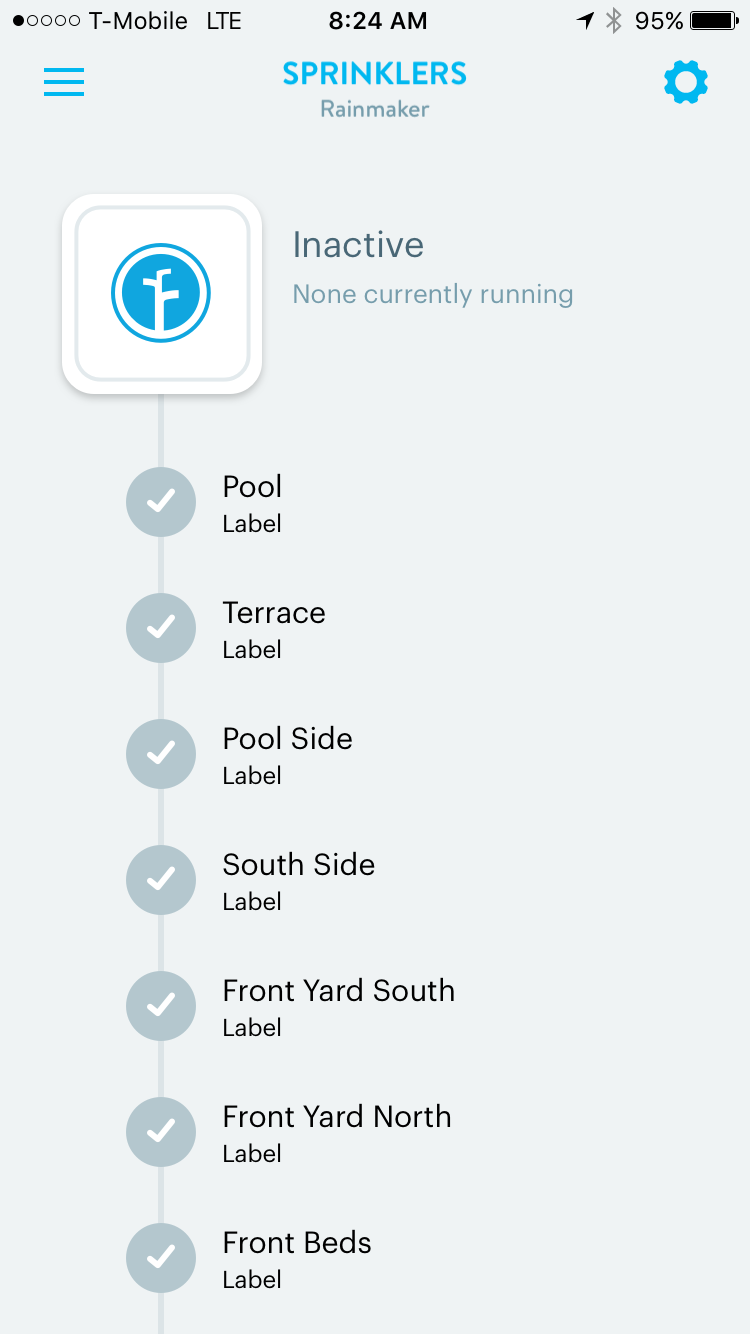
Here is what I get from the Wink app…
post by mckynzee on Dec 19, 2016
@Thehatrix Are you experiencing any issues within the rachio app running your different zones or schedules? Also, is your device online, offline, or in standby?
post by Thehatrix on Dec 19, 2016
No issues with the Rachio app at all. When I run the system it shows it’s running on the Wink app, it just won’t let me control the Rachio.
post by mckynzee on Dec 20, 2016
@Thehatrix Have you contacted wink support? I hate to point you another direction, but the wink we have is working well, and I am thinking it may be on their end
post by Thehatrix on Dec 20, 2016
I have. They said they will look into it so we will see…
post by mckynzee on Dec 20, 2016
@Thehatrix keep me updated on what they say! Sorry we couldn’t be more helpful
3 months later
post by dillon324 on Mar 29, 2017
I am having the same issue.
post by emil on Mar 30, 2017
@dillon324, thanks for reaching out – have you attempted to contact Wink support yet?
4 months later
post by Mjbcomputers on Jul 20, 2017
I’m so surprised this has never got resolved or answered! This post is from December 2016 and I searched all over the internet looking for the answer myself and found nothing! I just got my Rachio 8 Zone Gen 2 today and played with it for 5 hours before I figured out why I could not control any zones in the wink app! I was left wondering what wink even did! I was having the same issue as you, and support from wink is horrbile and their website is worse. I purchased a rachio simply because the wink website said it was compatible. I honestly feel like someone should start a class action lawsuit for false advertising. Anyway -
First of all, if your system says inactive it’s just because a zone hasn’t ran since it was connected to wink. That said, hopefully once connected to wink, and sprinklers ran (using the rachio app), you should at least see the last time the zone watered where it says “label”. If you scroll down there is an option that says “Select Schedule.”
When I first clicked “Select Schedule” in wink at the bottom of the zones, it came up blank… I could not figure out why? Again, I also got mad that I could not simply touch the zone, and tell it to run! After spending hours dinking around with things, I realized that when I setup my rachio sprinkler system, I choose to allow the rachio device to choose its own schedule for watering the zones. I mean why would you not, and thats the main reason we want this device! When you choose this option, no set schedule is made in rachio since the app / cloud will determine the schedule and therefor show you no control in wink!
What I did to fix this, is leave the auto schedule in place, and create an additional manual schedule for each zone! I told each zone to run the schedule every three weeks, since I just wanted the schedules in place so I could control the zones in the wink app! You have to create a schedule for each zone so that in wink, you can manually turn on each zone, otherwise, a schedule with all zones set will only allow you to turn on all zones and you won’t have individual control.
This isn’t a rachio issue, it’s a wink development problem! I have invested thousands into the wink app and automation and if I could describe wink in one sentence, it would be “wink where less then half of all features for the devices they recommend work.”
8 months later
post by markus7017 on Mar 3, 2018
fyi: I’m working on an openHAB2 binding for the Rachio controllers (I fact it’s already in beta state).
openHAB Version 2 is a powerful open source home automation system supporting a wide variety of devices and provides powerful automation options. Using HABpanel you could easily run it on any type of device using the browser.
The binding integrates Generation 2 controllers using the Rachio Cloud API. All controllers / zones will be auto-detected once connected to the cloud service (in theory an unlimited number of controllers and zones as well as multiple accounts). You get status information and could start/stop zones. Based on OH rules you could create your own schedule logic. It also integrates the event API, so you get notifications when watering starts, info on run-times etc. Gen 1 might also work, but I have no device to verify (depends on API support).
Let me know if you are interested to give it a try. I will become available on the Eclipse IoT market soon. Check the openHAB community for more details.
Cheers, Markus
4 months later
post by Toneus on Jun 30, 2018
Yes. OpenHAB2 works with Rachio.
I’m happy to start a new thread for configuration help. The Binding is available on Git. The README https://github.com/markus7017/org.openhab.binding.rachio/blob/master/README.md
post by plainsane on Jun 30, 2018
Thanx, I ditched openhab now, I’m going to stick to my Frankenstein zway to HomeKit setup.
post by xKing on Jul 1, 2018
UDI ISY supports Rachio integration
11 days later
post by XCrosswordsX on Jul 13, 2018
Hi Franz, unfortunately that list is comprised of mostly voice remote control devices. When I think of home “automation” it shouldn’t be a remote control. It should be a “automation hub”. Smartthings is a automation hub but there are others out there that rachio should be working with.
post by TMToronto on Jul 13, 2018
That is great news. Will this work with the Rachio 3 controller as well?
post by markus7017 on Jul 15, 2018
yes, I didn’t have one, but another a user reported successful test
14 days later
post by JPHauckSFO on Jul 29, 2018
As a total Mac Fan Boy I use Indigo from Indigo Domotics. I installed the plug in and got my api code and it was live. I am not controlling watering but I am pulling data points in so I can see how that all goes. But I did test and it functions in native sprinkler control mode with the plug in.
Love indigo. Brings my nest, hue, ubiquiti, insteon, AirPlay and so many other things nicely together.
post by Toneus on Jul 29, 2018
I have Rachio 3 working with OpenHAB2, thanks to the fine work by @markus7017.
Cheers!
10 days later
post by DeveloperDavid on Aug 9, 2018
Hubitat Elevation has built in Rachio integration. Very easy to setup, and works great! I am using Hubitat with my Gen 3 16 zone.
post by conradh on Aug 10, 2018
I would like to add Home Assistant to the list of working integrations. Even the Apple Homekit integration works. Siri integration etc.
4 months later
post by Richo on Dec 15, 2018
Hi, I would also like to add Fibaro HC2 to the list of possibilities.
Cheers