Drip Emitter Calculator for Precipitation Rate & Area - Schedules & Zones / Set Up & Edit Zones - Rachio Community
Home | Support | Status Page
Drip Emitter Calculator for Precipitation Rate & Area
Schedules & Zones Set Up & Edit Zones
You have selected 0 posts.
31.5k views 90 likes 11 links 21 users
15](https://community.rachio.com/u/azdavidr "azdavidr")
8](https://community.rachio.com/u/DroughtSaver "DroughtSaver")
5](https://community.rachio.com/u/sunny "sunny")
4](https://community.rachio.com/u/Linn "Linn")
4](https://community.rachio.com/u/laura.bauman "laura.bauman")
read 12 min
Top replies
2 / 61
Sep 2016
post by azdavidr on Sep 1, 2016
2
I put together a calculator for precipitation rate (PR) and area of emitter systems that do not have continuos, evenly spaced emitters. The calculator is complete, and includes the link to the Web Soil Survey instructions as well. The calculator is easy to use, but please read the notes above the calculator to be sure you give it the right data. The information below the calculator is just a description of the equations involved, so ignore that part of you don’t care for the details.
Please let me know if you have any issues. I’m hoping this cuts down on the setup issues that people have for these types of systems.
When you download the spreadsheet, be sure to enable editing or you won’t be able to use the calculator.
Drip Emitter Calculator for Precipitation Rate & Area (Download)
- GPH calculated to inch
- New user - water usage calculation
- Foundation soaker hose setup
- Too Dry Across the Board
- Arizona Blue Ice Cypress Trees - Best Setup?
- 85 more
31.5k views 90 likes 11 links 21 users
15](https://community.rachio.com/u/azdavidr "azdavidr")
8](https://community.rachio.com/u/DroughtSaver "DroughtSaver")
5](https://community.rachio.com/u/sunny "sunny")
4](https://community.rachio.com/u/Linn "Linn")
4](https://community.rachio.com/u/laura.bauman "laura.bauman")
read 12 min
Top replies
post by JPedrego on Sep 1, 2016
JPedrego Enthusiast
I’m on mobile right now so can’t download it yet but can’t wait to take a look at it later. I’ve set up all of my drip zones on flex using your recommendations and they are all doing great so I’m sure this will be a great help to everyone
post by Linn on Sep 2, 2016
Love, love, love what you put together!!!
I had one minor problem with it, and can’t figure out why it’s not working for me — in the area calculation, the trees one works, but the shrubs and groundcover cells don’t change the area amount. The nozzle portion of the spreadsheet worked great! I’m still on Windows 7 and using MSOffice 2007 (yes, I know that I am WAY overdue for an update, on my list of things to do). Being so far out of date might be my problem.
post by azdavidr on Sep 2, 2016
1
Glad that you like it!
Hmmm, that’s strange. I just downloaded it and it seems to be working OK for me. You should see a change in the ‘ZONE AREA’ if you change any of the green numbers, except for ‘GPH per plant’. Is there a chance that you were only changing ‘GPH per plant’ for the zones that you had a problem with ?
11 days later
post by Linn on Sep 14, 2016
@azdavidr, I finally got around to redownloading your spreadsheet. This time, when I made the changes to the number of plants, the trees, shrubs, and groundcover cells ALL work! I’m thinking it means I’m going to have to finally bite the bullet and upgrade my windows system to 10 and upgrade microsoft office. I’ve been having some other odd problems with excel as well. And of course, everything I’m running for windows is all unsupported now. (And I should know better – I used to be an IT Professional dealing with this stuff every day). Well … at least I’m making sure I’m taking multiple backups of everything . Sigh …
post by azdavidr on Sep 14, 2016
Good to know @Linn, thanks for your post. I upgraded two PC’s to Windows 10 last year from 7. It didn’t go nearly as bad for me as previous migrations. Upgrading Office takes some getting used to, but otherwise it wasn’t a big deal. Good luck with it!
post by Modawg2k on Sep 14, 2016
1
Linn](https://community.rachio.com/t/drip-emitter-calculator-for-precipitation-rate-area/6155 "Load parent post")
I was running Office 2008 up until a couple weeks ago on my Mac. I tried to use the Mac products (pages, numbers), but Office is just too engrained into the culture. Fortunately got the upgrade for $10 through my company.
post by sunny on Sep 14, 2016
Linn](https://community.rachio.com/t/drip-emitter-calculator-for-precipitation-rate-area/6155 "Load parent post")
@azdavidr’s spreadsheet is awesome, isn’t it!!
FYI, I am running Win 7 on my desktop with Office 2010 and everything worked as expected on the spreadsheet. Maybe it was just a setting?
I upgraded to Win10 on my Surface Pro, because I really disliked Win 8 that it shipped with. My thoughts on 10? Meh.
1 month later
post by DroughtSaver on Oct 24, 2016
2
Thank you, azdavidr. This spreadsheet is excellent. Wish the calculator included a zone for perennials (I have many roses, but they’re only a few years old, not mature bushes/shrubs).
How would I go about figuring out the “Inches of Water applied in Flex Daily schedule” for perennials?
Thanks
post by azdavidr on Oct 24, 2016
@DroughtSaver You can use any of the calculator entries for perennials . Trees, shrubs and pots can just be considered arbitrary labels. Realize that the “Inches of Water applied” are meant to be replaced by your specific flex moisture graph tables. Don’t use the ones already in the calculator as they are specific to my yard. Does this make sense?
post by DroughtSaver on Oct 24, 2016
3
Thanks, yes, that makes sense. I believe something strange may have happened after I setup the daily flex schedule. When I first installed the device two days ago, I tested all my drip zones and according to the Moisture Level statistics, I applied 0.15 in of water to each zone. How does it know this if I had yet to input custom nozzle PR using your helpful calculator? Or is it calculated irrespective of PR rate? When calculating custom Nozzle PR, for perennials, the flex daily inches of water number was 0.75in for perennials (3 zones), and for trees (1 zone), it was 1.88in. Last night, after setting up the schedule, I recalibrated each zone’s moisture balance by emptying it so it could have more accurate data going forward. That seemed to work fine, and Rachio gave me a schedule where it would water all zones tomorrow in the evening, and then ten days later, it would run a zone of perennials, and then the following day my other three perennial zones, irrigation of the tree zone wasn’t in the schedule (I guess it only shows what will be watered 10-14 days in the future?).
This morning, I check the watering schedule, and it seems to have changed. Right now it’s set to water at the scheduled time this evening, but there no scheduled watering events in the coming 10-14 days. When I try to look for the flexible daily schedule ‘Inches of Water’ number under moisture stats, in each zone, it’s at 0 in. Do you know what happened here? I’m thoroughly confused. Do I have to wait for Rachio to complete a full irrigation cycle again?
btw, we had a light drizzle in the early morning but it was recorded as only 0.02in (according to moisture stats), I doubt this made any sort of effect at all in the schedule. I should note that I have clay soil, which is moisture retentive but I do live in a pretty warm climate (inland Southern California, closer to the desert) and we still get days in the high 80s in October, so I’m expecting the zones to be watered more frequently.
Thank you in advance
post by DroughtSaver on Oct 24, 2016
Any thoughts of what happened or how explanations as to how I screwed this up? @franz or anyone else?
There’s a lot of information to take in, though I wish setting up drip zones could be a little easier. Btw, my custom PR values calculated through the spreadsheet for my drip emitters in the perennial zone (0.6in/hr) are not far from the default 0.5in/hr.
Thanks in advance
post by DroughtSaver on Oct 24, 2016
1
@azdavidr btw, why set efficiency to 100%? Drip has very efficient distribution uniformity? Doesn’t that depend on a lot of factors?
post by azdavidr on Oct 25, 2016
Every time you perform an ‘empty’ or ‘fill’ of the moisture tables it takes about a day for the moisture graphs to make sense again. If you still see this problem tomorrow then include some snapshots of your graphs, but be sure to expand the table detail underneath.
The goal of the calculator is to put out a set amount of volume, in gallons. At 100% you get exactly what you would expect based on the equations. You could dial the efficiency down from there and the watering duration will get longer. For drip systems I’m not sure that the ‘efficiency’ is terribly clear, at least to me. I know that some of my emitters put out a lower rate than others, but it would take an eternity to measure each one and figure out what the efficiency really is. That’s why I left it at 100% and left it as an ideal target. Again, if you want to lower it after you’re done with the calculator you can do that, and your times will increase accordingly to make up for the specified drop in efficiency.
post by DroughtSaver on Oct 25, 2016
You’re right, it took 12 hours or so to make sense again. Why is that interval? I noticed this behavior for other things when adjusting various settings.
it would take an eternity to measure each one and figure out what the efficiency really is.
I just measured a sample of 10 rainbird emitters in every 4 of my drip zones for the heck of it using paper cups and a stopwatch. They all give consistent flow and are calibrated correctly. I feel safe setting the efficiency to 100%
post by sunny on Oct 25, 2016
You must have a new system to have such a uniform distribution! Over time mineral deposits can plug emitters and leaks can occur. Just curious–are you using pressure compensating emitters?
post by DroughtSaver on Oct 25, 2016
Yes, they’re a few months old and they’re pressure compensating. They can be completely taken apart for cleaning. I also have 200 mesh stainless steel screen filter on each drip zone. I flush out the drip lines once a month as preventative maintenance (we have hard water here).
These are the emitters I use: https://www.dripdepot.com/item/ceta-cleanable-pressure-compensating-dripper-flow-rate-half-gph
post by sunny on Oct 25, 2016
Thanks for the link! I may have to try some of those emitters.
Exploring the site led me to a gravity feed timer that might come in handy for the fruit trees that need roughly a gallon of water /month during the winter. Since we winterize the rest of the garden and put the Iro in standby, the Hubs built a passive solar water storage system. The problem was finding a timer that could deliver that amount of water during the winter.
1 month later
post by DroughtSaver on Dec 7, 2016
3
azdavidr](https://community.rachio.com/t/drip-emitter-calculator-for-precipitation-rate-area/6155 "Load parent post")
@azdavidr do you know why flexible daily schedule ‘Inches of Water’ values change or just switch to 0.00 in? I haven’t touched the “empty” or “fill” functions in moisture graph since my last post here. I was used to consistently seeing the values 0.75 in. for perennial zones and 1.88 in. for tree zones since I got my Rachio in October, just before the start of the rainy season in southern California. I changed some drip nozzle values with your helpful calculator and ‘allowed depletion’ settings to adjust watering amount and frequency, but everything else stayed the same (soil type, slope, root depth, crop coefficient, sun exposure, etc).
the flex daily schedule inches of numbers have changed for all zones. Does this maybe have to do with fact that there hasn’t been scheduled irrigation in 2+ weeks for all but one zone (because of rains and cooler weather)? I’m seeing 0.00 in. on moisture graphs for all but one zone (the zones displaying 0.00 in all have same settings - vegetation type, soil, root depth, crop coff, etc). I did manually run some zones for a little bit when we had extremely windy weather last week. For another perennia zone, I see 0.6 in. instead of 0.75 in (this is a drip zone for lilies that need more frequent watering than the rest of my xeriscape/perennials). Aren’t these numbers supposed to be constant irrespective of weather?
Thanks
post by azdavidr on Dec 7, 2016
This Flex Daily FAQ talks about the watering duration:
http://support.rachio.com/article/382-flex-schedule-faq
I noticed that they talk about managed allowed depletion (MAD) changing the duration, so that would be my guess as to why the ‘inches of water’ changes.
\ Pasted image1407×249 21.2 KB](https://community.rachio.com/uploads/db1097/original/2X/3/3e00e93180bcb2000d527b6602b8419f286d488e.png "Pasted image")

You might play with it to see if that’s indeed the case. Note that changing MAD can be a bit tricky and end up changing both duration and frequency, whereas crop coefficient only changes frequency and the nozzle precipitation rate only changes watering duration. I think most people keep MAD at 50%?
post by Linn on Dec 8, 2016
I keep my grass MAD at 50%, but for my flower beds that are a mix of annuals and perennials I set the MAD to 25% – read that somewhere in some research out on the web (can’t remember now) and used it last year. Seemed to do well. You might want to do this for the drip zone for your liles.
post by azdavidr on Dec 8, 2016
Do you happen to do the same for your garden @Linn, assuming that you have one ?
post by Linn on Dec 10, 2016
I only have an herb garden, but I do the same for it.
4 months later
post by rsg on Apr 20, 2017
@azdavidr, I appreciate all your help on this. I’m currently in AZ and new to Rachio. My landscaper set up one of my zones to include both trees and shrubs (all on 2 gph emitters) but trees with more emitters, and shrubs with less. I was wondering how to go about using your spreadsheet you included with mixed zones? I was hoping I could just add up all my Emitters # of GPH (like 50 total [25x2gph]) to make it simple??
post by azdavidr on Apr 23, 2017
@rsg You can treat them like they’re all on the same zone for the sake of the calculation, and you can set the run time and get a decent number to put in for the area. The area value will lead to more accurate water usage estimates but doesn’t impact your schedule.
What’s more concerning is the impact on your shrubs and trees on being on the same zone and therefore schedule. If you work through the Water Use It Wisely site, you’ll see that the watering needs of shrubs and trees can be quite different, but with your system you can’t give each of them what they need. You have to pick one or both (trees and shrubs) to be optimized, and the other will suffer. You can try to find a middle ground, but at that point both will suffer to some degree. I’d suggest when you can afford the time to have someone install a separate valve with irrigation lines to your trees. I say that assuming that you have fewer trees so it will be less expensive than adding a shrub-only line.
3 months later
post by Water89 on Jul 20, 2017
So I’m brand new to Rachio, and have a gen 2 with one zone. The nozzles are what I’d call drip…but each dripper has like 6 little streams coming out in a circular fashion. Think of a grape, then have 6 low pressure streams of water. I’m completely baffled how to configure this in the app. I did the soil type research and got that input. I also tried the Rachio custom nozzle calculator but those numbers didn’t make sense. I ran my system for 15 minutes and according to my water meter it used 5 gallons. That came out to 34 inches and hour, but that’s vastly different than any nozzle spec in the app. Do I divide by the number of nozzles?
While I certainly appreciate the visual appearance of the spreadsheet, I haven’t the vaguest notion how to use it. First, I don’t know what plants I have. A landscaper installed them and all I know is they are drought tolerant (San Diego) and there are some knee high grasses, plus some other knee high stuff I have no idea what they are.
The whole thing seems highly confusing…I don’t understand how any homeowner can figure out drip systems. I mean the app doesn’t ask how many drippers you have. I just don’t see how you possibly get anything remotely accurate.
Any help is appreciated.
post by azdavidr on Jul 20, 2017
Are the heads something like this ?
http://www.homedepot.com/p/DIG-0-10-GPH-Adjustable-Multi-Stream-Dripper-25-Pack-B25B/100208564
Also, what are you irrigating with those types of heads ?
post by Modawg2k on Jul 20, 2017
That’s what I was thinking too, those things can fill up my pool in no time when fully opened up
7 months later
post by DroughtSaver on Feb 28, 2018
This is by far the most useful thread related to drip irrigation setup on the Rachio. My wish is for azdavidr’s spreadsheet to someone be integrated into Rachio’s advanced settings.
post by azdavidr on Feb 28, 2018
Thanks @DroughtSaver !
18 days later
post by laura.bauman on Mar 19, 2018
Hey @azdavidr!
Lo with Rachio Support here! We LOVE this calculator that you’ve created and are considering linking it in a support doc. Could we have your permission to link it if we decide to go that direction?
Thanks!
Lo
post by azdavidr on Mar 19, 2018
Sure, no problem Lo!
post by laura.bauman on Mar 19, 2018
Thanks a bunch! We’ll report back if/when it gets published.
Have a great rest of the day
Lo
9 months later
post by BiebsAZ on Dec 10, 2018
I hope this isn’t too basic, but I just installed my Rachio 3 and tried to use your spreadsheet to set my daily flex schedules. However, there isn’t any information yet to determine the “inches of water.” Everything is a “0”.
21 days later
post by azdavidr on Jan 1, 2019
Is your schedule on Flex Daily? If so, it should sure inches-of-water in the moisture tables. Sorry for the delayed response!
3 months later
post by Kubisuro on Mar 20, 2019
Wish this post could be pinned somewhere! I was just doing my annual review of my Flex settings and thought, “this is the post I ALWAYS come back to.” Thanks so much @azdavidr for your work on this and your tutorials (especially available water content).
post by azdavidr on Mar 20, 2019
You’re quite welcome, I’m really glad that you found it all helpful. Thanks for the post !
Pinned on Mar 20, 2019
Pinned on Mar 20, 2019
post by laura.bauman on Mar 20, 2019
Kubisuro](https://community.rachio.com/t/drip-emitter-calculator-for-precipitation-rate-area/6155 "Load parent post")
Pinned it to the Set Up & Edit Zones category
post by franz on Mar 20, 2019
franz Co-Founder/CTO @ Rachio
We can pin?
post by laura.bauman on Mar 20, 2019
@franz one of these days I’ll teach you all of my community secrets
post by tmcgahey on Mar 21, 2019
I don’t come back to this often at all…the excel file is saved on my desktop!
3 months later
post by apsmith12 on Jun 12, 2019
Hi there. First off, great resource, being in AZ this is helpful.
One question I have, is the system I have inherited has many of those micro bubblers, which I believe are 0-10gph and a few others that are more unknown. Would you recommend switching to straight GPH emitters? Many of the plants in my yard are doing great but I would love to get this even better!
Also, citrus, how do you manage those? Thats the zone I am having the hardest getting dialed in.
I treat palms like trees, is that correct?
post by apsmith12 on Jun 12, 2019
One additional question, Im confused on the spreadsheet.
In one zone, lets say I have 4 trees, canopies of 6,6,8,10 and 3 shrubs, canopies of 3, 6, 6.
Gallons needed for each is then 26,26,38,59 and 8,20,20
How do I figure out what to put into each cell, GPH per plant and Gallons per cycle, since its all under one Flex Daily inches amount.
post by sunny on Jun 12, 2019
Firstly, welcome @apsmith12!
If you post a bit more info about the trees, we could offer specific suggestions. What type of citrus? Are they mature trees? Are they in a lawn or on their own zone? Type of soil?
I have three mature trees–a Meyer lemon, an “AZ Sweets” orange and Lisbon lemon. During the hottest part of the summer, I deep water the orange and lemon every 7 - 14 days. During the winter, I may irrigate them once a month. The soil needs to dry to a depth of about six inches before the next time it’s irrigated.
The Meyer is in a pot, so it gets watered more often. My trees are happy with that schedule and produce well. I had so many lemons this year, I had trouble giving them away. I considered leaving grocery sacks full of lemons on the neighbors’ door steps, ringing the bell and running.
post by apsmith12 on Jun 12, 2019
So I have 7 zones, but for simplicity lets focus on my citrus zone.
Per the graphs my yard is cut into what looks like .05 and .09 available water, but lets stick with .09. I still think there needs to be some compensation there for added soil / mixed soil, its not like it was planted in pure gravely loam.
This zone has 5 trees, 1 establish (also that I dont care for) and 4 new.
Hybrid Sweet Orange/Bitter Orange ~6ft
Lisbon Lemon ~3ft
Key Lime ~ 2ft
Clementine ~2 ft
Valencia Orange ~2ft
The lemon is struggling (too dry I think) which is what got me back into my Rachio settings. The rest of my yard is actually looking fairly good, either by chance or luck. The other zones are either grass or some mixed types, so Ill leave those for later. I should note much of the yard is utilizing the adjustable micro bubble style heads (0-10gph)
The grass is easy, and as I have read, we are all aware GPH vs in/hr is the main issue with drip calculation, but I cant see how the formulas you have on these forums / excel sheet actually work outside of very uniform situations.
If I understand correctly, by setting the soil type, root depth and available water, Rachio has all it needs to determine how many inches of water it needs to drop. Changing the emitter type after that doesn’t change anything but how long it runs to drop that.
Now if I have some 2GPH emitters and some 1GPH emitters, then I dont see how the in/hr could be just one single number in the app, so I assume its necessary to have all of the drippers on a single valve the same size, and only adjust how many.
That then brings the problem of the smaller trees only needing 1-2 drippers but the one large tree needing far more to compensate for the blended runtime to cover the wide range of gallons needed using only 1 size dripper.
post by sunny on Jun 13, 2019
1
I can see where your situation would have you looking at your settings.
Gardening is both art and science. Rachio has the science down pat. There is no one size fits all and so many variables, no controller can accommodate all, but Rachio does an amazing job if the right parameters are used. The art of gardening is an on-going learning opportunity involving plant cultivation techniques, and even though I’ve been gardening for years, I am still learning.
I use both fixed and flexible zones. I agree, the grass is easy. The flexible schedules are perfect for that and a shaded zone I have that has a ground cover.
When it comes to the drip system, I use fixed schedules and knowledge of the water requirements for the types of plants I have growing. Some of my established desert plants thrive only on the rain we receive. (Unless it’s a particularly dry year)
It’s not a good idea to mix emitters with different flow rates, and as you noted, more emitters could be added to plants that need more water.
According to the U of A Cooperative Extension service, “Water use for grapefruit and lemon is about 20 percent higher than that of oranges” I would use a fixed schedule for those young citrus trees to get them through the heat of summer and water according to the needs of the lemon. The diameter of the canopy and time of year will determine how much water is needed. Mulching those young trees is also a good idea. After the trees are well established, a different type of schedule could be considered.
post by apsmith12 on Jun 13, 2019
It’s not a good idea to mix emitters with different flow rates, and as you noted, more emitters could be added to plants that need more water.
I dont actually agree with this. I think in the context of a flex scheduling and calculating in/hr this is true, but on a fixed schedule, if a tree needs 2x the water, either have 2x the emitters, or same number of emitters at half the size.
Now using a fixed schedule, I get your logic, but it almost feels like its not taking advantage of the Rachio? I think my struggle is to do the work outside of the system.
10 months later
post by ATNorCal on Apr 4, 2020
Thank you so much. This is something Rachio should have done. That said, I do really like my Rachio3, but been very frustrated with this whole GPH conversion stuff
post by Kubisuro on Apr 4, 2020
Yes, it has been a bit of a frustration. If there were an in-app purchase or an app subscription to gain access to an integrated GPH calculator for those of us that have zones on drip or micro sprayers… would love to support Rachio somehow since I don’t maintain a lawn.
post by ATNorCal on Apr 4, 2020
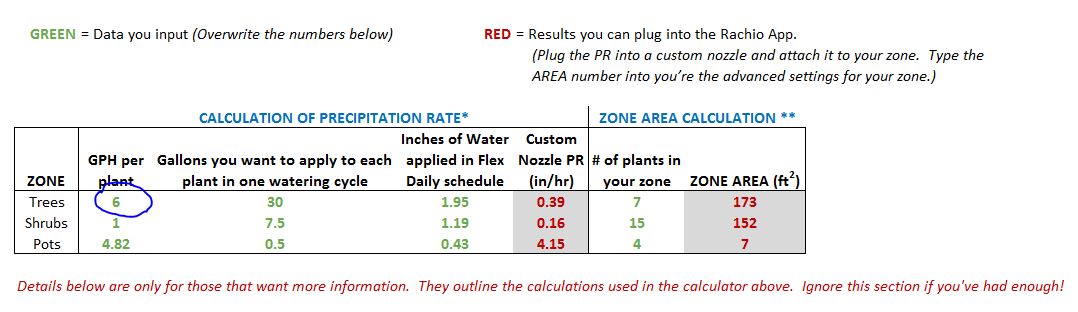
After a good night sleep, this morning with a cup of coffee, I took a good look at your spreadsheet. Love it. Do have one question though. In the input table, under the “GPH per plant”, what do you suggest that I enter if my trees for example, are not all receiving the same GPH? I have some very young ones that I have two 1GPH emitters under and some trees have three 2GPH under them. Do you suggest I take an average across all my trees and enter that average GPH in your first column?
\ screenshot.JPG1078×312 53.4 KB](https://community.rachio.com/uploads/db1097/original/2X/c/c8de9ab5f5709977efcf0d47bc6f16697b0b6748.jpeg "screenshot.JPG")
post by ATNorCal on Apr 4, 2020
Kubisuro](https://community.rachio.com/t/drip-emitter-calculator-for-precipitation-rate-area/6155 "Load parent post")
Yes, totally agree with you.
2 years later
post by bksaville on Jun 11, 2022
Registered just to say thank you @azdavidr for putting this together. I’ve struggled with emitters for a long time and finally just decided to dig in and really calculate these numbers using the spreadsheet, and everything looks great. The only thing I noticed different with my Rachio 3 is that you don’t create a custom nozzle, you just set the in/h measurement in the advanced settings for the zone.
Also I had the same problem as @BiebsAZ in that my flex daily showed 0’s, but then I realized I needed to create my flex daily schedule and then let it run at least once and then the numbers showed up. All minor things though. Thanks again!
post by azdavidr on Jun 11, 2022
Great, I’m glad it was helpful! I finally got fed up trying to figure out the in/hr to gph thing and just sat down with my pencil and calculator. It’s nice to see that it’s helping others. Flex Daily is a great way to irrigate on drip, so it’s worth a bit of extra effort in my opinion.
Good point. I wrote that doc. a while ago now!
Thanks again for the nice note of thanks @bksaville !!
9 days later
post by Gardencat on Jun 21, 2022
I was struggling to find a way to convert my dripping emitters to inch/hr precipitation rate. I found this article: Calculation of Precipitation Rate (PR) of Drip Emitters and Bubblers ...
Conceptually, PR = gph / root_area for one tree. For root area, maybe critical root area can be used? What is the Critical Root Zone around a tree?
I feel this is an intuitive way to calculate PR. Of course, root area is a little hard to get right.
10 months later
post by franz on Apr 18, 2023
franz Co-Founder/CTO @ Rachio
New Download URL for the calculator!
1 month later
post by makeitdrip on May 20, 2023
Man, this thread is from 2016. 7 years ago!! Why on earth hasn’t this been incorporated into the Rachio app??
We’ve got the co-founder of the company posting excel sheets over here wth. It’s laughable. I shouldn’t have to do math on a a spreadsheet to program my drip system. Ask me how many plants I have and how many emitters per plant and their size. Then do that math for me! THAT would be smart irrigation controller.
How Rachio hasn’t made this a HUGE priority is truly alarming
1 year later
post by ankushg on May 25, 2024
azdavidr](https://community.rachio.com/t/drip-emitter-calculator-for-precipitation-rate-area/6155 "Load parent post")
I also have a mixed zone but I’m not sure I understand how to get it configured :-\
I recently planted a 10gal lime tree, 15gal peach tree, and 5gal passionfruit vines, all on a single zone. They’re all planted in the same soil and have the same sun exposure. I have a single 1/2" drip line connecting all of them. The nursery said that the passionfruit is hardy enough that it should be fine on the same watering frequency as the trees.
Since the duration and frequency will be identical for the whole zone, I want to
- make sure I have appropriately sized drip emitters for each plant so the ratio of water output is roughly appropriate for each plant’s needs
- configure Rachio flex daily schedule to properly set up duration/frequency
- optimizing for the fruit trees whenever there’s a significant difference between the needs of the vines and the trees
- ideally, set up the inches/hour and area to allow Rachio to properly estimate the gallon output of my zone
I think I can get 1 and 2 done by using your spreadsheet as follows:
- create separate row for trees vs vines, with the plant-specific
Gallons you want to apply - hold
Inches of Water applied in Flex Daily scheduleandCustom Nozzle PR (in/hr)constant between rows to triangulate the gpm per plant
Any idea on how to then use those resulting values to have some sort of weighted average for “Zone Area”?
post by Thomas_Lerman on May 25, 2024
Thomas_LermanRachio Power User
I do not know the answers for you, but another option that may or may not help you . . . to get more water around trees, instead of changing the drip emitter size, I increase the number of emitters. Giving an example that I do not have at this time, if I were to have one emitter on a vine and four on a tree, the tree would get 4x the water (and spread around the trees) as the vine.
post by azdavidr on May 25, 2024
ankushg](https://community.rachio.com/t/drip-emitter-calculator-for-precipitation-rate-area/6155 "Load parent post")
Since it’s all one zone, you can really only use one row in the table. Then what’s left is to add or remove emitters on each plant so for the resulting duration of the zone you get more or less water.
1 year later
post by earlaud on Jun 24, 2025
Thank you. I live in Peoria and this will help.
Reply
New & Unread Topics
Topic list, column headers with buttons are sortable.
Want to read more? Browse other topics in Set Up & Edit Zones or view latest topics.
Invalid date
Invalid date
Loading complete