Continuous Sensor Activated/Deactivated? - Accessories & Sensors / Rain Sensors - Rachio Community
Home | Support | Status Page
Continuous Sensor Activated/Deactivated?
Accessories & Sensors Rain Sensors
You have selected 0 posts.
7.1k views 25 likes 5 links 16 users
27](https://community.rachio.com/u/though "though")
9](https://community.rachio.com/u/franz "franz")
7](https://community.rachio.com/u/Linn "Linn")
7](https://community.rachio.com/u/MarcusDFW "MarcusDFW")
5](https://community.rachio.com/u/Gene "Gene")
read 7 min
Top replies
2 / 81
Oct 2018
post by though on Oct 11, 2018
Hello,
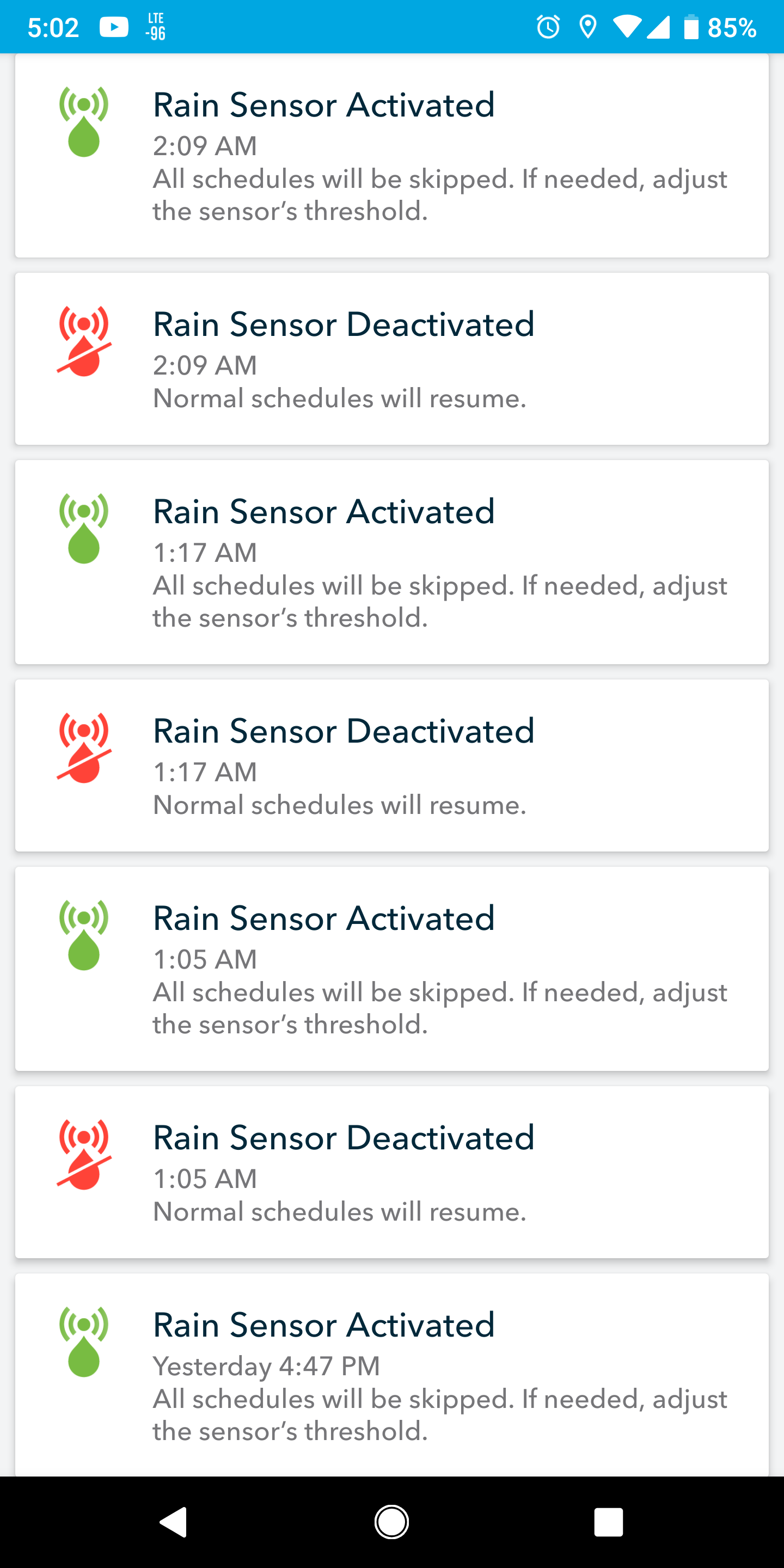
Is this a bug with the Rachio 3? I recently switched from the Rain Bird controllers to R3’s and I am getting these?
\ Screenshot_20181011-170239.png1440×2880 301 KB](https://community.rachio.com/uploads/db1097/original/2X/2/2d288f22485a891b73e2f392a920df6e969b4813.png "Screenshot_20181011-170239.png")
7.1k views 25 likes 5 links 16 users
27](https://community.rachio.com/u/though "though")
9](https://community.rachio.com/u/franz "franz")
7](https://community.rachio.com/u/Linn "Linn")
7](https://community.rachio.com/u/MarcusDFW "MarcusDFW")
5](https://community.rachio.com/u/Gene "Gene")
read 7 min
Top replies
post by franz on Oct 11, 2018
franz Co-Founder/CTO @ Rachio
Can you post a photo of the wiring? We have a few amazing people in this forum that can help out.
It is more than likely a wiring issue and not software. We have no known software issues with the rain sensor.
post by Linn on Oct 11, 2018
I am also getting these on My Gen 3 . There has been some past discussion that the rain sensor might need to be cleaned. In my case, I was getting these PLUS a LOT of Power Cycles. After working with support, I unwired and turned the rain sensor off. I was still having problems, and the support staff sent me a new replacement controller (LOVE that Rachio stands behind it’s product!!!). New controller installed and Power Cycle problem seems to be gone.
I had the activate/deactivate happen once on Aug 22, and then not again until after Florence came through, and I was getting them constantly. The sensor was replaced last November (I had been having similar problems on my Gen 1). My hardware guy seems to think that the rain sensors rarely fail, but now that my controller is again working well, I’m going to start arguing with him that it might just need cleaning. That storm could definitely have gotten some debris into it. It would be worth looking at yours if the wiring looks correct.
post by though on Oct 11, 2018
franz](https://community.rachio.com/t/continuous-sensor-activated-deactivated/15963/1 "Load parent post")
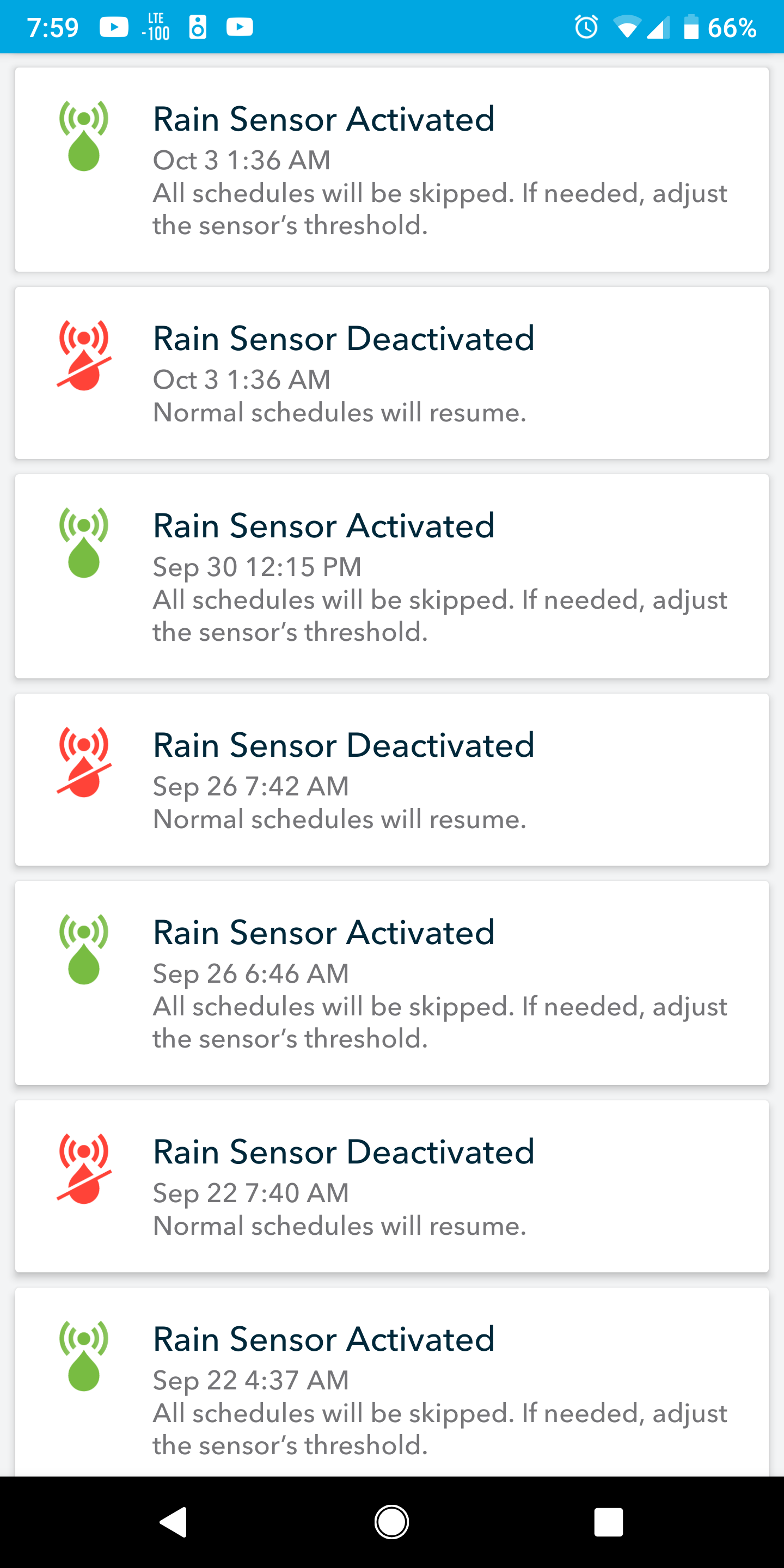
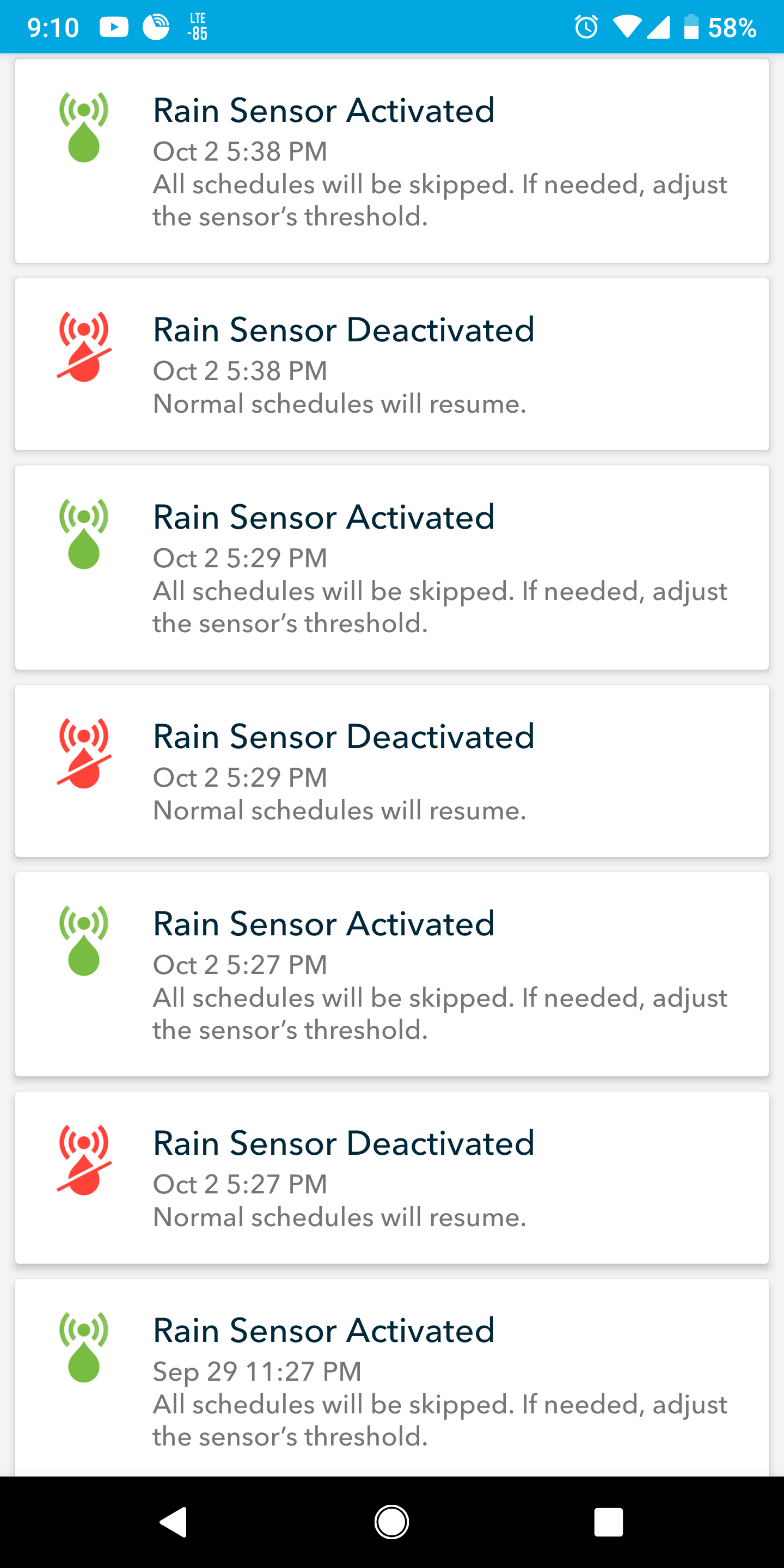
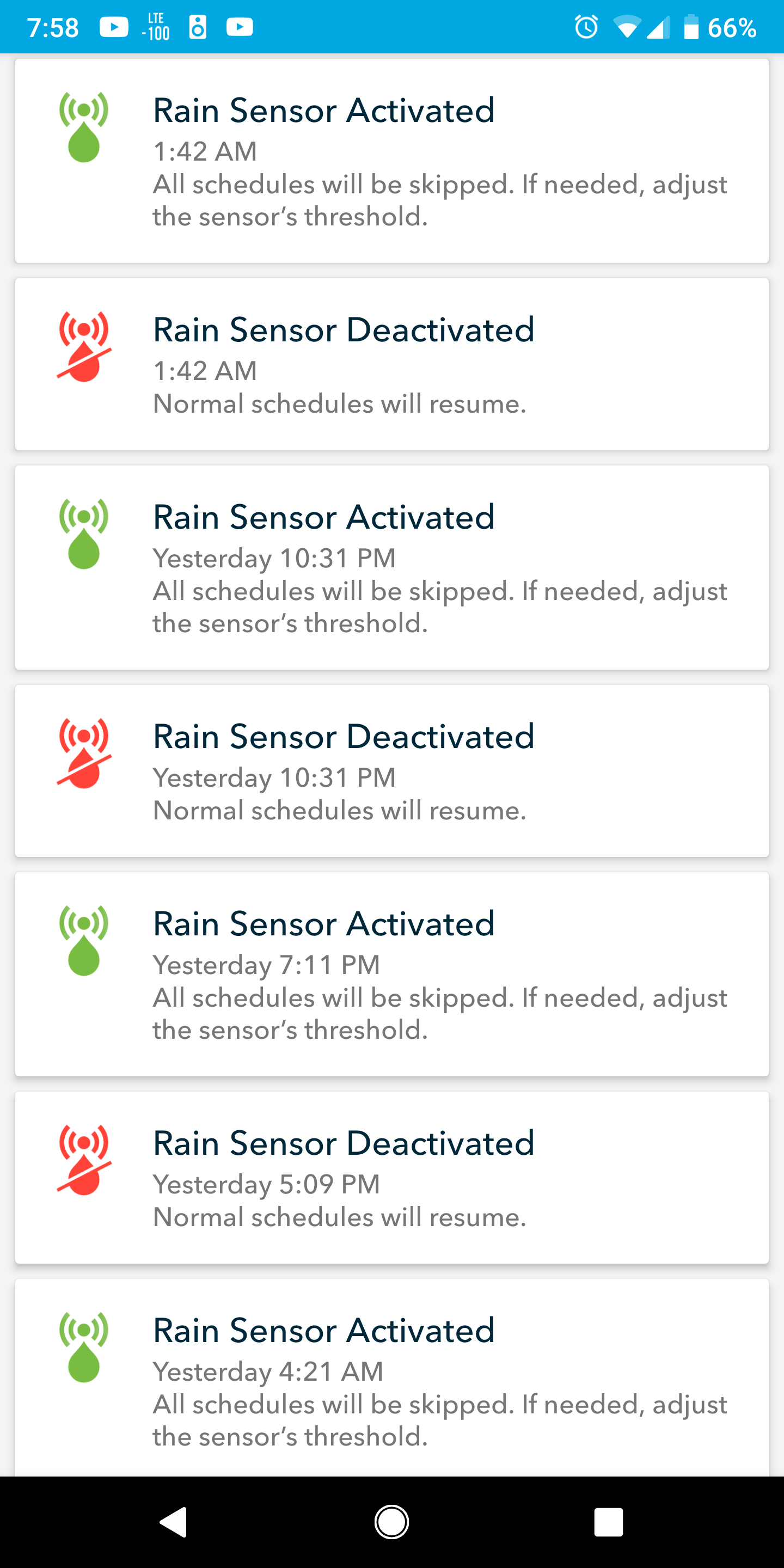
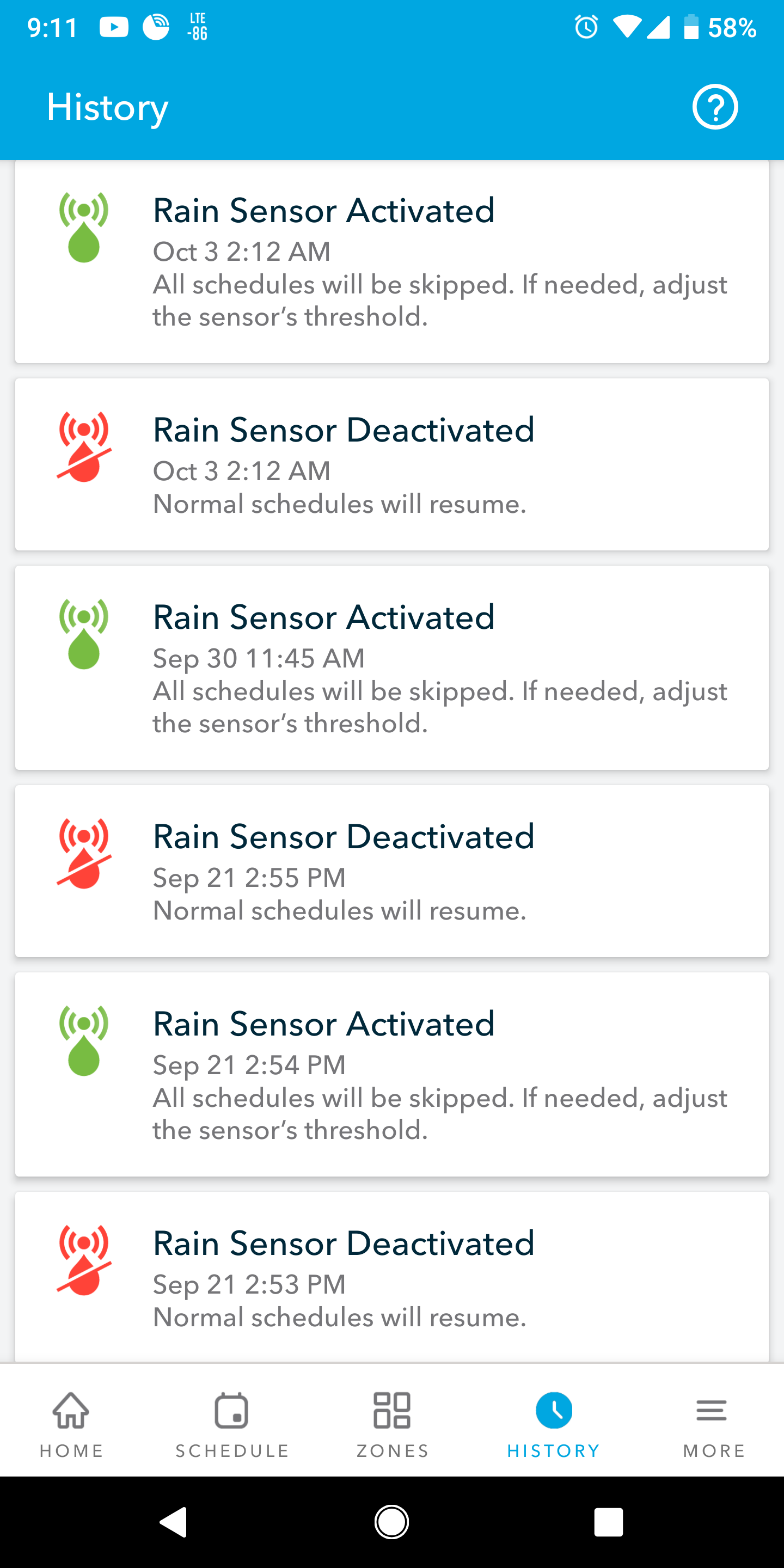
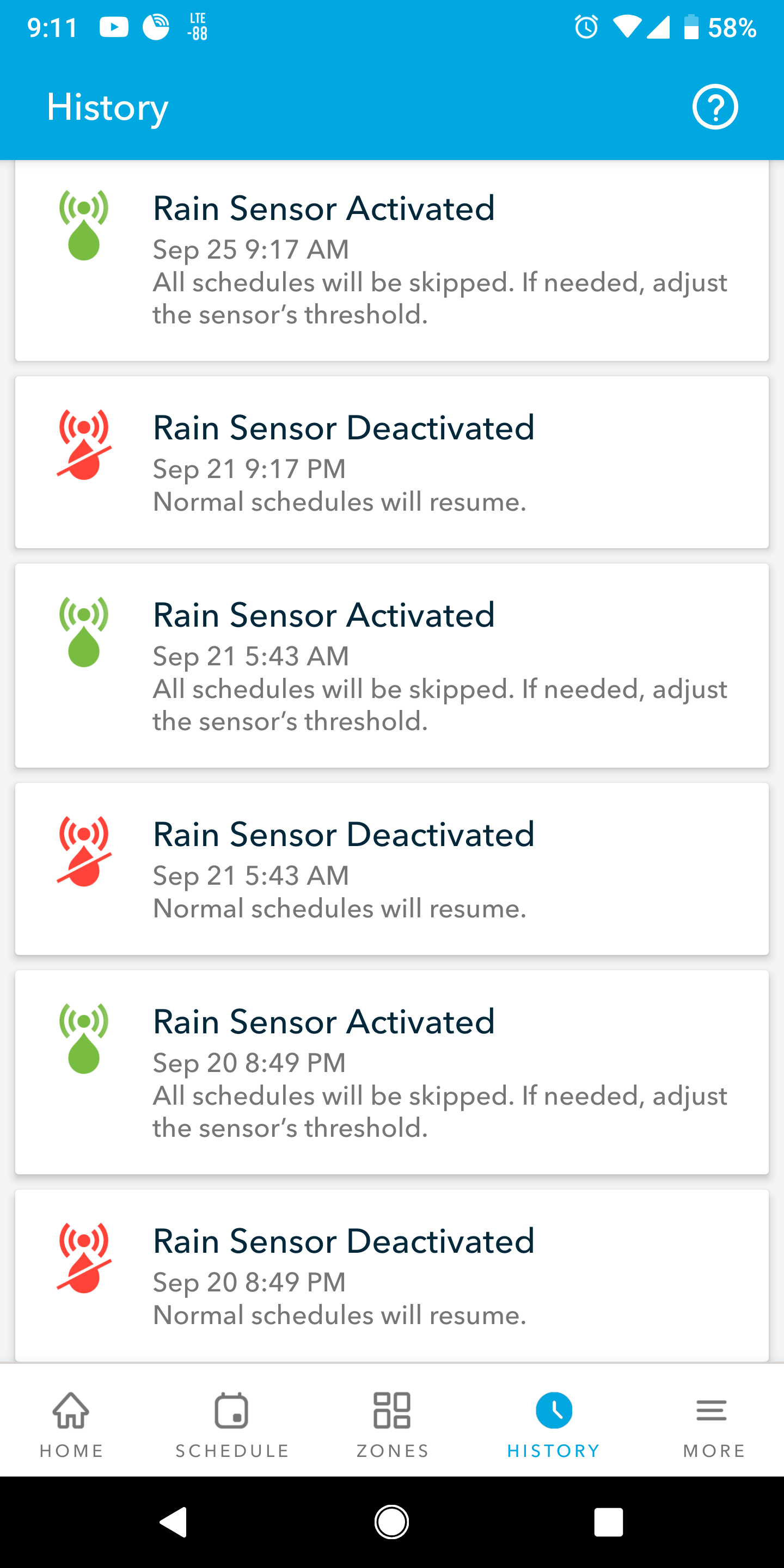
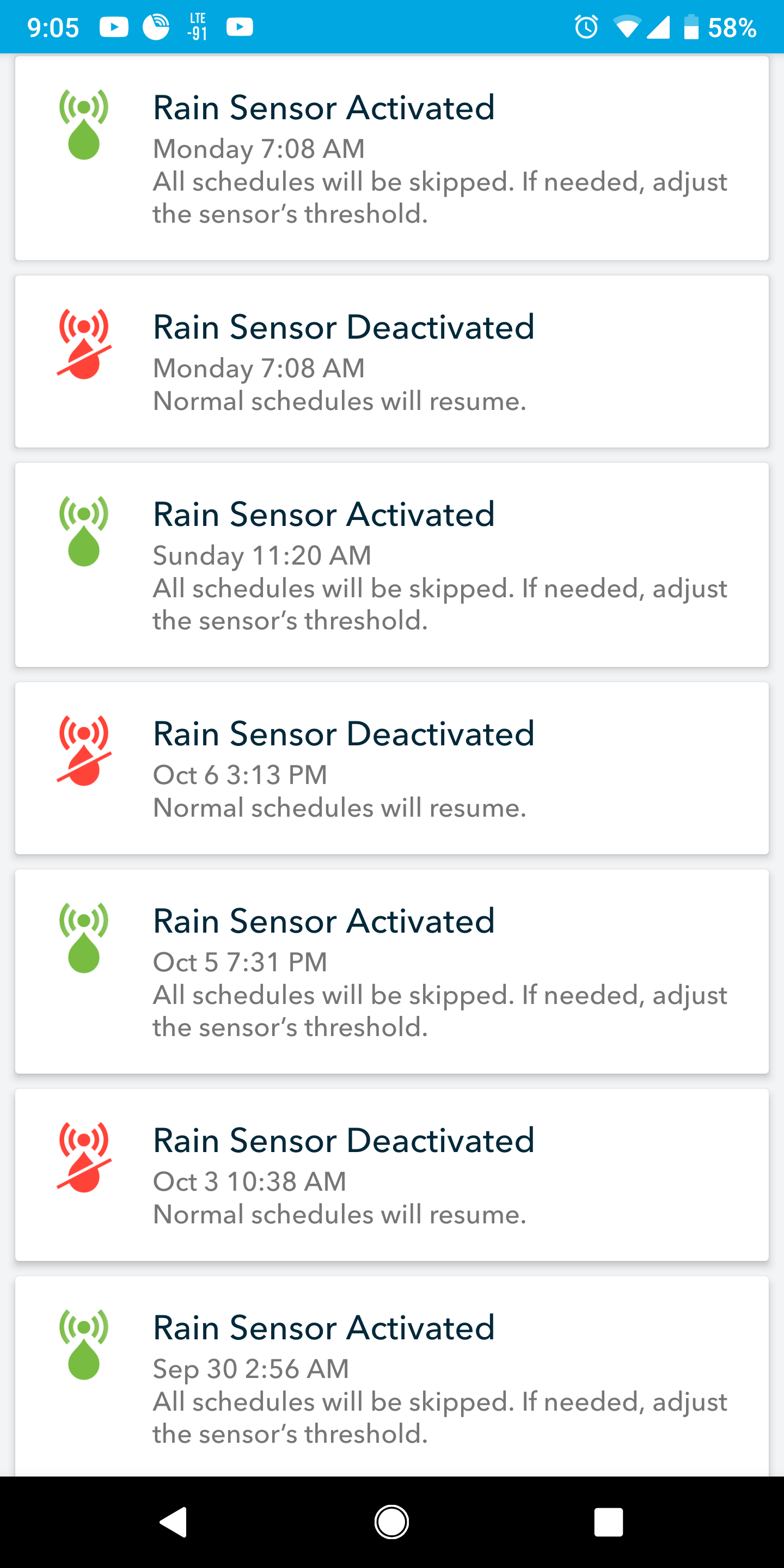
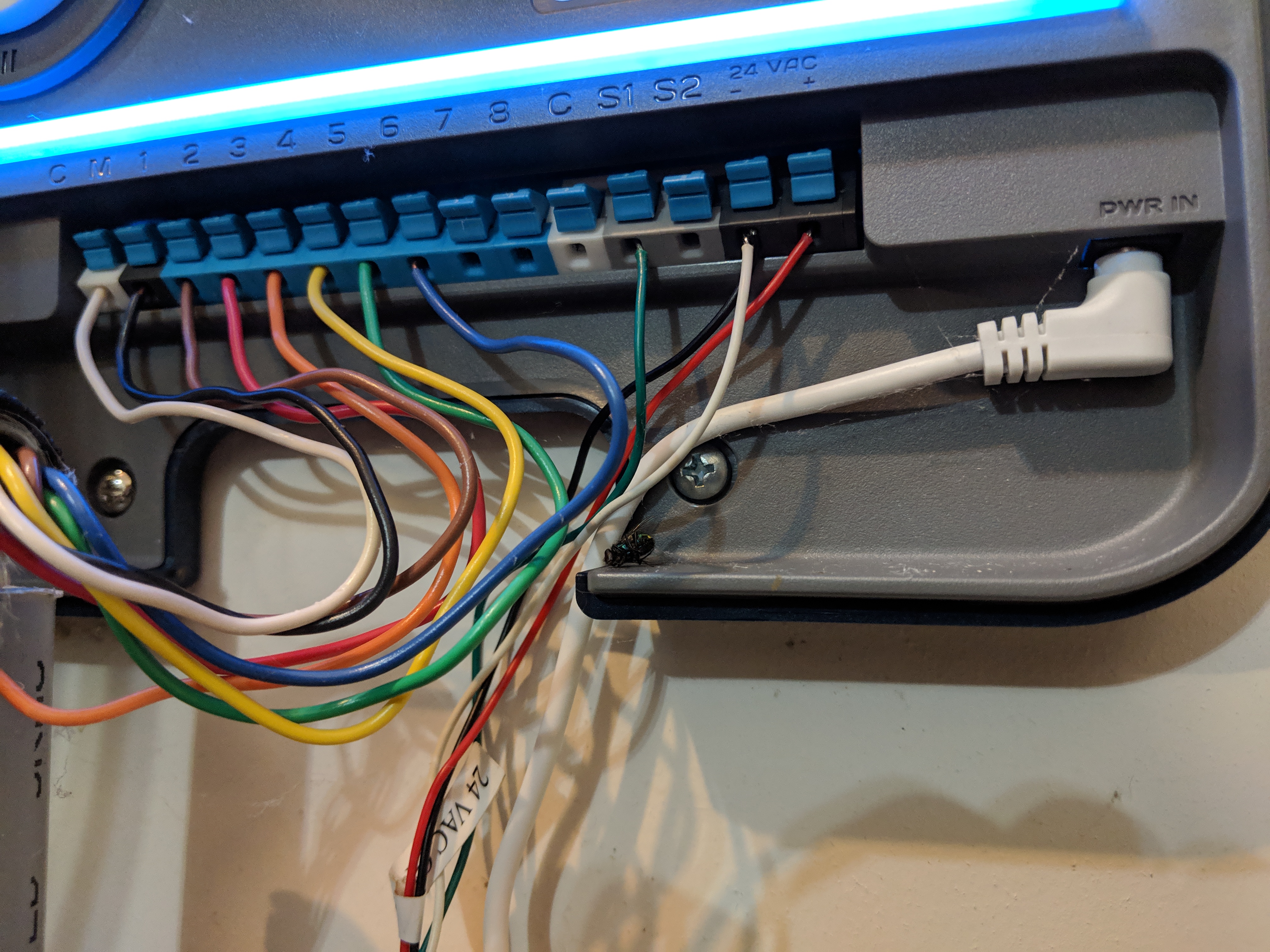
I have 7 or the R3’s around town, all with rain senors connected. 5 are the Rain Bird WR2, 2 are Irritrol. All units are behaving similarly with the activated/deactivated deal. Attached are screenshots from my 6 other units, as well as an install pic of one of the WR2’s.
\ Screenshot_20181011-195950.png1440×2880 321 KB](https://community.rachio.com/uploads/db1097/original/2X/f/f9e2ae5e6b692afd83c667395fdd01d9282c518c.png "Screenshot_20181011-195950.png")
\ Screenshot_20181011-211025.png1440×2880 317 KB](https://community.rachio.com/uploads/db1097/original/2X/2/2ce87e62dc9d37b44ac2151145aa3747e1896b72.png "Screenshot_20181011-211025.png")
\ Screenshot_20181011-195901.png1440×2880 319 KB](https://community.rachio.com/uploads/db1097/original/2X/e/ebf3dff9e717180c6695cc2cff39ae6ae876f375.png "Screenshot_20181011-195901.png")
\ Screenshot_20181011-211107.png1440×2880 303 KB](https://community.rachio.com/uploads/db1097/original/2X/3/34c90d9492bc4dc06b61c4a5098b4d2a123841ec.png "Screenshot_20181011-211107.png")
\ Screenshot_20181011-211146.png1440×2880 309 KB](https://community.rachio.com/uploads/db1097/original/2X/5/5dbe3c563c91873839cd2d6d44de4aea310a60b0.png "Screenshot_20181011-211146.png")
\ Screenshot_20181011-210523.png1440×2880 325 KB](https://community.rachio.com/uploads/db1097/original/2X/3/38f00f5f4a47faf35acf1d150e2194fd16abd30e.png "Screenshot_20181011-210523.png")
!
\ IMG_20181011_213102.jpg4032×3024 3.23 MB](https://community.rachio.com/uploads/db1097/original/2X/e/eaafa6bd10dcf4063a7392583624760dc8765866.jpeg "IMG_20181011_213102.jpg")
post by franz on Oct 12, 2018
franz Co-Founder/CTO @ Rachio
\ be9b4af78e7f3a2cfaed5b33dd857ecb.gif500×563 1.74 MB](https://community.rachio.com/uploads/db1097/original/2X/f/f60595a28023744883040f90246e2c4427720964.gif "be9b4af78e7f3a2cfaed5b33dd857ecb.gif")
post by Gene on Oct 12, 2018
though](https://community.rachio.com/t/continuous-sensor-activated-deactivated/15963/1 "Load parent post")
The wiring, at least on the Gen 3 unit shown, looks good. Have your customers been getting any rain at all during this time? What is the central zip code of the area?
If you get a chance, it would be helpful to get a picture of the WR2’s LCD readout from one of the locations which shows increased activity.
Are the Irritrol sensors wired or wireless?
post by though on Oct 12, 2018
1
All of the wiring is exactly the same as the pic attached. I installed them all on the same day.
One of the screenshots I attached is from the wiring photo I attached.
It’s been raining off and on during this whole time of Activated/Deactivated alerts.
The Irritrol units are also wireless.
The WR2 displays look correct. If you manually engage the WR2, the Rachio3 senses it as it should. Same thing when you disengage the WR2, the Rachio3 also senses this.
A quick random theory comes to mind… wonder if it has anything to do with the controllers being in “standby mode”? I doubt this has anything to do with it, but just a thought…
post by Gene on Oct 12, 2018
Based on everything you’ve mentioned, it sounds to me that the system works as intended.
Please keep in mind that when the rain sensor is activated due to rain, the spongy material within rain sensor physically soaks up water and triggers when a preset threshold is reached (you can adjust threshold on the sensor and/or the receiver unit). In order to reset, the absorbed water needs time to drain / dry out which can take a long time if the weather is overcast, during high humidity and due to additional rain.
If the weather doesn’t clear out for long enough time, sensors will stay “tripped” indefinitely, while waiting for a chance to dry out.
The reason why I asked for a picture of the receiver unit from one of your WR2’s installs is that threshold may be set too low. Just because the unit has reached the threshold and tripped, doesn’t mean that the outside sensor does not continue to absorb moisture which in turn will require a longer time to dry out to reach a low preset.
post by DLane on Oct 12, 2018
though](https://community.rachio.com/t/continuous-sensor-activated-deactivated/15963/1 "Load parent post")
@though - how about the batteries in the remote units? I don’t know what would happen if the batteries are not providing enough juice to broadcast back.
Have the remote units been cleaned recently?
What happens when the units are manually tripped?
I’m assuming that when the rain sensor option is turned off on the Rachio, the messages stop. Correct?
post by though on Oct 12, 2018
Gene](https://community.rachio.com/t/continuous-sensor-activated-deactivated/15963/1 "Load parent post")
Hi @Gene,
I understand that they will stay tripped for as long as it takes to dry out. That’s not the issue. The issue is that I get a notification at 3:42p that it’s dry and ready to go! Then get another notification the same minute (3:42p) that it’s wet and “tripped” again.
Not once did this happen when I was using all 7 sensors with Rain Bird WiFi controllers.
post by Gene on Oct 12, 2018
1
@though, yes, I see what you are talking about.
It will be a good questions for @franz as to what signal conditioning / software debouching is being done with the rain sensor data. As the rain sensor dries / gets closer to the set point, parameters like wind and temperature can cause a “noisy” signal and I would not rely on the rain sensors / receivers themselves to do any sort of signal conditioning.
post by franz on Oct 12, 2018
franz Co-Founder/CTO @ Rachio
@though Our firmware engineers are researching this behavior on the controller. Will let you know once they’ve determined what could be causing this.
post by though on Oct 12, 2018
Gene](https://community.rachio.com/t/continuous-sensor-activated-deactivated/15963/1 "Load parent post")
The sensor simply is open or closed. The Rachio takes that info and does what it’s supposed to do with it.
Having said that, I just winterized my systems today for the season. I will circle back on this issue when I get them up and running again in April/May. I will probably put new batteries in all of the sensors too, whether they appear to be needed or not. It’s possible that the sensors could be going off/on randomly, with a weak battery, and thus triggering the Rachio to send the Activate/Deactivate notifications.
Having said that, it may be best to delete this thread and start a new one next season if the problem persists.
post by Linn on Oct 12, 2018
franz](https://community.rachio.com/t/continuous-sensor-activated-deactivated/15963/1 "Load parent post")
Thank you, @franz.
My rain sensor is a wired Hunter Mini-Clik that is having the same symptoms as @though on my Rachio 3. My controller is still operating (we JUST got our first fall day today in NC — It’s been pretty darn hot for too darn long).
post by golfbravo on Oct 14, 2018
I have exactly this behavior. The unit SEEMS to work correctly, but I get the activated decativated report often.
Cheers
post by Sprinklerman on Oct 15, 2018
@though I have a WR2 on a Gen 2 and it triggers activated and deactivated a lot during a weather event. Like within one minute or so. Makes no sense. It’s done this since day one.
I’ve got a wireless Irritrol sensor that never does that. It activates when needed, then deactivates normally.
I recently disabled the sensor setting.
post by though on Oct 15, 2018
I have both WR2’s and Irrirol wireless sensors dispatched. I’ve noticed this exact behavior with both brands/models.
I want to make sure that any units that are doing this have new batteries installed in them before I say for sure this is a Rachio issue. A theory that I have is that, for example, maybe a sensor is triggered (wet) and you get notified. Meanwhile, the battery is low/intermittent on the wireless transmitter and it comes back online and wet. The Rachio may treat this info as a dry/wet event thus getting 2 additional notifications because of the low/intermittent battery.
I have no idea, just tossing out ideas…
post by Linn on Oct 15, 2018
@though, I have the same problem and my Hunter Mini-Clik is hard wired.
post by though on Oct 15, 2018
Are you 1,000% sure that your connections are solid and no breaks in the wire?
post by Linn on Oct 15, 2018
Nope. But I’m 99.9% sure
post by though on Oct 15, 2018
Can you go to your sensor outside and wiggle the wires? Also, wiggle the wires at the controller. See if you get any sensor notifications while you do that. Those are your most likely weak points in the wires/connections.
post by Sprinklerman on Oct 15, 2018
though](https://community.rachio.com/t/continuous-sensor-activated-deactivated/15963/1 "Load parent post")
@though That’s a good theory.
I need to add my Irritrol sensor is brand new. I installed it this past Spring. It’s also on a Gen 3.
The WR2 was new last year, but I’ll plan on checking those batteries next time I’m in the area. If they are good, then I’ll plan on moving the sensor closer to the controller to see if the signal is dropping.
Another thought, I wonder if all the Wi-Fi, Bluetooth, Data, and other signals interfere in some way. It shouldn’t, but this is a heavy residential area.
Of course, @Linn’s issues ends a signal issue.
post by Sprinklerman on Oct 15, 2018
Linn](https://community.rachio.com/t/continuous-sensor-activated-deactivated/15963/1 "Load parent post")
@Linn Is your sensor in full sun with no chance of getting shade from limbs or overhangs?
post by franz on Oct 15, 2018
franz Co-Founder/CTO @ Rachio
Our hardware team identified a firmware issue related to this. We will roll this out once tested and validated.
post by though on Oct 15, 2018
Thanks for the update @franz!
Is there a thread that keeps track of firmware updates/announcements/changelog?
post by franz on Oct 16, 2018
franz Co-Founder/CTO @ Rachio
We typically post major releases on the community, smaller incremental firmware changes or other usually aren’t broadcasted. I’ll make sure the team pings this thread when we have validated the firmware issue.
post by laura.bauman on Oct 16, 2018
@though We do have a changelog on our Help Center. Links below
Lo
post by Linn on Oct 16, 2018
@laura.bauman FYI - I went to the IOS link, then to the changelog link and it gets “the page you were looking for doesn’t exist”. It’s got a bad link.
post by though on Oct 16, 2018
laura.bauman](https://community.rachio.com/t/continuous-sensor-activated-deactivated/15963/1 "Load parent post")
Please correct me if I’m wrong, but those links show app updates/changelogs, not actually controller firmware info/update info?
post by laura.bauman on Oct 16, 2018
Whoops! Thanks for the heads up @Linn. Product of combining support articles Taking that out now. ‘’
Correct! That is just app changelog. I apologize - I saw changelog and jumped for the links without reading the firmware part! Creating a firmware changelog is a request we’ve seen and if we decide to create one we’ll let you all know here
post by Linn on Oct 17, 2018
A firmware change log for us nerds would be a nice addition.
17 days later
post by Sprinklerman on Nov 4, 2018
@franz My customer with a new Irritrol wireless sensor shows a history of over fifty-five activation/deactivation events from October 20 to October 26. On the 25th there were eighteen events.
Is there a chance the update didn’t reach his controller?
post by Linn on Nov 4, 2018
I had an issue with the messages on October 29. When I checked firmware that day, it was still on the same firmware, so that could have been the case with your customer.
@franz does the newest firmware upgrade address this issue?
post by franz on Nov 4, 2018
franz Co-Founder/CTO @ Rachio
@Sprinklerman We are still validating this firmware in small controller batches. If you PM me your customer’s email address I’ll have the team update it this week for them.
post by though on Nov 4, 2018
Can you post here when it’s been pushed out to the masses?
Thanks
post by jsimek on Nov 5, 2018
I saw there was a firmware update for my Rachio 3 this morning. I applied the update and now I have non-stop rain sensor activation/deactivation notices. I finally had to disable the rain sensor just to get the app to shut up. The rain sensor status was working fine prior to the firmware update. How can I go back to the old firmware?
post by though on Nov 5, 2018
I noticed my units are now on Firm 601.
post by franz on Nov 5, 2018
franz Co-Founder/CTO @ Rachio
Firmware version iro3-firmware-hk-5-601 for the Generation 3 controllers should resolve these issues. It was released to all Generation 3 controllers that have a rain sensor.
We are still working on the Generation 2 firmware that will address these issues and will notify when released.
post by jsimek on Nov 6, 2018
The update to 601 firmware is what triggered the non-stop activation/deactivation notices on my Generation 3. How can I go back to the previous firmware version since that worked fine?
post by jsimek on Nov 6, 2018
Just enabled the rain sensor again. So far the notices are stable.
post by jsimek on Nov 6, 2018
Spoke too soon. After 3 hours of stable rain sensor status, it is now back to continuously flipping from activated to deactivated.
post by though on Nov 6, 2018
Try a fresh set of batteries in the sensor and report back.
Also, maybe the temperature is cold and throwing out false positives?
post by jsimek on Nov 6, 2018
There are no batteries. It’s hard wired and was replaced at the end of September.
post by though on Nov 6, 2018
Are you experiencing cold temperatures?
post by franz on Nov 6, 2018
franz Co-Founder/CTO @ Rachio
@jsimek I’m having the team research your controller.
9 months later
post by mattkwi on Jul 25, 2019
I just had a new irrigation system put in. All equipment brand new. Rained the first couple days after install, so it didn’t run. Today’s the first full sunny day and my Rachio app is constantly stating that Rain Sensor is activates/deactivated over and over. Easily over 100 notifications already. The sensor is new and it looks properly installed and clean. Connected to C and S1. Any thoughts before I deactivate this thing??
post by though on Jul 25, 2019
Did you purchase the R3? If so, you should consider just removing the rain sensor, honestly.
As for the multiple notifications, you don’t mention which sensor you have, but it may need wired to S1 (or S2) and 24v-
post by mattkwi on Jul 25, 2019
It’s a Hunter Mini-Click and yes sorry, Rachio Gen 3. It’s been constant all day.
Activated
Deactivated
Activated
Deactivated
Etc etc over and over
post by though on Jul 25, 2019
Wired?
I would take it back and put the money toward something else, just my opinion. The R3 uses local weather station data which is probably better than a sensor.
did you try S1 and 24v- ?
post by Gene on Jul 25, 2019
mattkwi](https://community.rachio.com/t/continuous-sensor-activated-deactivated/15963/1 "Load parent post")
@though is right, your sensor should be connected to S1 and 24V-
Cheers,
Gene
post by mattkwi on Jul 25, 2019
Thanks I will try that. Should I power cycle it or power down when moving the wires?
Right now it’s red to S1 and black to C. I should move the black, correct?
post by Gene on Jul 25, 2019
It is always a good idea to power things down, just to be on the safe side. That being said, the likelihood of something going wrong while moving the wires with the unit ON are minimal.
You are correct, black wire needs to be moved from C terminal to 24v- terminal. Red wire can stay in place.
Cheers,
Gene
post by though on Jul 25, 2019
I don’t think wire colors matter so much but ya, what @Gene said.
Let us know what happens.
post by mattkwi on Jul 25, 2019
Thanks for all the help guys. Haven’t been receiving the notifications since I made the swap.
Just waiting for the city to install my second meter and I will really start saving some $$$
1 month later
post by MarcusDFW on Aug 27, 2019
franz](https://community.rachio.com/t/continuous-sensor-activated-deactivated/15963/1 "Load parent post")
I’m having this same issue and my Rachio3 and Rainbird WR2 were just installed yesterday… has there been a firmware update??
post by franz on Aug 27, 2019
franz Co-Founder/CTO @ Rachio
Sounds like a wiring or issue with the rain sensor. Here is an article that might help with troubleshooting.
post by MarcusDFW on Aug 31, 2019
though](https://community.rachio.com/t/continuous-sensor-activated-deactivated/15963/1 "Load parent post")
I just a had brand new Rachio 3 and Rainbird WR2 installed and I am getting the same exact notices you mentioned in this post… Rain sensor will activate as it should because it has started raining but then a few minutes later it will update showing rain sensor deactivated and then a few minutes later activated again and back and forth 2-3 times… did you ever resolve this on your system and if so what what was it?
post by MarcusDFW on Aug 31, 2019
franz](https://community.rachio.com/t/continuous-sensor-activated-deactivated/15963/1 "Load parent post")
it’s NOT the Rain Sensor because it’s brand new NOR is it wiring because it was just professionally installed correctly… too many threads all over the internet about this issue…
post by though on Aug 31, 2019
take a pic of the wiring and attach it.
post by though on Aug 31, 2019
sounds to me like it was installed incorrectly. we’ll see when we see the photos.
post by MarcusDFW on Sep 2, 2019
MarcusDFW](https://community.rachio.com/t/continuous-sensor-activated-deactivated/15963/1 "Load parent post")
Sent reply with picture of wiring… let me know if you got it and it shows what you needed…
post by though on Sep 2, 2019
It doesn’t show that you posted a photo.
post by MarcusDFW on Sep 2, 2019
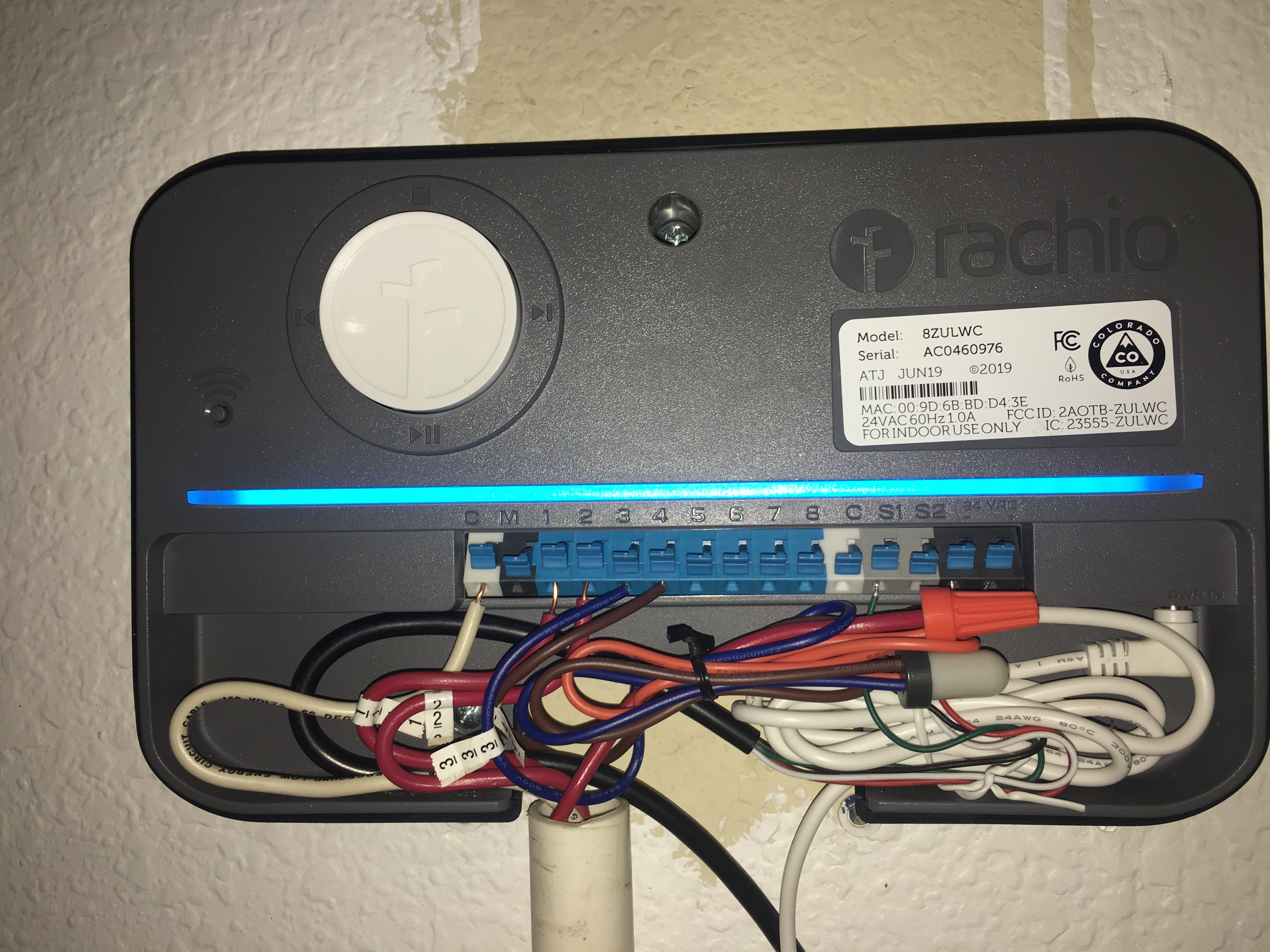
\ IMG_2554.jpg4032×3024 2.51 MB](https://community.rachio.com/uploads/db1097/original/2X/6/6504d26dda503c25399a7dedc1e79125e51475a2.jpeg "IMG_2554.jpg")
post by though on Sep 2, 2019
That worked BUT 3 of your 4 wires are covered up by the wire nuts. Pull the wire nuts back and retake the pic so we can see where all 4 colored wires are going.
post by MarcusDFW on Sep 2, 2019
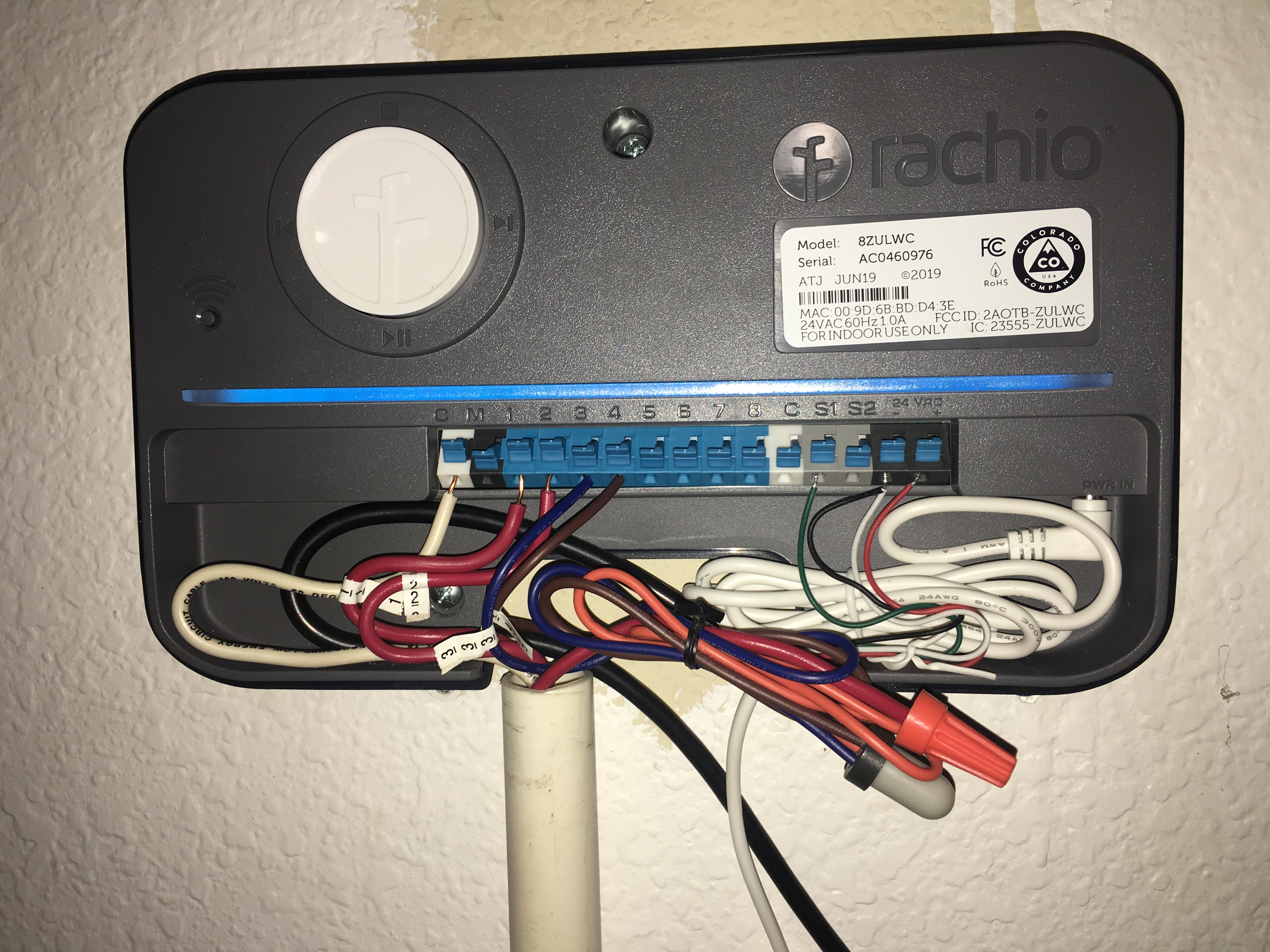
\ 6CBBCF3D-C9CF-49D8-9645-EF5C8BDBBA7B.jpeg4032×3024 2.73 MB](https://community.rachio.com/uploads/db1097/original/2X/9/9b900a97241708803525a49f535805fadc26372a.jpeg "6CBBCF3D-C9CF-49D8-9645-EF5C8BDBBA7B.jpeg")
post by though on Sep 3, 2019
It appears wired correctly looking at your photo.
Is S1 turned on in your app and set to “Rain sensor”? and S2 is off?
Are you still getting multiple false duplicates?
post by MarcusDFW on Sep 3, 2019
Yes S1is turned on in the app and S2 is turned off… it has rained twice since install date… 1st time got multiple false duplicates like you showed on your post a year ago… 2nd time got one… hasn’t rained in the last few days
post by though on Sep 3, 2019
1
the sensor could potentially be faulty too. i would disable the cold sensor on it and dial up the water threshold level on it.
7 months later
post by Tyler on Apr 15, 2020
Gotta post on this one. I have the same issue, the sensor seems fine but as soon as I switched from standby mode back to schedule I get a thousand updates about activated and deactivated rain sensor. Rain sensor is wired, less than a year old, and worked fine before i put the unit in standby mode for the winter. I’ve deleted and updated the app, and downloaded firmware. It’s wired the same as other posts. Umm… think I hit the things, help?
3 months later
post by ChipH2O on Jul 21, 2020
Enabling rain sensor S1 or S2 via Rachio’s native app activates “Rain sensor on” banner notification and History indicates “Rain sensor activated”. However, no rain sensor is attached to Rachio controller. Products include Rachio Gen 3 w/ Hunter Mini-Click rain sensor.
3 months later
post by aoberhof on Oct 6, 2020
franz](https://community.rachio.com/t/continuous-sensor-activated-deactivated/15963/1 "Load parent post")
I am using a Hunter Rain Clik Wireless rain sensor. I was experiencing the described continuous sensor activation / deactivation issue. There are two (2) yellow wires from the Receiver that are connected to 24V + and 24V -. If your rain sensor is cycling as described above - simply reverse the two yellow wires to the opposite polarity. After rewiring, go to your rain sensor and hold the switch (spindle) down for 3 full seconds. Your issue should be resolved with this change in polarity wiring.
Art O.
3 years later
post by RSP on Jun 26, 2023
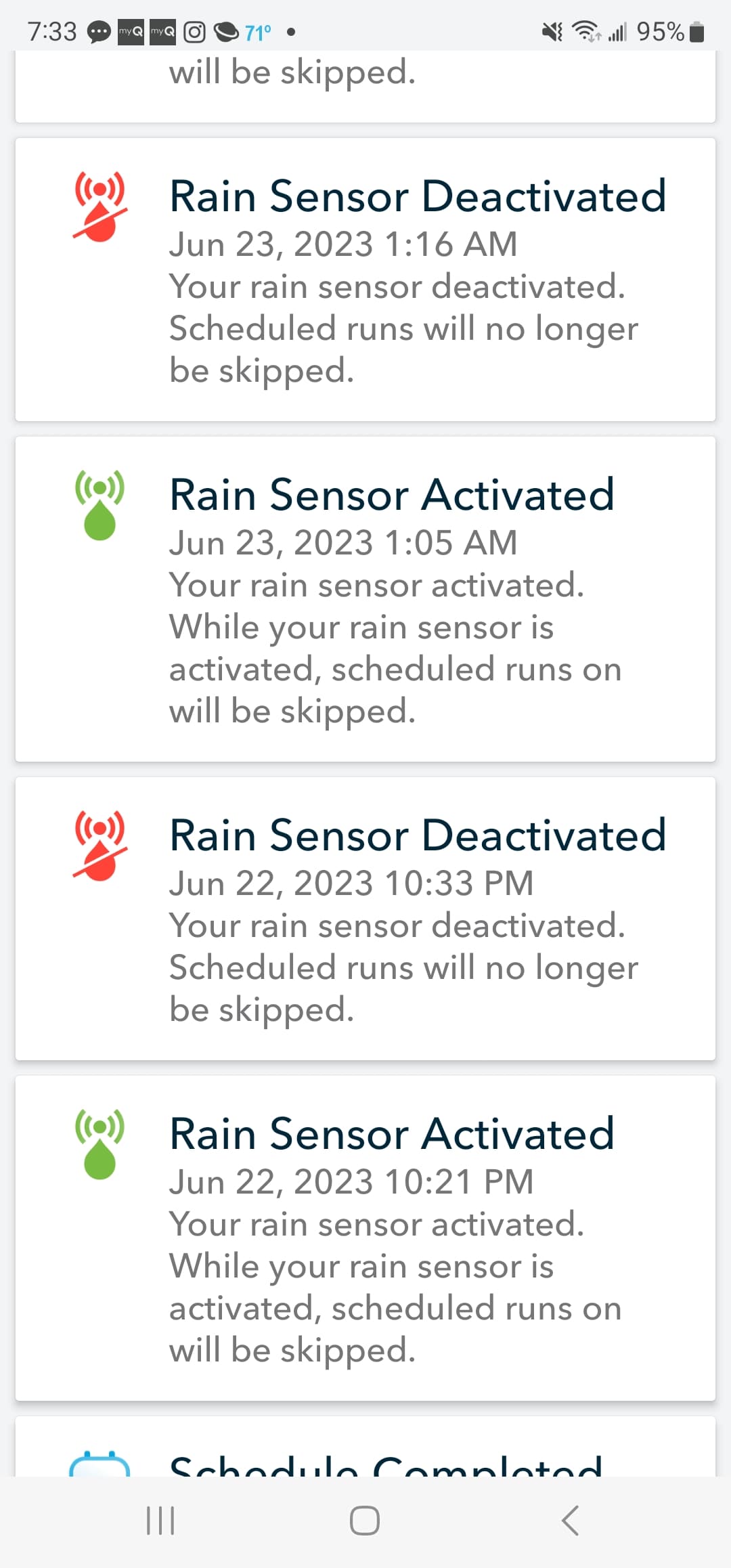
I recently switched from a RainBird system and kept my Rain Bird wireless rain senosor. It is wired correctly to the 24v and S1 connectors. I keep getting the Activated/Deactivated cycle within the same minute.
\ Screenshot_20230626_073331_Rachio1080×2316 143 KB](https://community.rachio.com/uploads/db1097/original/2X/8/81147ceabc32f193a80b8b6f96314cd39c634b7c.jpeg "Screenshot_20230626_073331_Rachio")
post by tmcgahey on Jun 26, 2023
What sensor model do you have?
post by though on Jun 26, 2023
RSP](https://community.rachio.com/t/continuous-sensor-activated-deactivated/15963/1 "Load parent post")
Post a photo of your wiring.
post by RSP on Jun 26, 2023
tmcgahey](https://community.rachio.com/t/continuous-sensor-activated-deactivated/15963/1 "Load parent post")
\ 20230626_120300.jpg2252×4000 1.34 MB](https://community.rachio.com/uploads/db1097/original/2X/c/c2d50535e23bd1a1dff2f435e197373ff964cc41.jpeg "20230626_120300.jpg")
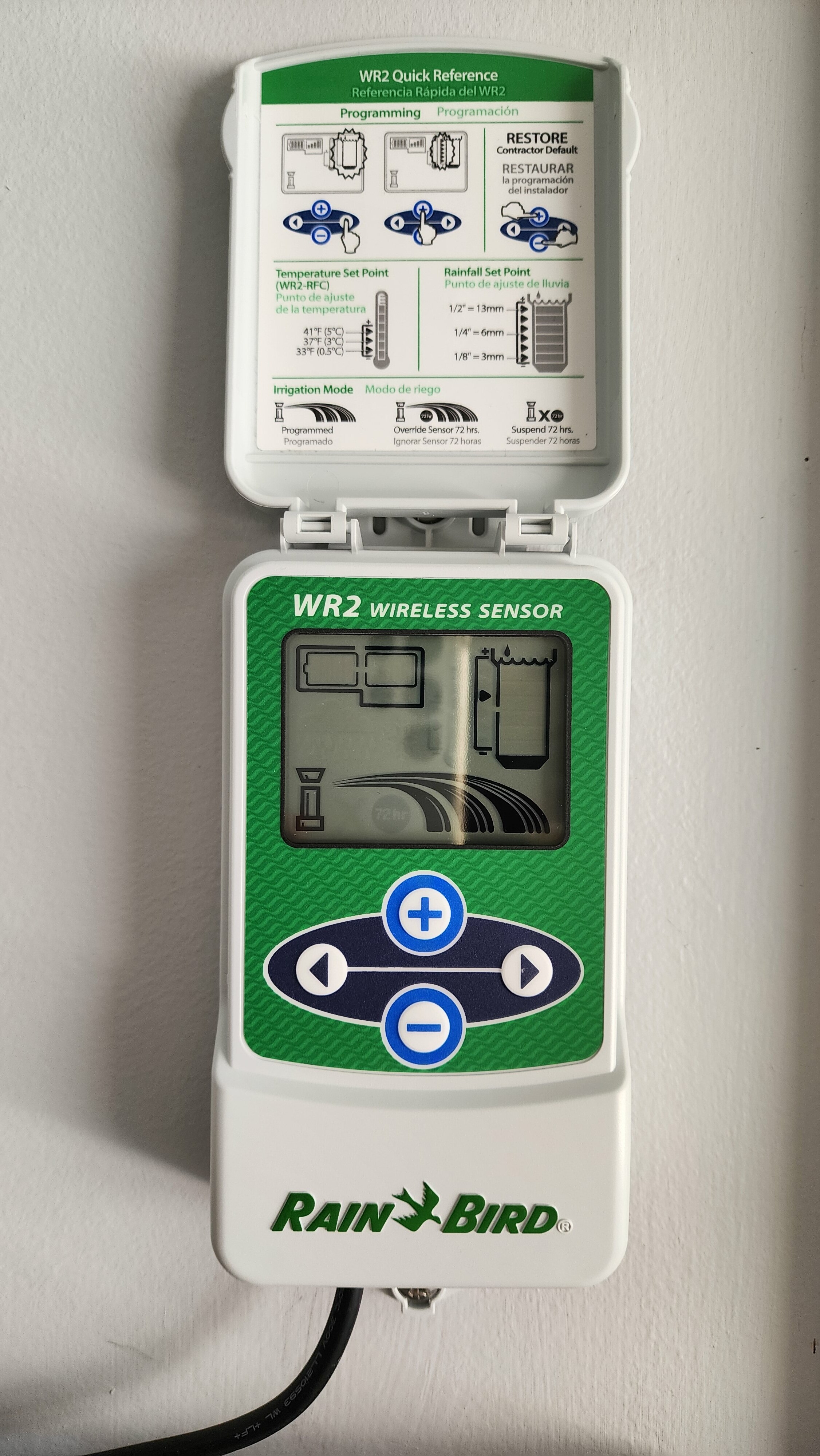
post by though on Jun 26, 2023
Battery is dead or wired incorrectly.
post by tmcgahey on Jun 26, 2023
RSP](https://community.rachio.com/t/continuous-sensor-activated-deactivated/15963/1 "Load parent post")
Like @though said, there might be an issue with the wiring, battery going dead, or possibly the sensor is failing.
Here is a link to the wiring for WR2 sensor. Make sure it is wired correctly first…
post by though on Jun 26, 2023
RSP](https://community.rachio.com/t/continuous-sensor-activated-deactivated/15963/1 "Load parent post")
That is a photo of the display of the WR2. Need wiring photo with it.
post by RSP on Jun 26, 2023
tmcgahey](https://community.rachio.com/t/continuous-sensor-activated-deactivated/15963/1 "Load parent post")
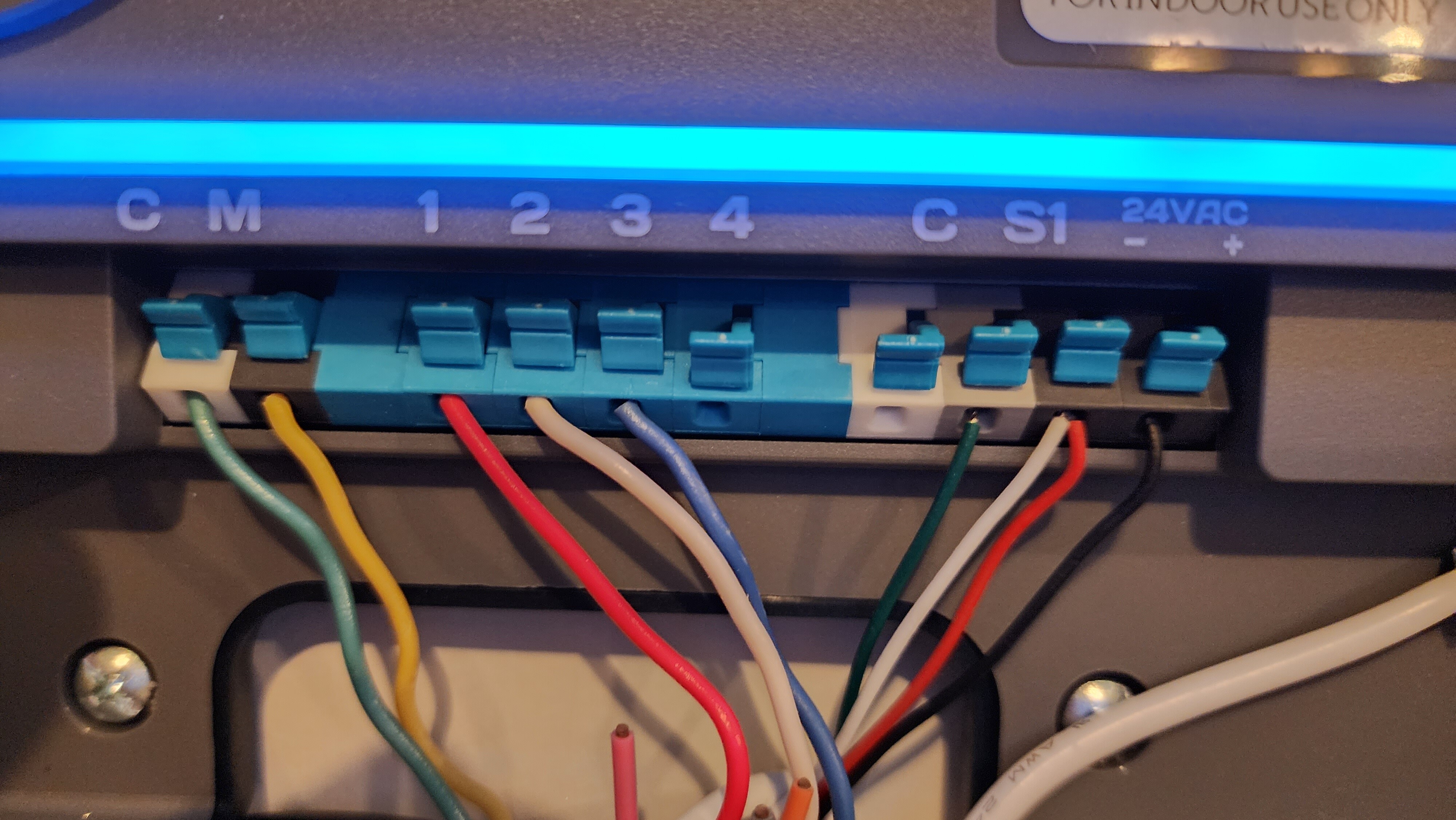
Well, I am happy to tell you that your wiring directions are incorrect. The Rain Bird WR-2 has to have the Black Wire to the + and the Red Wire to the -.
I flipped positions on the wires after reading to try that on another site and am thrilled to tell you that was the issue.
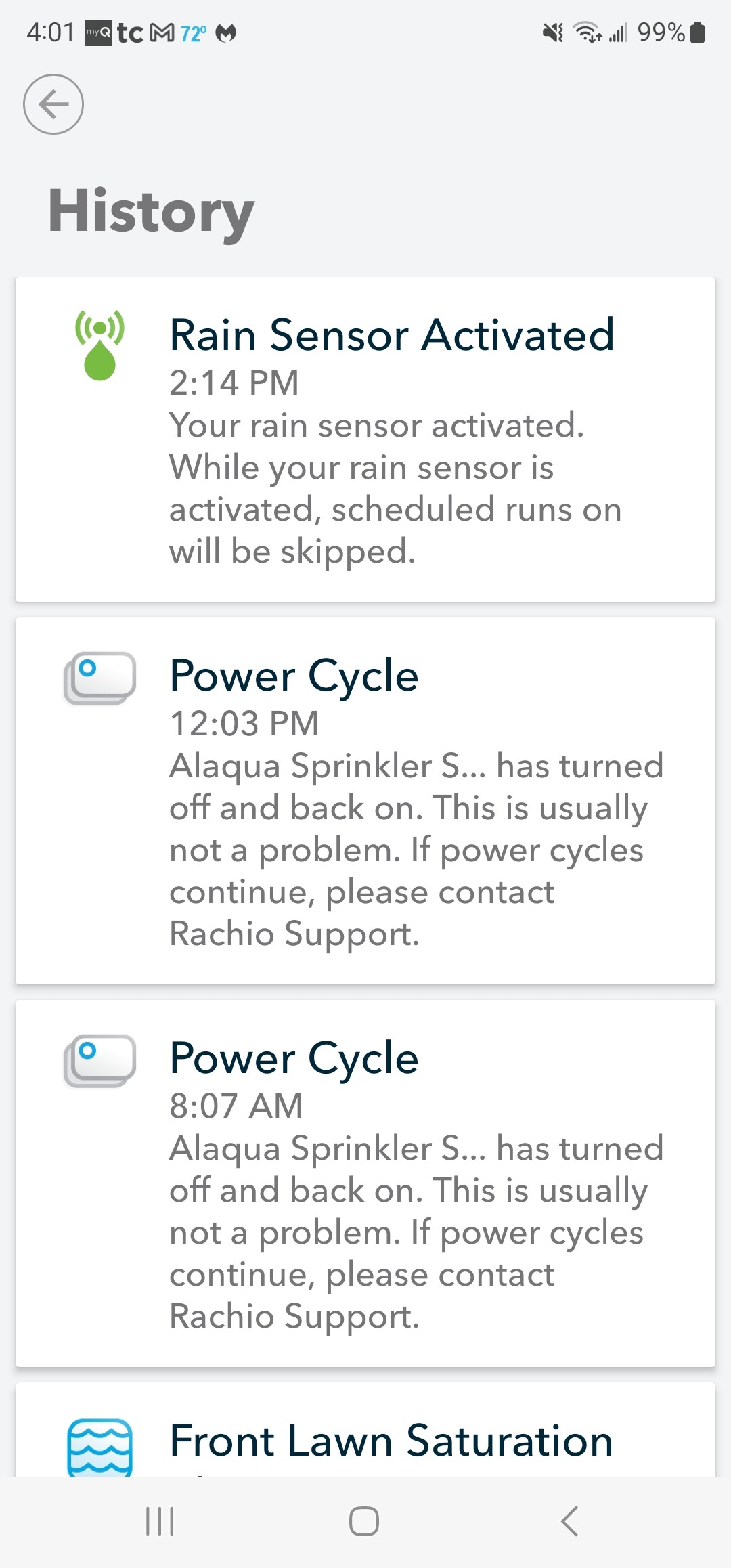
It is raining now and appears to be working properly. See attached images.
I appreciate you trying to troubleshoot this issue with me.
\ 20230626_155916.jpg4000×2252 1.4 MB](https://community.rachio.com/uploads/db1097/original/2X/e/e8c59654c02ab501ed2275e8680fdd84c639f83f.jpeg "20230626_155916.jpg")
\ Screenshot_20230626_160141_Rachio.jpg1080×2316 228 KB](https://community.rachio.com/uploads/db1097/original/2X/c/cb4e45732a418e229cdd2aab0a6add74c6f59c5f.jpeg "Screenshot_20230626_160141_Rachio.jpg")
post by tmcgahey on Jun 26, 2023
Curious if yours wasn’t wired backwards on the sensor side…on a number of “dumb controllers” the 24VAC isn’t + or -, so it typically doesn’t matter. There have been numerous people that have set that sensor up per the instructions without issue…
Either way, glad you got it set up!
post by though on Jun 26, 2023
Ya odd deal. Should theoretically work with either color. I would think about changing the 2032 battery if you haven’t in a while. Good idea even if it’s currently working…
Reply
New & Unread Topics
Topic list, column headers with buttons are sortable.
Want to read more? Browse other topics in Rain Sensors or view latest topics.
Invalid date
Invalid date
Loading complete